> ## Documentation Index
> Fetch the complete documentation index at: https://cometchat-22654f5b-docs-platform-docs-release.mintlify.site/llms.txt
> Use this file to discover all available pages before exploring further.
# Group Details
> Group Details — CometChat documentation.
## Overview
`CometChatDetails` is a [Component](/ui-kit/ios/v4/components-overview#components) that provides additional information and settings related to a specific group.
The details screen includes the following elements and functionalities:
1. Group Information: It displays details about the user. This includes his/her profile picture, name, status, and other relevant information.
2. Group Chat Features: It provides additional functionalities for managing the group. This includes options to add or remove participants, assign roles or permissions, and view group-related information.
3. Group Actions: This offers actions related to the group, such as leaving the group, or deleting the group.
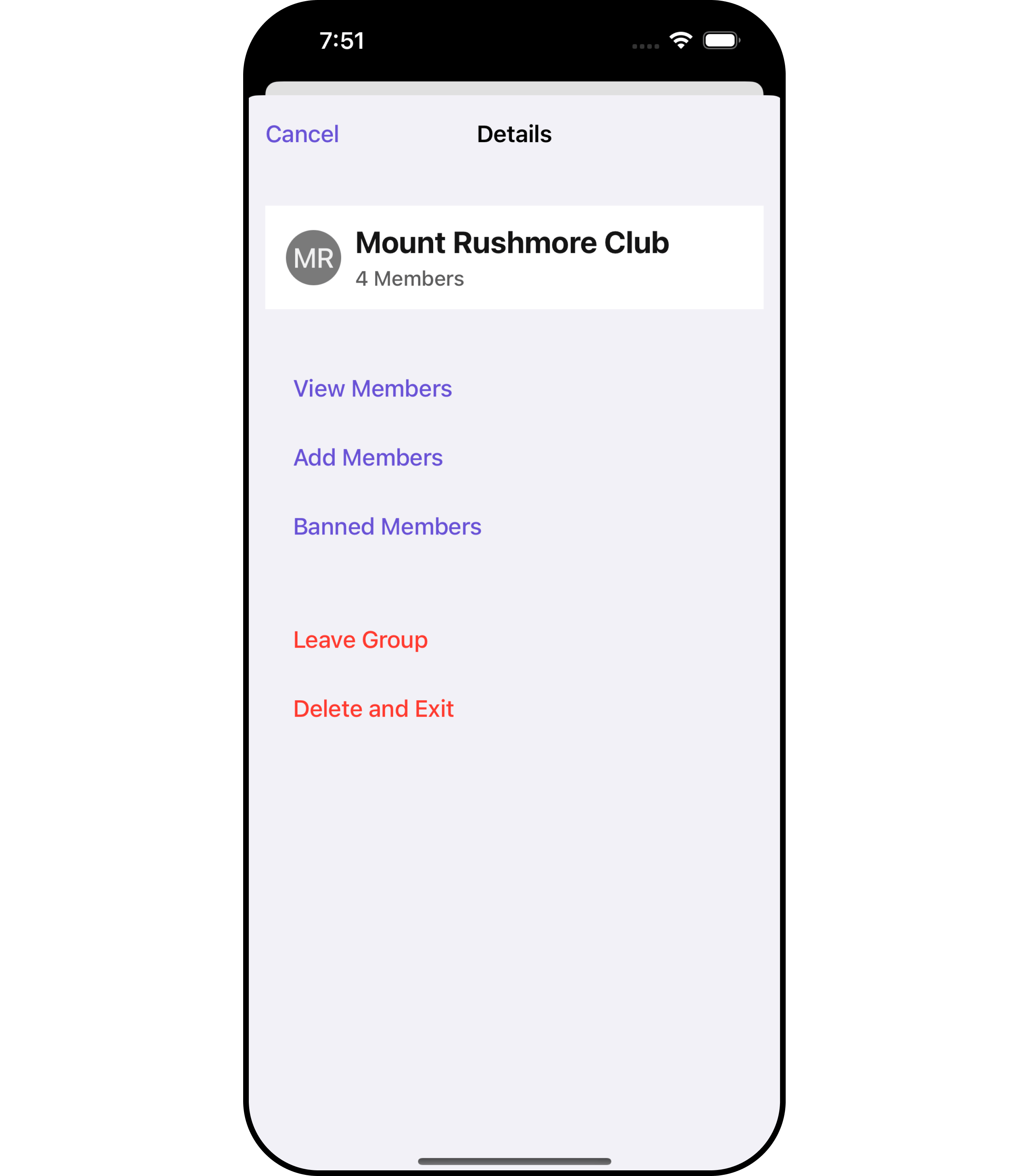 The `CometChatDetails` component is composed of the following BaseComponents:
| Components | Description |
| --------------------------------------------- | --------------------------------------------------------------------------------------------------------------------------------------------------------------------------------------------- |
| [CometChatListBase](/ui-kit/ios/v4/list-base) | `CometChatListBase` serves as a container component equipped with a title (navigationBar), search functionality (search-bar), background settings, and a container for embedding a list view. |
***
## Usage
### Integration
`CometChatDetails`, as a custom **view controller**, offers flexible integration options, allowing it to be launched directly via button clicks or any user-triggered action. Additionally, it seamlessly integrates into tab view controllers. With banned members, users gain access to a wide range of parameters and methods for effortless customization of its user interface.
The following code snippet exemplifies how you can seamlessly integrate the CometChatDetails component into your application.
```swift theme={null}
CometChat.getGroup(GUID: "GROUP_ID", onSuccess: { (group) in
DispatchQueue.main.async {
let cometChatDetails = CometChatDetails()
.set(group: group)
let naviVC = UINavigationController(rootViewController: cometChatDetails)
self.present(naviVC, animated: true, completion: nil)
}
}, onError: { (error) in
DispatchQueue.main.async {
print("Error fetching group: \(String(describing: error?.errorDescription))")
}
})
```
Ensure to import CometChatSDK
If you are already using a navigation controller, you can use the pushViewController function instead of presenting the view controller.
Replace "GROUP\_ID" with the ID of the group you want to fetch.
***
### Actions
[Actions](/ui-kit/ios/v4/components-overview#actions) dictate how a component functions. They are divided into two types: Predefined and User-defined. You can override either type, allowing you to tailor the behavior of the component to fit your specific needs.
##### 1. onClose
The `onClose` event is typically triggered when the close button is clicked and it carries a default action. However, with the following code snippet, you can effortlessly override this default operation.
This action does not come with any predefined behavior. However, you have the flexibility to override this event and tailor it to suit your needs using the following code snippet.
```swift theme={null}
let cometChatDetails = CometChatDetails()
.set(group: group)
.set (onClose:{
//Perform Your Action
})
```
##### 2. SetOnError
You can customize this behavior by using the provided code snippet to override the `On Error` and improve error handling.
```swift theme={null}
let cometChatDetails = CometChatDetails()
.set(group: group)
.setOnError (onError:{
error in
//Perform Your Action
})
```
##### 3. SetOnBack
Enhance your application's functionality by leveraging the `SetOnBack` feature. This capability allows you to customize the behavior associated with navigating back within your app. Utilize the provided code snippet to override default behaviors and tailor the user experience according to your specific requirements.
```swift theme={null}
let cometChatDetails = CometChatDetails()
.set(group: group)
.setOnBack (onBack:{
//Perform Your Action
})
```
***
### Filters
**Filters** allow you to customize the data displayed in a list within a Component. You can filter the list based on your specific criteria, allowing for a more customized. Filters can be applied using RequestBuilders of Chat SDK.
`CometChatDetails` component does not have available filters.
***
### Events
[Events](/ui-kit/ios/v4/components-overview#events) are emitted by a `Component`. By using event you can extend existing functionality. Being global events, they can be applied in Multiple Locations and are capable of being Added or Removed.
Events emitted by the Join Group component is as follows.
| Event | Description |
| ---------------------------- | ----------------------------------------------------------------------------------------------------------- |
| **onGroupMemberLeave** | This event is triggered when the group member leaves the group successfully. |
| **onGroupDelete** | This event is triggered when the group member deletes the group successfully. |
| **onGroupMemberChangeScope** | This will get triggered when the logged in user changes the scope of another group member. |
| **onGroupMemberBan** | This will get triggered when the logged in user bans a group member from the group. |
| **onGroupMemberKick** | This will get triggered when the logged in user kicks another group member from the group. |
| **onGroupMemberUnban** | This will get triggered when the logged in user unbans a user banned from the group. |
| **onGroupMemberJoin** | This will get triggered when the logged in user joins a group. |
| **onGroupMemberAdd** | This will get triggered when the logged in user add new members to the group. |
| **onOwnershipChange** | This will get triggered when the logged in user transfer the ownership of their group to some other member. |
| **onGroupCreate** | This will get triggered when the logged in user creates a new group. |
| **onCreateGroupClick** | This will get triggered when the logged in user taps on create group button. |
```swift theme={null}
// View controller from your project where you want to listen events.
public class ViewController: UIViewController {
public override func viewDidLoad() {
super.viewDidLoad()
// Subscribing for the listener to listen events from user module
CometChatGroupEvents.addListener("UNIQUE_ID", self as CometChatGroupEventListener)
}
}
// Listener events from groups module
extension ViewController: CometChatGroupEventListener {
public func onGroupMemberLeave(leftUser: User, leftGroup: Group) {
// Do Stuff
}
public func onGroupMemberLeave(leftUser: User, leftGroup: Group) {
// Do Stuff
}
public func onGroupMemberChangeScope(updatedBy: User, updatedUser: User, scopeChangedTo: CometChat.MemberScope, scopeChangedFrom: CometChat.MemberScope, group: Group) {
// Do Stuff
}
public func onGroupMemberBan(bannedUser: User, bannedGroup: Group, bannedBy: User) {
// Do Stuff
}
public func onGroupMemberKick(kickedUser: User, kickedGroup: Group, kickedBy: User) {
// Do Stuff
}
public func onGroupMemberUnban(unbannedUserUser: User, unbannedUserGroup: Group, unbannedBy: User) {
// Do Stuff
}
public func onGroupMemberJoin(joinedUser: User, joinedGroup: Group) {
// Do Stuff
}
public func onGroupMemberAdd(group: Group, members: [GroupMember], addedBy: User) {
// Do Stuff
}
public func onOwnershipChange(group: Group?, member: GroupMember?) {
// Do Stuff
}
public func onGroupCreate(group: Group) {
// Do Stuff
}
public func onCreateGroupClick() {
// Do Stuff
}
}
```
```swift Emitting Group Events theme={null}
///emit this when logged in user leaves the group.
CometChatGroupEvents.emitOnGroupMemberLeave(leftUser: User, leftGroup: Group)
///you need to pass the [Group] object of the group which is deleted
CometChatGroupEvents.emitOnGroupDelete(group: Group)
```
***
```swift View controller theme={null}
public override func viewWillDisappear(_ animated: Bool) {
// Uncubscribing for the listener to listen events from user module
CometChatGroupEvents.removeListener("LISTENER_ID_USED_FOR_ADDING_THIS_LISTENER")
}
```
***
## Customization
To fit your app's design requirements, you can customize the appearance of the Details component. We provide exposed methods that allow you to modify the experience and behavior according to your specific needs.
### Style
Using **Style** you can **customize** the look and feel of the component in your app, These parameters typically control elements such as the **color**, **size**, **shape**, and **fonts** used within the component.
##### 1. Details Style
You can set the `DetailsStyle` to the CometChatDetails Component to customize the styling.
```swift theme={null}
// Creating DetailsStyle object
let detailsStyle = DetailsStyle()
// Creating Modifying the propeties of conversations
detailsStyle.set(background: .systemPurple)
.set(cornerRadius: CometChatCornerStyle(cornerRadius: 12.0))
.set(borderColor: .purple)
.set(borderWidth: 3)
.set(titleFont: .systemFont(ofSize: 18))
.set(titleColor: .black)
.set(onlineStatusColor: .green)
.set(listItemTitleFont: .systemFont(ofSize: 18))
.set(listItemTitleColor: .systemBlue)
.set(listItemsubTitleFont: .systemFont(ofSize: 18))
.set(privateGroupIconBackgroundColor: #colorLiteral(red: 0, green: 0.7843137255, blue: 0.4352941176, alpha: 1))
.set(protectedGroupIconBackgroundColor: #colorLiteral(red: 0.968627451, green: 0.6470588235, blue: 0, alpha: 1))
CometChat.getGroup(GUID: "GROUP_ID", onSuccess: { (group) in
DispatchQueue.main.async {
let cometChatDetails = CometChatDetails()
.set(group: group)
.set(detailsStyle: detailsStyle)
let naviVC = UINavigationController(rootViewController: cometChatDetails)
self.present(naviVC, animated: true, completion: nil)
}
}, onError: { (error) in
DispatchQueue.main.async {
print("Error fetching group: \(String(describing: error?.errorDescription))")
}
})
```
The `CometChatDetails` component is composed of the following BaseComponents:
| Components | Description |
| --------------------------------------------- | --------------------------------------------------------------------------------------------------------------------------------------------------------------------------------------------- |
| [CometChatListBase](/ui-kit/ios/v4/list-base) | `CometChatListBase` serves as a container component equipped with a title (navigationBar), search functionality (search-bar), background settings, and a container for embedding a list view. |
***
## Usage
### Integration
`CometChatDetails`, as a custom **view controller**, offers flexible integration options, allowing it to be launched directly via button clicks or any user-triggered action. Additionally, it seamlessly integrates into tab view controllers. With banned members, users gain access to a wide range of parameters and methods for effortless customization of its user interface.
The following code snippet exemplifies how you can seamlessly integrate the CometChatDetails component into your application.
```swift theme={null}
CometChat.getGroup(GUID: "GROUP_ID", onSuccess: { (group) in
DispatchQueue.main.async {
let cometChatDetails = CometChatDetails()
.set(group: group)
let naviVC = UINavigationController(rootViewController: cometChatDetails)
self.present(naviVC, animated: true, completion: nil)
}
}, onError: { (error) in
DispatchQueue.main.async {
print("Error fetching group: \(String(describing: error?.errorDescription))")
}
})
```
Ensure to import CometChatSDK
If you are already using a navigation controller, you can use the pushViewController function instead of presenting the view controller.
Replace "GROUP\_ID" with the ID of the group you want to fetch.
***
### Actions
[Actions](/ui-kit/ios/v4/components-overview#actions) dictate how a component functions. They are divided into two types: Predefined and User-defined. You can override either type, allowing you to tailor the behavior of the component to fit your specific needs.
##### 1. onClose
The `onClose` event is typically triggered when the close button is clicked and it carries a default action. However, with the following code snippet, you can effortlessly override this default operation.
This action does not come with any predefined behavior. However, you have the flexibility to override this event and tailor it to suit your needs using the following code snippet.
```swift theme={null}
let cometChatDetails = CometChatDetails()
.set(group: group)
.set (onClose:{
//Perform Your Action
})
```
##### 2. SetOnError
You can customize this behavior by using the provided code snippet to override the `On Error` and improve error handling.
```swift theme={null}
let cometChatDetails = CometChatDetails()
.set(group: group)
.setOnError (onError:{
error in
//Perform Your Action
})
```
##### 3. SetOnBack
Enhance your application's functionality by leveraging the `SetOnBack` feature. This capability allows you to customize the behavior associated with navigating back within your app. Utilize the provided code snippet to override default behaviors and tailor the user experience according to your specific requirements.
```swift theme={null}
let cometChatDetails = CometChatDetails()
.set(group: group)
.setOnBack (onBack:{
//Perform Your Action
})
```
***
### Filters
**Filters** allow you to customize the data displayed in a list within a Component. You can filter the list based on your specific criteria, allowing for a more customized. Filters can be applied using RequestBuilders of Chat SDK.
`CometChatDetails` component does not have available filters.
***
### Events
[Events](/ui-kit/ios/v4/components-overview#events) are emitted by a `Component`. By using event you can extend existing functionality. Being global events, they can be applied in Multiple Locations and are capable of being Added or Removed.
Events emitted by the Join Group component is as follows.
| Event | Description |
| ---------------------------- | ----------------------------------------------------------------------------------------------------------- |
| **onGroupMemberLeave** | This event is triggered when the group member leaves the group successfully. |
| **onGroupDelete** | This event is triggered when the group member deletes the group successfully. |
| **onGroupMemberChangeScope** | This will get triggered when the logged in user changes the scope of another group member. |
| **onGroupMemberBan** | This will get triggered when the logged in user bans a group member from the group. |
| **onGroupMemberKick** | This will get triggered when the logged in user kicks another group member from the group. |
| **onGroupMemberUnban** | This will get triggered when the logged in user unbans a user banned from the group. |
| **onGroupMemberJoin** | This will get triggered when the logged in user joins a group. |
| **onGroupMemberAdd** | This will get triggered when the logged in user add new members to the group. |
| **onOwnershipChange** | This will get triggered when the logged in user transfer the ownership of their group to some other member. |
| **onGroupCreate** | This will get triggered when the logged in user creates a new group. |
| **onCreateGroupClick** | This will get triggered when the logged in user taps on create group button. |
```swift theme={null}
// View controller from your project where you want to listen events.
public class ViewController: UIViewController {
public override func viewDidLoad() {
super.viewDidLoad()
// Subscribing for the listener to listen events from user module
CometChatGroupEvents.addListener("UNIQUE_ID", self as CometChatGroupEventListener)
}
}
// Listener events from groups module
extension ViewController: CometChatGroupEventListener {
public func onGroupMemberLeave(leftUser: User, leftGroup: Group) {
// Do Stuff
}
public func onGroupMemberLeave(leftUser: User, leftGroup: Group) {
// Do Stuff
}
public func onGroupMemberChangeScope(updatedBy: User, updatedUser: User, scopeChangedTo: CometChat.MemberScope, scopeChangedFrom: CometChat.MemberScope, group: Group) {
// Do Stuff
}
public func onGroupMemberBan(bannedUser: User, bannedGroup: Group, bannedBy: User) {
// Do Stuff
}
public func onGroupMemberKick(kickedUser: User, kickedGroup: Group, kickedBy: User) {
// Do Stuff
}
public func onGroupMemberUnban(unbannedUserUser: User, unbannedUserGroup: Group, unbannedBy: User) {
// Do Stuff
}
public func onGroupMemberJoin(joinedUser: User, joinedGroup: Group) {
// Do Stuff
}
public func onGroupMemberAdd(group: Group, members: [GroupMember], addedBy: User) {
// Do Stuff
}
public func onOwnershipChange(group: Group?, member: GroupMember?) {
// Do Stuff
}
public func onGroupCreate(group: Group) {
// Do Stuff
}
public func onCreateGroupClick() {
// Do Stuff
}
}
```
```swift Emitting Group Events theme={null}
///emit this when logged in user leaves the group.
CometChatGroupEvents.emitOnGroupMemberLeave(leftUser: User, leftGroup: Group)
///you need to pass the [Group] object of the group which is deleted
CometChatGroupEvents.emitOnGroupDelete(group: Group)
```
***
```swift View controller theme={null}
public override func viewWillDisappear(_ animated: Bool) {
// Uncubscribing for the listener to listen events from user module
CometChatGroupEvents.removeListener("LISTENER_ID_USED_FOR_ADDING_THIS_LISTENER")
}
```
***
## Customization
To fit your app's design requirements, you can customize the appearance of the Details component. We provide exposed methods that allow you to modify the experience and behavior according to your specific needs.
### Style
Using **Style** you can **customize** the look and feel of the component in your app, These parameters typically control elements such as the **color**, **size**, **shape**, and **fonts** used within the component.
##### 1. Details Style
You can set the `DetailsStyle` to the CometChatDetails Component to customize the styling.
```swift theme={null}
// Creating DetailsStyle object
let detailsStyle = DetailsStyle()
// Creating Modifying the propeties of conversations
detailsStyle.set(background: .systemPurple)
.set(cornerRadius: CometChatCornerStyle(cornerRadius: 12.0))
.set(borderColor: .purple)
.set(borderWidth: 3)
.set(titleFont: .systemFont(ofSize: 18))
.set(titleColor: .black)
.set(onlineStatusColor: .green)
.set(listItemTitleFont: .systemFont(ofSize: 18))
.set(listItemTitleColor: .systemBlue)
.set(listItemsubTitleFont: .systemFont(ofSize: 18))
.set(privateGroupIconBackgroundColor: #colorLiteral(red: 0, green: 0.7843137255, blue: 0.4352941176, alpha: 1))
.set(protectedGroupIconBackgroundColor: #colorLiteral(red: 0.968627451, green: 0.6470588235, blue: 0, alpha: 1))
CometChat.getGroup(GUID: "GROUP_ID", onSuccess: { (group) in
DispatchQueue.main.async {
let cometChatDetails = CometChatDetails()
.set(group: group)
.set(detailsStyle: detailsStyle)
let naviVC = UINavigationController(rootViewController: cometChatDetails)
self.present(naviVC, animated: true, completion: nil)
}
}, onError: { (error) in
DispatchQueue.main.async {
print("Error fetching group: \(String(describing: error?.errorDescription))")
}
})
```
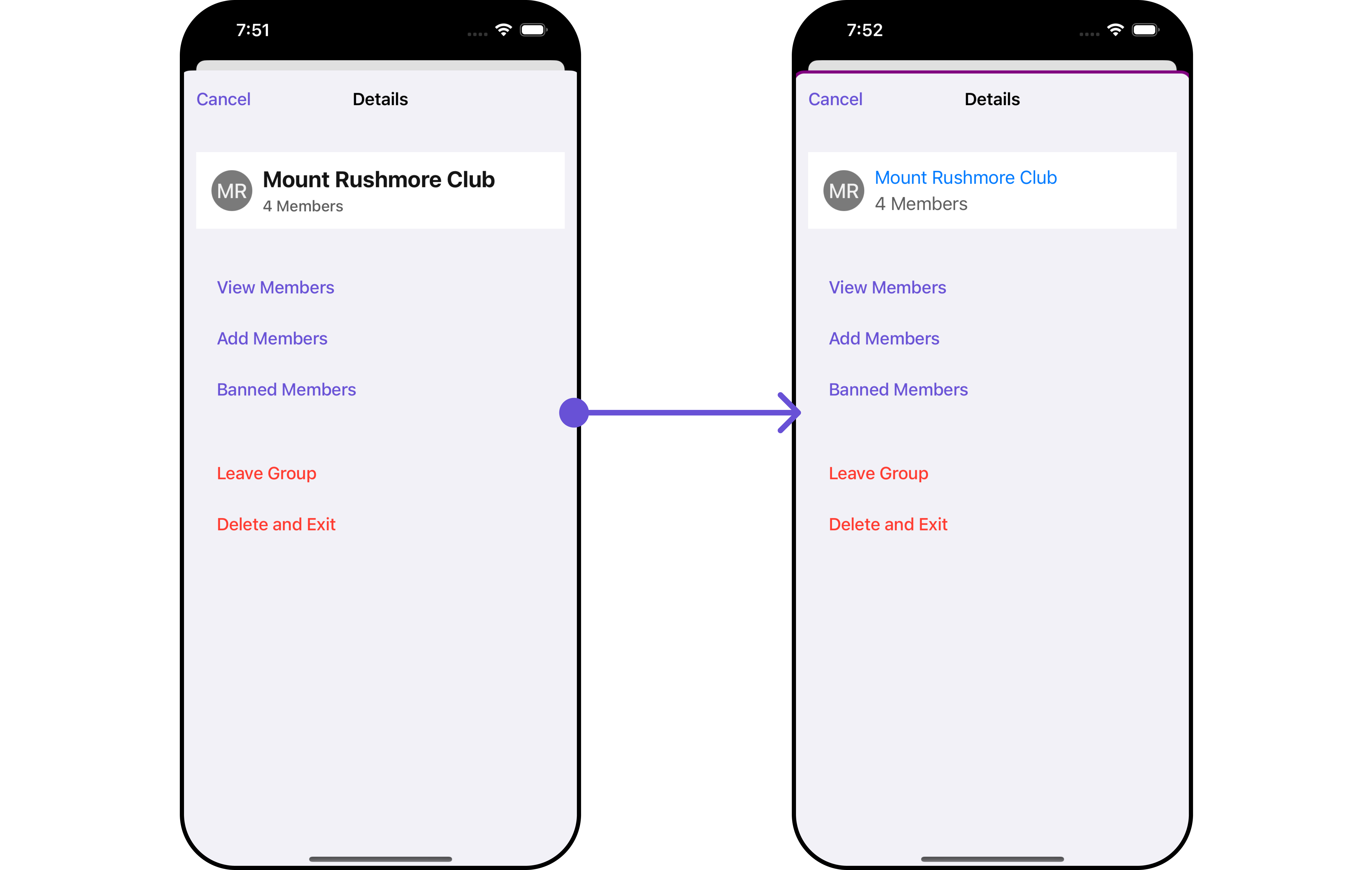 List of properties exposed by DetailsStyle
| Property | Description | Code |
| ------------------------------------- | ------------------------------------- | ------------------------------------------------- |
| **Background** | Sets the background color | `set(background: UIColor)` |
| **CornerRadius** | Sets the corner radius | `set(cornerRadius: CometChatCornerStyle)` |
| **BorderWidth** | Sets the border width | `set(borderWidth: CGFloat)` |
| **TitleColor** | Sets the title color | `set(titleColor: UIColor)` |
| **TitleFont** | Sets the title font | `set(titleFont: UIFont)` |
| **OnlineStatusColor** | Sets online status color | `set(onlineStatusColor: UIColor)` |
| **PrivateGroupIconBackgroundColor** | Sets private group background color | `set(privateGroupIconBackgroundColor: UIColor)` |
| **ProtectedGroupIconBackgroundColor** | Sets protected group background color | `set(protectedGroupIconBackgroundColor: UIColor)` |
| **HeaderBackground** | Sets header background color | `set(headerBackground: UIColor)` |
| **HeaderTextColor** | Sets header text color | `set(headerTextColor: UIColor)` |
| **HeaderTextFont** | Sets header text font | `set(headerTextFont: UIFont)` |
| **ListItemTitleColor** | Sets list item title color | `set(listItemTitleColor: UIColor)` |
| **ListItemTitleFont** | Sets list item title font | `set(listItemTitleFont: UIFont)` |
| **ListItemSubtitleFont** | Sets list item subtitle font | `set(listItemsubTitleFont: UIFont)` |
***
##### 2. Avatar Style
To apply customized styles to the `Avatar` component in the CometChatDetails Component, you can use the following code snippet. For further insights on `Avatar` Styles [refer](/ui-kit/ios/v4/avatar)
```swift Swift theme={null}
// Creating AvatarStyle object
let avatarStyle = AvatarStyle()
// Creating Modifying the propeties of avatar
avatarStyle.set(background: .red)
.set(textFont: .systemFont(ofSize: 18))
.set(textColor: .blue)
.set(cornerRadius: CometChatCornerStyle(cornerRadius: 8.0))
.set(borderColor: .cyan)
.set(borderWidth: 2)
.set(outerViewWidth: 3)
.set(outerViewSpacing: 3)
CometChat.getGroup(GUID: "GROUP_ID", onSuccess: { (group) in
DispatchQueue.main.async {
let cometChatDetails = CometChatDetails()
.set(group: group)
.set(avatarStyle: avatarStyle)
let naviVC = UINavigationController(rootViewController: cometChatDetails)
self.present(naviVC, animated: true, completion: nil)
}
}, onError: { (error) in
DispatchQueue.main.async {
print("Error fetching group: \(String(describing: error?.errorDescription))")
}
})
```
***
##### 3. StatusIndicator Style
To apply customized styles to the Status Indicator component in the CometChatDetails Component, You can use the following code snippet. For further insights on Status Indicator Styles [refer](/ui-kit/ios/v4/status-indicator)
```swift theme={null}
// Creating StatusIndicatorStyle object
let statusIndicatorStyle = StatusIndicatorStyle()
// Creating Modifying the propeties of avatar
statusIndicatorStyle.set(background: .red)
.set(borderColor: .systemBlue)
.set(borderWidth: 10)
CometChat.getGroup(GUID: "GROUP_ID", onSuccess: { (group) in
DispatchQueue.main.async {
let cometChatDetails = CometChatDetails()
.set(group: group)
.set(statusIndicatorStyle: statusIndicatorStyle)
let naviVC = UINavigationController(rootViewController: cometChatDetails)
self.present(naviVC, animated: true, completion: nil)
}
}, onError: { (error) in
DispatchQueue.main.async {
print("Error fetching group: \(String(describing: error?.errorDescription))")
}
})
```
***
##### 4. ListItem Style
To apply customized styles to the `ListItemStyle` component in the `CometChatDetails` Component, you can use the following code snippet. For further insights on `ListItemStyle` Styles [refer](/ui-kit/ios/v4/list-item)
List of properties exposed by DetailsStyle
| Property | Description | Code |
| ------------------------------------- | ------------------------------------- | ------------------------------------------------- |
| **Background** | Sets the background color | `set(background: UIColor)` |
| **CornerRadius** | Sets the corner radius | `set(cornerRadius: CometChatCornerStyle)` |
| **BorderWidth** | Sets the border width | `set(borderWidth: CGFloat)` |
| **TitleColor** | Sets the title color | `set(titleColor: UIColor)` |
| **TitleFont** | Sets the title font | `set(titleFont: UIFont)` |
| **OnlineStatusColor** | Sets online status color | `set(onlineStatusColor: UIColor)` |
| **PrivateGroupIconBackgroundColor** | Sets private group background color | `set(privateGroupIconBackgroundColor: UIColor)` |
| **ProtectedGroupIconBackgroundColor** | Sets protected group background color | `set(protectedGroupIconBackgroundColor: UIColor)` |
| **HeaderBackground** | Sets header background color | `set(headerBackground: UIColor)` |
| **HeaderTextColor** | Sets header text color | `set(headerTextColor: UIColor)` |
| **HeaderTextFont** | Sets header text font | `set(headerTextFont: UIFont)` |
| **ListItemTitleColor** | Sets list item title color | `set(listItemTitleColor: UIColor)` |
| **ListItemTitleFont** | Sets list item title font | `set(listItemTitleFont: UIFont)` |
| **ListItemSubtitleFont** | Sets list item subtitle font | `set(listItemsubTitleFont: UIFont)` |
***
##### 2. Avatar Style
To apply customized styles to the `Avatar` component in the CometChatDetails Component, you can use the following code snippet. For further insights on `Avatar` Styles [refer](/ui-kit/ios/v4/avatar)
```swift Swift theme={null}
// Creating AvatarStyle object
let avatarStyle = AvatarStyle()
// Creating Modifying the propeties of avatar
avatarStyle.set(background: .red)
.set(textFont: .systemFont(ofSize: 18))
.set(textColor: .blue)
.set(cornerRadius: CometChatCornerStyle(cornerRadius: 8.0))
.set(borderColor: .cyan)
.set(borderWidth: 2)
.set(outerViewWidth: 3)
.set(outerViewSpacing: 3)
CometChat.getGroup(GUID: "GROUP_ID", onSuccess: { (group) in
DispatchQueue.main.async {
let cometChatDetails = CometChatDetails()
.set(group: group)
.set(avatarStyle: avatarStyle)
let naviVC = UINavigationController(rootViewController: cometChatDetails)
self.present(naviVC, animated: true, completion: nil)
}
}, onError: { (error) in
DispatchQueue.main.async {
print("Error fetching group: \(String(describing: error?.errorDescription))")
}
})
```
***
##### 3. StatusIndicator Style
To apply customized styles to the Status Indicator component in the CometChatDetails Component, You can use the following code snippet. For further insights on Status Indicator Styles [refer](/ui-kit/ios/v4/status-indicator)
```swift theme={null}
// Creating StatusIndicatorStyle object
let statusIndicatorStyle = StatusIndicatorStyle()
// Creating Modifying the propeties of avatar
statusIndicatorStyle.set(background: .red)
.set(borderColor: .systemBlue)
.set(borderWidth: 10)
CometChat.getGroup(GUID: "GROUP_ID", onSuccess: { (group) in
DispatchQueue.main.async {
let cometChatDetails = CometChatDetails()
.set(group: group)
.set(statusIndicatorStyle: statusIndicatorStyle)
let naviVC = UINavigationController(rootViewController: cometChatDetails)
self.present(naviVC, animated: true, completion: nil)
}
}, onError: { (error) in
DispatchQueue.main.async {
print("Error fetching group: \(String(describing: error?.errorDescription))")
}
})
```
***
##### 4. ListItem Style
To apply customized styles to the `ListItemStyle` component in the `CometChatDetails` Component, you can use the following code snippet. For further insights on `ListItemStyle` Styles [refer](/ui-kit/ios/v4/list-item)
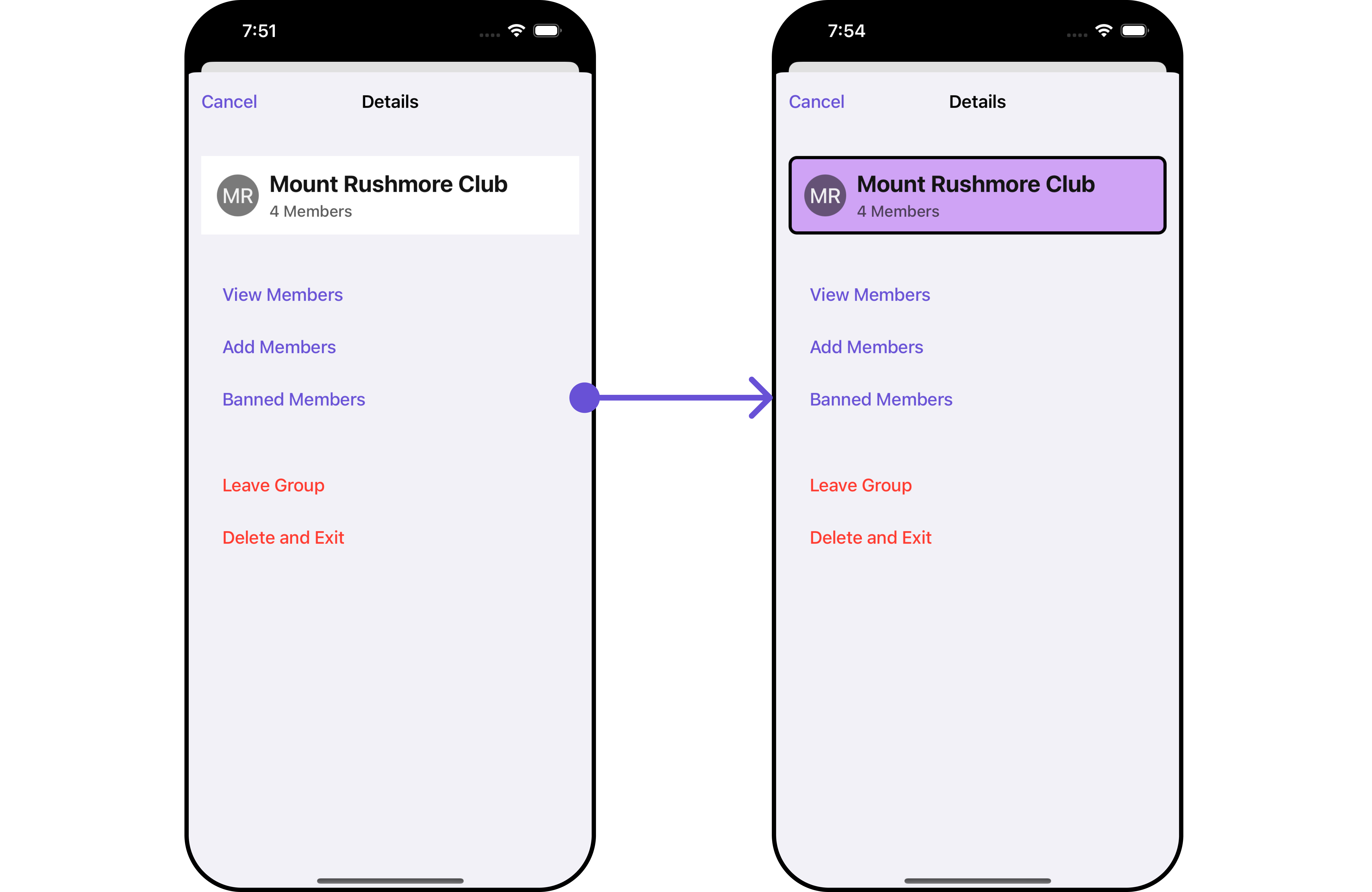 ```swift theme={null}
// Creating ListItemStyle object
let listItemStyle = ListItemStyle()
listItemStyle.set(background: .init(red: 0.81, green: 0.64, blue: 0.96, alpha: 1.00))
.set(titleFont: .systemFont(ofSize: 18))
.set(titleColor: .init(red: 0.47, green: 0.02, blue: 0.93, alpha: 1.00))
.set(cornerRadius: CometChatCornerStyle(cornerRadius: 8.0))
.set(borderColor: .black)
.set(borderWidth: 3)
CometChat.getGroup(GUID: "GROUP_ID", onSuccess: { (group) in
DispatchQueue.main.async {
let cometChatDetails = CometChatDetails()
.set(group: group)
.set(listItemStyle: listItemStyle)
let naviVC = UINavigationController(rootViewController: cometChatDetails)
self.present(naviVC, animated: true, completion: nil)
}
}, onError: { (error) in
DispatchQueue.main.async {
print("Error fetching group: \(String(describing: error?.errorDescription))")
}
})
```
Replace "GROUP\_ID" with the ID of the group you want to fetch.
***
### Functionality
These are a set of small functional customizations that allow you to fine-tune the overall experience of the component. With these, you can change text, set custom icons, and toggle the visibility of UI elements.
```swift theme={null}
CometChat.getGroup(GUID: "GROUP_ID", onSuccess: { (group) in
DispatchQueue.main.async {
let cometChatDetails = CometChatDetails()
.set(group: group)
.set(title: "cc", mode: .automatic)
.hide(profile: false)
.show(closeButton: true)
let naviVC = UINavigationController(rootViewController: cometChatDetails)
self.present(naviVC, animated: true, completion: nil)
}
}, onError: { (error) in
DispatchQueue.main.async {
print("Error fetching group: \(String(describing: error?.errorDescription))")
}
})
```
Replace "GROUP\_ID" with the ID of the group you want to fetch.
Below is a list of customizations along with corresponding code snippets
| Property | Description | Code |
| --------------------------------------------------- | ---------------------------------------------------------------- | ------------------------------------------------------------------- |
| **Title** 🛑 | Custom title for the component | `.set(title: String, mode: UINavigationItem.LargeTitleDisplayMode)` |
| **BackButtonTitle** | Custom text for the back button | `.set(backButtonTitle: String?)` |
| **SearchPlaceholderText** | Custom placeholder text for search field | `.set(searchPlaceholder: String)` |
| **ShowBackButton** | Whether to hide/show the back button | `.show(backButton: Bool)` |
| **ErrorStateText** | Custom error state text | `.set(errorStateText: String)` |
| **BackButtonIcon** | Custom back button icon | `.set(backButtonIcon: UIImage)` |
| **HideAddButton** | Whether to hide the add button | `.hide(addButton: Bool)` |
| **SearchPlaceholder** | Set the placeholder for search bar | `set(searchPlaceholder: String)` |
| **SearchIcon** | Sets the icon for the search bar | `set(searchIcon:UIImage)` |
| **SearchClearIcon** | Sets the clear icon for the search bar | `set(searchClearIcon:UIImage)` |
| **SearchBarHeight** | Set the height for the search bar | `set(searchBarHeight: CGFloat)` |
| **HideSearch** | Hide / unhide the search bar as per boolean value | `hide(search: Bool)` |
| **SelectionMode** | This enables a selection, it has three modes: .single, .multiple | `selectionMode(mode: SelectionMode)` |
| **HideSeparator** | This method will hide the separator | `hide(separator: Bool)` |
| **DisableUserPresence** | This method disables user's online/offline status | `disable(userPresence: Bool)` |
| **UpdateUser** | This method specifies the option to update user object locally | `.update(user: User?)` |
| **UpdateGroup** | This method specifies the option to update group object locally | `.update(group: Group?)` |
| **PrivateGroupIcon** | Sets the group icon for private group | `set(privateGroupIcon: UIImage)` |
| **ProtectedGroupIcon** | Sets the group icon for protected group | `set(protectedGroupIcon: UIImage)` |
| **BackButtonTint** | Sets the tint color for the back button | `set(backButtonTint: UIColor)` |
| **BackButtonIcon** | Sets the icon for the back button | `set(backButtonIcon: UIImage)` |
| **BackButtonTitle** | Sets the title for the back button | `set(backButtonTitle: String)` |
| **BackButtonTitleFont** | Sets the title font for the back button | `set(backButtonTitleFont: UIFont)` |
| **BackButtonTitleColor** | Sets the title color for the back button | `set(backButtonTitleColor: UIColor)` |
| **Title** | Sets the title for CometChatDetails | `set(title: String)` |
| **TitleColor** | Sets the title color for CometChatDetails | `set(titleColor: UIColor)` |
| **LargeTitleColor** | Sets the large title color for CometChatDetails | `set(largeTitleColor: UIColor)` |
| **TitleFont** | Sets the title font for CometChatDetails | `set(titleFont: UIFont)` |
| **LargeTitleFont** | Sets the title font for CometChatDetails | `set(largeTitleFont: UIFont)` |
| **CloseButton** | Shows close button for CometChatDetails | `show(closeButton: Bool)` |
| **CloseButtonIcon** | Shows close button icon for CometChatDetails | `set(closeButtonIcon: UIImage)` |
***
### Advance
For advanced-level customization, you can set custom views to the component. This lets you tailor each aspect of the component to fit your exact needs and application aesthetics. You can create and define your views, layouts, and UI elements and then incorporate those into the component.
***
#### SubtitleView
You can set your custom Subtitle view using the `.setSubtitleView()` method. But keep in mind, by using this you will override the default Subtitle view functionality.
```swift theme={null}
let cometChatDetails = CometChatDetails()
.set(group: group)
.set (subTitleView:{ user,group in
//Perform Your Action
})
```
* You can customize the subtitle view for each CometChatDetails item to meet your requirements
**Example**
```swift theme={null}
// Creating ListItemStyle object
let listItemStyle = ListItemStyle()
listItemStyle.set(background: .init(red: 0.81, green: 0.64, blue: 0.96, alpha: 1.00))
.set(titleFont: .systemFont(ofSize: 18))
.set(titleColor: .init(red: 0.47, green: 0.02, blue: 0.93, alpha: 1.00))
.set(cornerRadius: CometChatCornerStyle(cornerRadius: 8.0))
.set(borderColor: .black)
.set(borderWidth: 3)
CometChat.getGroup(GUID: "GROUP_ID", onSuccess: { (group) in
DispatchQueue.main.async {
let cometChatDetails = CometChatDetails()
.set(group: group)
.set(listItemStyle: listItemStyle)
let naviVC = UINavigationController(rootViewController: cometChatDetails)
self.present(naviVC, animated: true, completion: nil)
}
}, onError: { (error) in
DispatchQueue.main.async {
print("Error fetching group: \(String(describing: error?.errorDescription))")
}
})
```
Replace "GROUP\_ID" with the ID of the group you want to fetch.
***
### Functionality
These are a set of small functional customizations that allow you to fine-tune the overall experience of the component. With these, you can change text, set custom icons, and toggle the visibility of UI elements.
```swift theme={null}
CometChat.getGroup(GUID: "GROUP_ID", onSuccess: { (group) in
DispatchQueue.main.async {
let cometChatDetails = CometChatDetails()
.set(group: group)
.set(title: "cc", mode: .automatic)
.hide(profile: false)
.show(closeButton: true)
let naviVC = UINavigationController(rootViewController: cometChatDetails)
self.present(naviVC, animated: true, completion: nil)
}
}, onError: { (error) in
DispatchQueue.main.async {
print("Error fetching group: \(String(describing: error?.errorDescription))")
}
})
```
Replace "GROUP\_ID" with the ID of the group you want to fetch.
Below is a list of customizations along with corresponding code snippets
| Property | Description | Code |
| --------------------------------------------------- | ---------------------------------------------------------------- | ------------------------------------------------------------------- |
| **Title** 🛑 | Custom title for the component | `.set(title: String, mode: UINavigationItem.LargeTitleDisplayMode)` |
| **BackButtonTitle** | Custom text for the back button | `.set(backButtonTitle: String?)` |
| **SearchPlaceholderText** | Custom placeholder text for search field | `.set(searchPlaceholder: String)` |
| **ShowBackButton** | Whether to hide/show the back button | `.show(backButton: Bool)` |
| **ErrorStateText** | Custom error state text | `.set(errorStateText: String)` |
| **BackButtonIcon** | Custom back button icon | `.set(backButtonIcon: UIImage)` |
| **HideAddButton** | Whether to hide the add button | `.hide(addButton: Bool)` |
| **SearchPlaceholder** | Set the placeholder for search bar | `set(searchPlaceholder: String)` |
| **SearchIcon** | Sets the icon for the search bar | `set(searchIcon:UIImage)` |
| **SearchClearIcon** | Sets the clear icon for the search bar | `set(searchClearIcon:UIImage)` |
| **SearchBarHeight** | Set the height for the search bar | `set(searchBarHeight: CGFloat)` |
| **HideSearch** | Hide / unhide the search bar as per boolean value | `hide(search: Bool)` |
| **SelectionMode** | This enables a selection, it has three modes: .single, .multiple | `selectionMode(mode: SelectionMode)` |
| **HideSeparator** | This method will hide the separator | `hide(separator: Bool)` |
| **DisableUserPresence** | This method disables user's online/offline status | `disable(userPresence: Bool)` |
| **UpdateUser** | This method specifies the option to update user object locally | `.update(user: User?)` |
| **UpdateGroup** | This method specifies the option to update group object locally | `.update(group: Group?)` |
| **PrivateGroupIcon** | Sets the group icon for private group | `set(privateGroupIcon: UIImage)` |
| **ProtectedGroupIcon** | Sets the group icon for protected group | `set(protectedGroupIcon: UIImage)` |
| **BackButtonTint** | Sets the tint color for the back button | `set(backButtonTint: UIColor)` |
| **BackButtonIcon** | Sets the icon for the back button | `set(backButtonIcon: UIImage)` |
| **BackButtonTitle** | Sets the title for the back button | `set(backButtonTitle: String)` |
| **BackButtonTitleFont** | Sets the title font for the back button | `set(backButtonTitleFont: UIFont)` |
| **BackButtonTitleColor** | Sets the title color for the back button | `set(backButtonTitleColor: UIColor)` |
| **Title** | Sets the title for CometChatDetails | `set(title: String)` |
| **TitleColor** | Sets the title color for CometChatDetails | `set(titleColor: UIColor)` |
| **LargeTitleColor** | Sets the large title color for CometChatDetails | `set(largeTitleColor: UIColor)` |
| **TitleFont** | Sets the title font for CometChatDetails | `set(titleFont: UIFont)` |
| **LargeTitleFont** | Sets the title font for CometChatDetails | `set(largeTitleFont: UIFont)` |
| **CloseButton** | Shows close button for CometChatDetails | `show(closeButton: Bool)` |
| **CloseButtonIcon** | Shows close button icon for CometChatDetails | `set(closeButtonIcon: UIImage)` |
***
### Advance
For advanced-level customization, you can set custom views to the component. This lets you tailor each aspect of the component to fit your exact needs and application aesthetics. You can create and define your views, layouts, and UI elements and then incorporate those into the component.
***
#### SubtitleView
You can set your custom Subtitle view using the `.setSubtitleView()` method. But keep in mind, by using this you will override the default Subtitle view functionality.
```swift theme={null}
let cometChatDetails = CometChatDetails()
.set(group: group)
.set (subTitleView:{ user,group in
//Perform Your Action
})
```
* You can customize the subtitle view for each CometChatDetails item to meet your requirements
**Example**
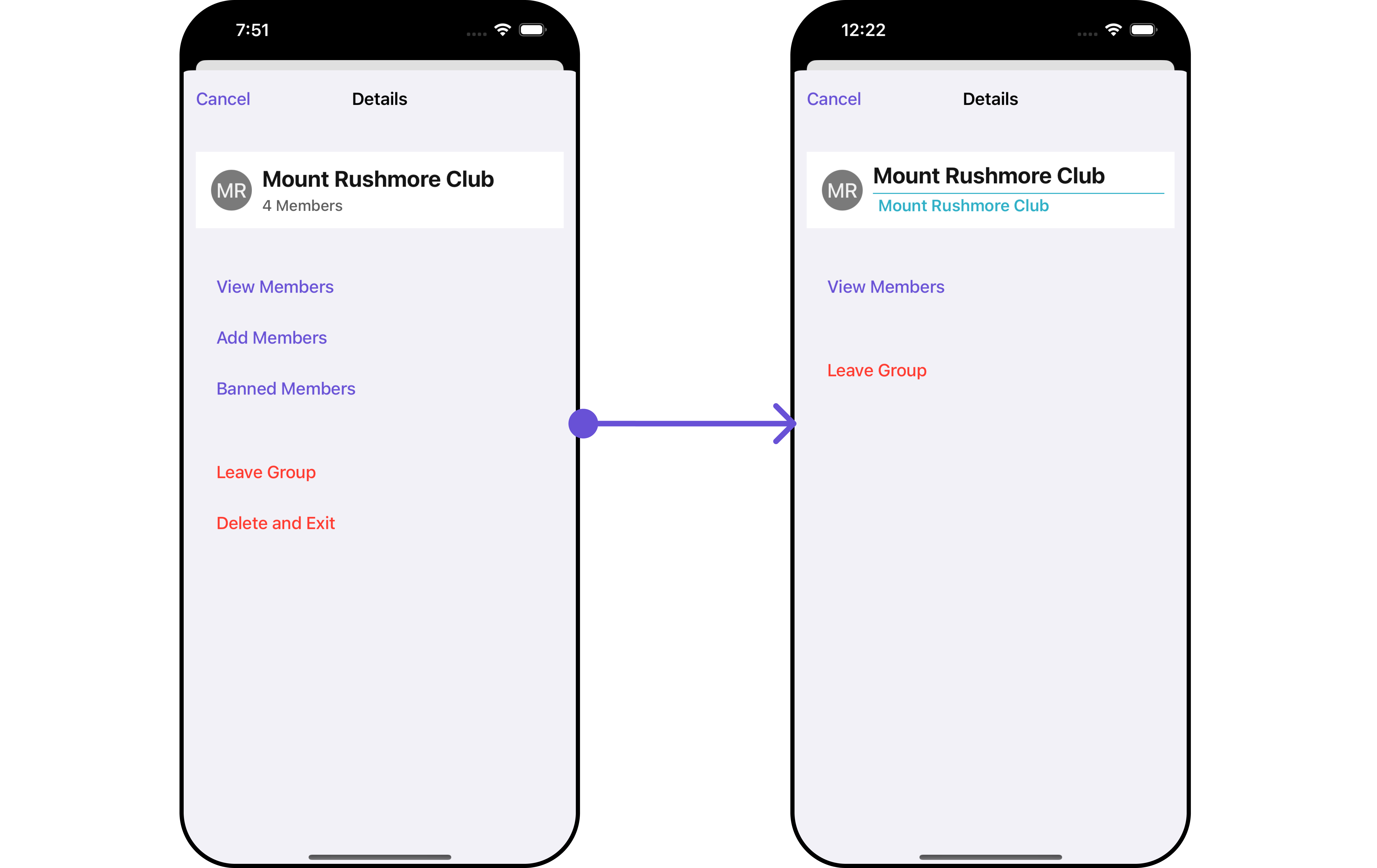 In this example, we will create a `Custom_GroupDetails_SubtitleView`a UIView file.
Custom\_GroupDetails\_SubtitleView
```swift theme={null}
import UIKit
import CometChatSDK
import CometChatUIKitSwift
class CustomGroupDetailsSubtitleView: UIView {
private let titleLabel: UILabel = {
let label = UILabel()
label.translatesAutoresizingMaskIntoConstraints = false
label.font = UIFont.boldSystemFont(ofSize: 16)
label.textColor = UIColor.systemTeal
return label
}()
private let separatorView: UIView = {
let view = UIView()
view.translatesAutoresizingMaskIntoConstraints = false
view.backgroundColor = UIColor.systemTeal
return view
}()
override init(frame: CGRect) {
super.init(frame: frame)
setupView()
}
required init?(coder: NSCoder) {
super.init(coder: coder)
setupView()
}
private func setupView() {
addSubview(separatorView)
addSubview(titleLabel)
NSLayoutConstraint.activate([
separatorView.topAnchor.constraint(equalTo: topAnchor),
separatorView.leadingAnchor.constraint(equalTo: leadingAnchor),
separatorView.trailingAnchor.constraint(equalTo: trailingAnchor),
separatorView.heightAnchor.constraint(equalToConstant: 1),
titleLabel.topAnchor.constraint(equalTo: separatorView.bottomAnchor, constant: 5),
titleLabel.centerXAnchor.constraint(equalTo: centerXAnchor),
titleLabel.centerYAnchor.constraint(equalTo: centerYAnchor),
titleLabel.leadingAnchor.constraint(equalTo: leadingAnchor, constant: 5),
titleLabel.trailingAnchor.constraint(equalTo: trailingAnchor, constant: -5)
])
}
func configure(with user: User?, group: Group?) {
titleLabel.text = user?.name ?? group?.name ?? "N/A"
}
}
```
We will be passing a custom subtitle view to CometChatDetails, ensuring a tailored and user-friendly interface.
```swift View controller theme={null}
CometChat.getGroup(GUID: "GROUP_ID", onSuccess: { (group) in
DispatchQueue.main.async {
let cometChatDetails = CometChatDetails()
.set(group: group)
.set (subTitleView:{ user,group in
let customGroupDetailsSubtitleView = CustomGroupDetailsSubtitleView()
customGroupDetailsSubtitleView.configure(with: user, group: group)
return customGroupDetailsSubtitleView
})
let naviVC = UINavigationController(rootViewController: cometChatDetails)
self.present(naviVC, animated: true, completion: nil)
}
}, onError: { (error) in
DispatchQueue.main.async {
print("Error fetching group: \(String(describing: error?.errorDescription))")
}
})
```
Ensure to pass and present `CometChatDetails`. If a navigation controller is already in use, utilize the pushViewController function instead of directly presenting the view controller.
#### DetailsTemplate
The `CometChatDetailsTemplate` offers a structure for organizing information in the CometChat details component. It serves as a blueprint, defining how group-related details are presented. This structure allows for customization and organization within the CometChat interface.
```swift View controller theme={null}
CometChat.getGroup(GUID: "GROUP_ID", onSuccess: { (group) in
DispatchQueue.main.async {
let customOption1 = CometChatDetailsOption(
id: "customOptionId1",
title: "Custom 1",
customView: nil,
titleColor: .systemPurple,
titleFont: UIFont.systemFont(ofSize: 18),
height: 44,
onClick: { user, group, section, option, controller in
print("Custom option 1 selected")
}
)
let customOption2 = CometChatDetailsOption(
id: "customOptionId2",
title: "Custom 2",
customView: nil,
titleColor: .systemBlue,
titleFont: UIFont.systemFont(ofSize: 18),
height: 44,
onClick: { user, group, section, option, controller in
print("Custom option 2 selected")
}
)
let customTemplate = CometChatDetailsTemplate(
id: "customTemplateId",
title: "Custom template",
titleFont: .boldSystemFont(ofSize: 20),
titleColor: .systemPurple,
itemSeparatorColor: .black,
hideItemSeparator: false,
customView: nil,
options: { user, group in
return [customOption1, customOption2]
}
)
let cometChatDetails = CometChatDetails()
.set(group: group)
.set(templates: [customTemplate])
let naviVC = UINavigationController(rootViewController: cometChatDetails)
self.present(naviVC, animated: true, completion: nil)
}
}, onError: { (error) in
DispatchQueue.main.async {
print("Error fetching group: \(String(describing: error?.errorDescription))")
}
})
```
Replace "GROUP\_ID" with the ID of the group you want to fetch.
This defines the structure of template data for the details component.
| Properties | Type | Description |
| ---------------------- | -------------------------------------------------------------------------------------- | -------------------------------------------------------------------------------------------------------------------- |
| **id** | String | Unique identifier for the template. |
| **title** | String | A text to display below the template. |
| **titleColor** | UIColor | Defines the color for the title in the template. |
| **itemSeparatorColor** | UIColor | Defines the separator color for the option in the template. |
| **hideItemSeparator** | Bool | Used to hide the item separator in the template. |
| **customView** | UIView | Used to set the custom view for the template. |
| **options** | ((\_ user: CometChat.User?, \_ group: CometChat.Group?) -> \[CometChatDetailsOption])? | Used to set the list of options for the template. It is a closure that returns an array of `CometChatDetailsOption`. |
***
#### DetailsOption
The `DetailsOption` defines the structure for individual options within the CometChat details component, facilitating customization and functionality for user interactions. This defines the structure of each option for a template in the details component.
##### Methods
| Method | Description |
| ------------------------------------------------------------------------------------------------------ | ------------------------------------------------------------------------- |
| **`add(option: CometChatDetailsOption, templateID: String)`** | Add new option in template for given templateID. |
| **`update(oldOption: CometChatDetailsOption, newOption: CometChatDetailsOption, templateID: String)`** | Updates existing option with new option in template for given templateID. |
| **`remove(option: CometChatDetailsOption, templateID: String)`** | Removes option in template for given templateID. |
##### Properties
| Properties | Type | Description |
| -------------- | ------------------------------------------------------------------------------------------------------------------------------ | ----------------------------------------------------- |
| **id** | String | Unique identifier for the option. |
| **title** | String | A text to display below the icon. |
| **icon** | UIImage | A image to display for the option. |
| **titleColor** | UIColor | Defines the color for the title. |
| **titleFont** | UIFont | Defines the font for the title. |
| **iconTint** | UIColor | Defines the color for the icon. |
| **height** | CGFloat | Defines the height for the option. |
| **customView** | UIView | Defines the custom view for the option. |
| **onClick** | `((_ user: User?, _ group: Group?, _ section: Int, _ option: CometChatDetailsOption, _ controller: UIViewController?) -> ())?` | The action to perform when user clicks on the option. |
***
## Configurations
[Configurations](/ui-kit/ios/v4/components-overview#configurations) offer the ability to customize the properties of each component within a Composite Component. CometChatDetails has `Add Members`, `Banned Members`, `Transfer Ownership` and `Group Members` component. Hence, each of these components will have its individual \`Configuration\`\`.
* `Configurations` expose properties that are available in its individual components.
***
#### Group Members
You can customize the properties of the Group Members component by making use of the `groupMembersConfiguration`. You can accomplish this by employing the `groupMembersConfiguration` as demonstrated below:
```swift theme={null}
// Create an object of GroupMembersConfiguration
let groupMembersConfiguration = GroupMembersConfiguration()
```
All exposed properties of `GroupMembersConfiguration` can be found under [Group Members](/ui-kit/ios/v4/group-members#configuration). Properties marked with the 🛑 symbol are not accessible within the Configuration Object.
**Example**
Let's say you want to change the style of the Group Member subcomponent and, in addition, you only want to hide separator and show back button.
You can modify the style using the `groupMembersStyle` property, hide the separator using `hideSeparator` property and show back button using `.show(backButton: bool)` property.
```swift theme={null}
CometChat.getGroup(GUID: "GROUP_ID", onSuccess: {
(group) in
DispatchQueue.main.async {
// Create an object of GroupMembersConfiguration
let groupMembersConfiguration = GroupMembersConfiguration()
let avatarStyle = AvatarStyle()
avatarStyle.set(cornerRadius: .init(cornerRadius: 5))
let groupMembersStyle = GroupMembersStyle()
groupMembersStyle.set(background: .blue)
.set(cornerRadius: CometChatCornerStyle(cornerRadius: 0.0))
.set(borderColor: .cyan)
.set(borderWidth: 3)
.set(largeTitleFont: .boldSystemFont(ofSize: 34))
.set(titleFont: .systemFont(ofSize: 18))
.set(titleColor: .systemOrange)
.set(searchIconTint: .brown)
.set(searchTextFont: .systemFont(ofSize: 16))
.set(searchTextColor: .red)
.set(searchPlaceholderFont: .systemFont(ofSize: 16))
.set(searchPlaceholderColor: .green)
// Assign the properties as per your need
groupMembersConfiguration.show(backButton: true)
.hide(separator: false)
.set(avatarStyle: avatarStyle)
.set(groupMembersStyle: groupMembersStyle)
let cometChatDetails = CometChatDetails()
.set(group: group)
.set(groupMemberConfiguration: groupMembersConfiguration)
let naviVC = UINavigationController(rootViewController: cometChatDetails)
self.present(naviVC, animated: true, completion: nil)
}
}
, onError: {
(error) in
DispatchQueue.main.async {
print("Error fetching group: \(String(describing: error?.errorDescription))")
}
})
```
Replace "GROUP\_ID" with the ID of the group you want to fetch.
***
#### Add Members
You can customize the properties of the Add Members component by making use of the `AddMembersConfiguration`. You can accomplish this by employing the `addMembersConfiguration` as demonstrated below:
```swift theme={null}
// Create an object of AddMembersConfiguration
let addMembersConfiguration = AddMembersConfiguration()
```
All exposed properties of `AddMembersConfiguration` can be found under [Add Members](/ui-kit/ios/v4/group-add-members). Properties marked with the 🛑 symbol are not accessible within the Configuration Object.
**Example**
Let's say you want to change the style of the Add Members subcomponent and, in addition, you only want to show the back button.
You can modify the style using the `ListItemStyle` property and `AvatarStyle` property
In this example, we will create a `Custom_GroupDetails_SubtitleView`a UIView file.
Custom\_GroupDetails\_SubtitleView
```swift theme={null}
import UIKit
import CometChatSDK
import CometChatUIKitSwift
class CustomGroupDetailsSubtitleView: UIView {
private let titleLabel: UILabel = {
let label = UILabel()
label.translatesAutoresizingMaskIntoConstraints = false
label.font = UIFont.boldSystemFont(ofSize: 16)
label.textColor = UIColor.systemTeal
return label
}()
private let separatorView: UIView = {
let view = UIView()
view.translatesAutoresizingMaskIntoConstraints = false
view.backgroundColor = UIColor.systemTeal
return view
}()
override init(frame: CGRect) {
super.init(frame: frame)
setupView()
}
required init?(coder: NSCoder) {
super.init(coder: coder)
setupView()
}
private func setupView() {
addSubview(separatorView)
addSubview(titleLabel)
NSLayoutConstraint.activate([
separatorView.topAnchor.constraint(equalTo: topAnchor),
separatorView.leadingAnchor.constraint(equalTo: leadingAnchor),
separatorView.trailingAnchor.constraint(equalTo: trailingAnchor),
separatorView.heightAnchor.constraint(equalToConstant: 1),
titleLabel.topAnchor.constraint(equalTo: separatorView.bottomAnchor, constant: 5),
titleLabel.centerXAnchor.constraint(equalTo: centerXAnchor),
titleLabel.centerYAnchor.constraint(equalTo: centerYAnchor),
titleLabel.leadingAnchor.constraint(equalTo: leadingAnchor, constant: 5),
titleLabel.trailingAnchor.constraint(equalTo: trailingAnchor, constant: -5)
])
}
func configure(with user: User?, group: Group?) {
titleLabel.text = user?.name ?? group?.name ?? "N/A"
}
}
```
We will be passing a custom subtitle view to CometChatDetails, ensuring a tailored and user-friendly interface.
```swift View controller theme={null}
CometChat.getGroup(GUID: "GROUP_ID", onSuccess: { (group) in
DispatchQueue.main.async {
let cometChatDetails = CometChatDetails()
.set(group: group)
.set (subTitleView:{ user,group in
let customGroupDetailsSubtitleView = CustomGroupDetailsSubtitleView()
customGroupDetailsSubtitleView.configure(with: user, group: group)
return customGroupDetailsSubtitleView
})
let naviVC = UINavigationController(rootViewController: cometChatDetails)
self.present(naviVC, animated: true, completion: nil)
}
}, onError: { (error) in
DispatchQueue.main.async {
print("Error fetching group: \(String(describing: error?.errorDescription))")
}
})
```
Ensure to pass and present `CometChatDetails`. If a navigation controller is already in use, utilize the pushViewController function instead of directly presenting the view controller.
#### DetailsTemplate
The `CometChatDetailsTemplate` offers a structure for organizing information in the CometChat details component. It serves as a blueprint, defining how group-related details are presented. This structure allows for customization and organization within the CometChat interface.
```swift View controller theme={null}
CometChat.getGroup(GUID: "GROUP_ID", onSuccess: { (group) in
DispatchQueue.main.async {
let customOption1 = CometChatDetailsOption(
id: "customOptionId1",
title: "Custom 1",
customView: nil,
titleColor: .systemPurple,
titleFont: UIFont.systemFont(ofSize: 18),
height: 44,
onClick: { user, group, section, option, controller in
print("Custom option 1 selected")
}
)
let customOption2 = CometChatDetailsOption(
id: "customOptionId2",
title: "Custom 2",
customView: nil,
titleColor: .systemBlue,
titleFont: UIFont.systemFont(ofSize: 18),
height: 44,
onClick: { user, group, section, option, controller in
print("Custom option 2 selected")
}
)
let customTemplate = CometChatDetailsTemplate(
id: "customTemplateId",
title: "Custom template",
titleFont: .boldSystemFont(ofSize: 20),
titleColor: .systemPurple,
itemSeparatorColor: .black,
hideItemSeparator: false,
customView: nil,
options: { user, group in
return [customOption1, customOption2]
}
)
let cometChatDetails = CometChatDetails()
.set(group: group)
.set(templates: [customTemplate])
let naviVC = UINavigationController(rootViewController: cometChatDetails)
self.present(naviVC, animated: true, completion: nil)
}
}, onError: { (error) in
DispatchQueue.main.async {
print("Error fetching group: \(String(describing: error?.errorDescription))")
}
})
```
Replace "GROUP\_ID" with the ID of the group you want to fetch.
This defines the structure of template data for the details component.
| Properties | Type | Description |
| ---------------------- | -------------------------------------------------------------------------------------- | -------------------------------------------------------------------------------------------------------------------- |
| **id** | String | Unique identifier for the template. |
| **title** | String | A text to display below the template. |
| **titleColor** | UIColor | Defines the color for the title in the template. |
| **itemSeparatorColor** | UIColor | Defines the separator color for the option in the template. |
| **hideItemSeparator** | Bool | Used to hide the item separator in the template. |
| **customView** | UIView | Used to set the custom view for the template. |
| **options** | ((\_ user: CometChat.User?, \_ group: CometChat.Group?) -> \[CometChatDetailsOption])? | Used to set the list of options for the template. It is a closure that returns an array of `CometChatDetailsOption`. |
***
#### DetailsOption
The `DetailsOption` defines the structure for individual options within the CometChat details component, facilitating customization and functionality for user interactions. This defines the structure of each option for a template in the details component.
##### Methods
| Method | Description |
| ------------------------------------------------------------------------------------------------------ | ------------------------------------------------------------------------- |
| **`add(option: CometChatDetailsOption, templateID: String)`** | Add new option in template for given templateID. |
| **`update(oldOption: CometChatDetailsOption, newOption: CometChatDetailsOption, templateID: String)`** | Updates existing option with new option in template for given templateID. |
| **`remove(option: CometChatDetailsOption, templateID: String)`** | Removes option in template for given templateID. |
##### Properties
| Properties | Type | Description |
| -------------- | ------------------------------------------------------------------------------------------------------------------------------ | ----------------------------------------------------- |
| **id** | String | Unique identifier for the option. |
| **title** | String | A text to display below the icon. |
| **icon** | UIImage | A image to display for the option. |
| **titleColor** | UIColor | Defines the color for the title. |
| **titleFont** | UIFont | Defines the font for the title. |
| **iconTint** | UIColor | Defines the color for the icon. |
| **height** | CGFloat | Defines the height for the option. |
| **customView** | UIView | Defines the custom view for the option. |
| **onClick** | `((_ user: User?, _ group: Group?, _ section: Int, _ option: CometChatDetailsOption, _ controller: UIViewController?) -> ())?` | The action to perform when user clicks on the option. |
***
## Configurations
[Configurations](/ui-kit/ios/v4/components-overview#configurations) offer the ability to customize the properties of each component within a Composite Component. CometChatDetails has `Add Members`, `Banned Members`, `Transfer Ownership` and `Group Members` component. Hence, each of these components will have its individual \`Configuration\`\`.
* `Configurations` expose properties that are available in its individual components.
***
#### Group Members
You can customize the properties of the Group Members component by making use of the `groupMembersConfiguration`. You can accomplish this by employing the `groupMembersConfiguration` as demonstrated below:
```swift theme={null}
// Create an object of GroupMembersConfiguration
let groupMembersConfiguration = GroupMembersConfiguration()
```
All exposed properties of `GroupMembersConfiguration` can be found under [Group Members](/ui-kit/ios/v4/group-members#configuration). Properties marked with the 🛑 symbol are not accessible within the Configuration Object.
**Example**
Let's say you want to change the style of the Group Member subcomponent and, in addition, you only want to hide separator and show back button.
You can modify the style using the `groupMembersStyle` property, hide the separator using `hideSeparator` property and show back button using `.show(backButton: bool)` property.
```swift theme={null}
CometChat.getGroup(GUID: "GROUP_ID", onSuccess: {
(group) in
DispatchQueue.main.async {
// Create an object of GroupMembersConfiguration
let groupMembersConfiguration = GroupMembersConfiguration()
let avatarStyle = AvatarStyle()
avatarStyle.set(cornerRadius: .init(cornerRadius: 5))
let groupMembersStyle = GroupMembersStyle()
groupMembersStyle.set(background: .blue)
.set(cornerRadius: CometChatCornerStyle(cornerRadius: 0.0))
.set(borderColor: .cyan)
.set(borderWidth: 3)
.set(largeTitleFont: .boldSystemFont(ofSize: 34))
.set(titleFont: .systemFont(ofSize: 18))
.set(titleColor: .systemOrange)
.set(searchIconTint: .brown)
.set(searchTextFont: .systemFont(ofSize: 16))
.set(searchTextColor: .red)
.set(searchPlaceholderFont: .systemFont(ofSize: 16))
.set(searchPlaceholderColor: .green)
// Assign the properties as per your need
groupMembersConfiguration.show(backButton: true)
.hide(separator: false)
.set(avatarStyle: avatarStyle)
.set(groupMembersStyle: groupMembersStyle)
let cometChatDetails = CometChatDetails()
.set(group: group)
.set(groupMemberConfiguration: groupMembersConfiguration)
let naviVC = UINavigationController(rootViewController: cometChatDetails)
self.present(naviVC, animated: true, completion: nil)
}
}
, onError: {
(error) in
DispatchQueue.main.async {
print("Error fetching group: \(String(describing: error?.errorDescription))")
}
})
```
Replace "GROUP\_ID" with the ID of the group you want to fetch.
***
#### Add Members
You can customize the properties of the Add Members component by making use of the `AddMembersConfiguration`. You can accomplish this by employing the `addMembersConfiguration` as demonstrated below:
```swift theme={null}
// Create an object of AddMembersConfiguration
let addMembersConfiguration = AddMembersConfiguration()
```
All exposed properties of `AddMembersConfiguration` can be found under [Add Members](/ui-kit/ios/v4/group-add-members). Properties marked with the 🛑 symbol are not accessible within the Configuration Object.
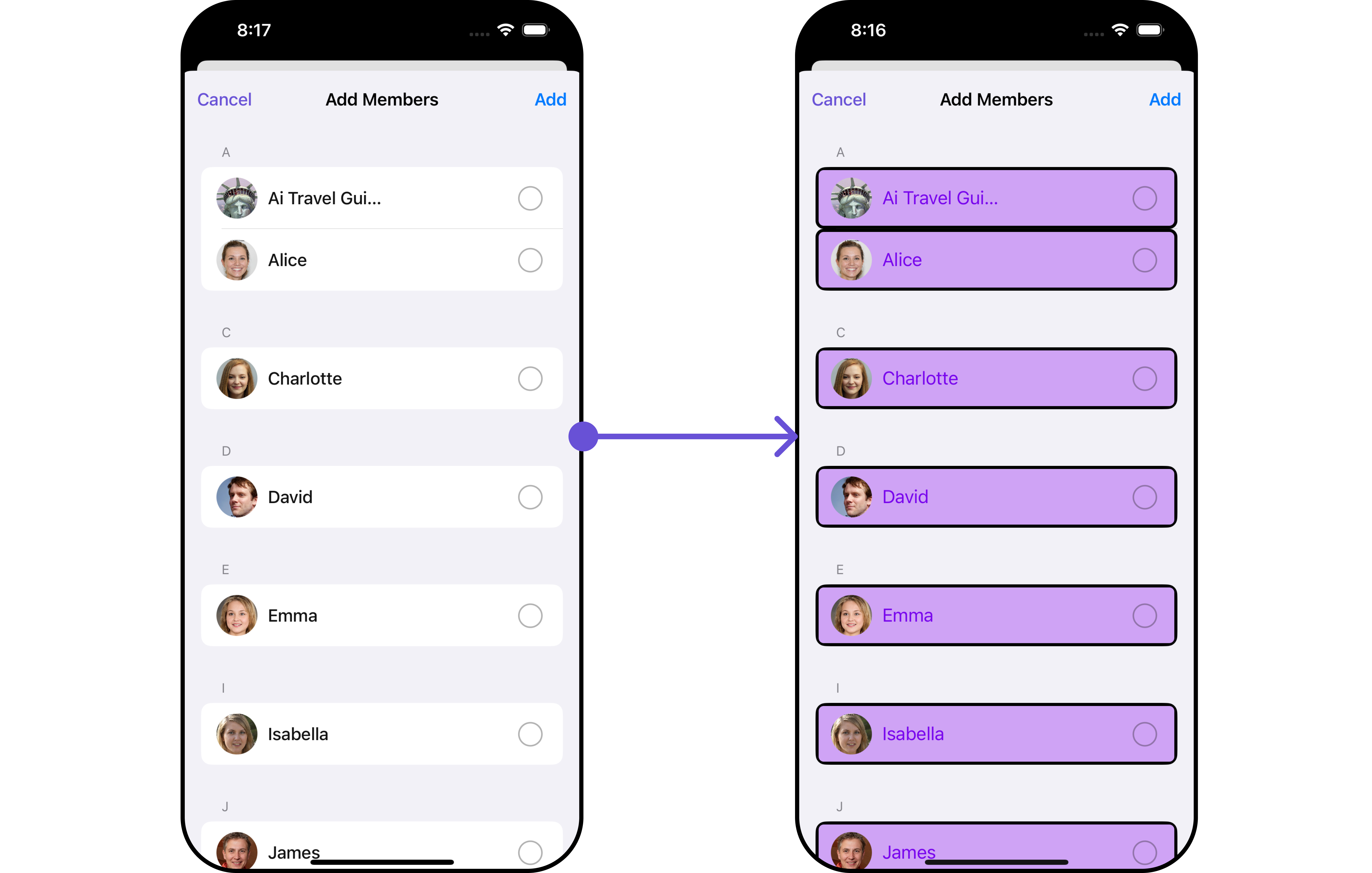
**Example**
Let's say you want to change the style of the Add Members subcomponent and, in addition, you only want to show the back button.
You can modify the style using the `ListItemStyle` property and `AvatarStyle` property
 ```swift Swift theme={null}
CometChat.getGroup(GUID: "GROUP_ID", onSuccess: { (group) in
DispatchQueue.main.async {
// Create an object of AddMembersConfiguration
let addMembersConfiguration = AddMembersConfiguration()
let avatarStyle = AvatarStyle()
avatarStyle.set(cornerRadius: .init(cornerRadius: 5))
// Creating ListItemStyle object
let listItemStyle = ListItemStyle()
// Creating Modifying the propeties of list item
listItemStyle.set(background: .init(red: 0.81, green: 0.64, blue: 0.96, alpha: 1.00))
.set(titleFont: .systemFont(ofSize: 18))
.set(titleColor: .init(red: 0.47, green: 0.02, blue: 0.93, alpha: 1.00))
.set(cornerRadius: CometChatCornerStyle(cornerRadius: 8.0))
.set(borderColor: .black)
.set(borderWidth: 3)
// Assign the properties as per your need
addMembersConfiguration.show(backButton: true)
.set(avatarStyle: avatarStyle)
.set(listItemStyle: listItemStyle)
let cometChatDetails = CometChatDetails()
.set(group: group)
.set(addMembersConfiguration: addMembersConfiguration)
let naviVC = UINavigationController(rootViewController: cometChatDetails)
self.present(naviVC, animated: true, completion: nil)
}
}, onError: { (error) in
DispatchQueue.main.async {
print("Error fetching group: \(String(describing: error?.errorDescription))")
}
})
```
Replace "GROUP\_ID" with the ID of the group you want to fetch.
***
#### Banned Members
You can customize the properties of the Banned Members component by making use of the `BannedMembersConfiguration`. You can accomplish this by employing the `bannedMembersConfiguration` as demonstrated below:
```swift theme={null}
// Create an object of BannedMembersConfiguration
let bannedMembersConfiguration = BannedMembersConfiguration()
```
All exposed properties of `BannedMembersConfiguration` can be found under [Banned Members](/ui-kit/ios/v4/group-banned-members). Properties marked with the 🛑 symbol are not accessible within the Configuration Object.
**Example**
Let's say you want to change the style of the Banned Members subcomponent and, in addition, you only want to show the back button.
You can modify the style using the `ListItemStyle` property and `AvatarStyle` property
```swift Swift theme={null}
CometChat.getGroup(GUID: "GROUP_ID", onSuccess: { (group) in
DispatchQueue.main.async {
// Create an object of AddMembersConfiguration
let addMembersConfiguration = AddMembersConfiguration()
let avatarStyle = AvatarStyle()
avatarStyle.set(cornerRadius: .init(cornerRadius: 5))
// Creating ListItemStyle object
let listItemStyle = ListItemStyle()
// Creating Modifying the propeties of list item
listItemStyle.set(background: .init(red: 0.81, green: 0.64, blue: 0.96, alpha: 1.00))
.set(titleFont: .systemFont(ofSize: 18))
.set(titleColor: .init(red: 0.47, green: 0.02, blue: 0.93, alpha: 1.00))
.set(cornerRadius: CometChatCornerStyle(cornerRadius: 8.0))
.set(borderColor: .black)
.set(borderWidth: 3)
// Assign the properties as per your need
addMembersConfiguration.show(backButton: true)
.set(avatarStyle: avatarStyle)
.set(listItemStyle: listItemStyle)
let cometChatDetails = CometChatDetails()
.set(group: group)
.set(addMembersConfiguration: addMembersConfiguration)
let naviVC = UINavigationController(rootViewController: cometChatDetails)
self.present(naviVC, animated: true, completion: nil)
}
}, onError: { (error) in
DispatchQueue.main.async {
print("Error fetching group: \(String(describing: error?.errorDescription))")
}
})
```
Replace "GROUP\_ID" with the ID of the group you want to fetch.
***
#### Banned Members
You can customize the properties of the Banned Members component by making use of the `BannedMembersConfiguration`. You can accomplish this by employing the `bannedMembersConfiguration` as demonstrated below:
```swift theme={null}
// Create an object of BannedMembersConfiguration
let bannedMembersConfiguration = BannedMembersConfiguration()
```
All exposed properties of `BannedMembersConfiguration` can be found under [Banned Members](/ui-kit/ios/v4/group-banned-members). Properties marked with the 🛑 symbol are not accessible within the Configuration Object.
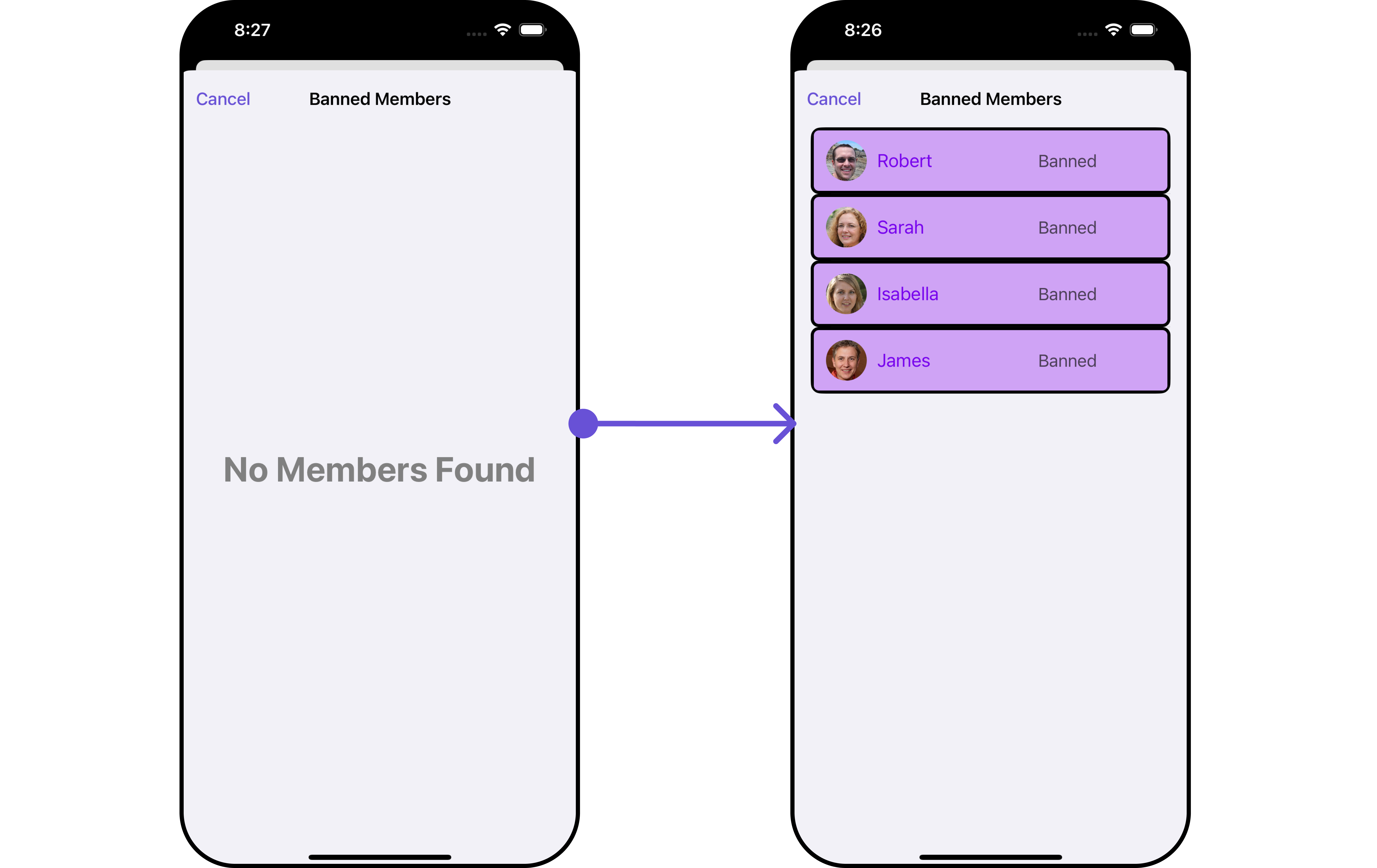
**Example**
Let's say you want to change the style of the Banned Members subcomponent and, in addition, you only want to show the back button.
You can modify the style using the `ListItemStyle` property and `AvatarStyle` property
 ```swift theme={null}
CometChat.getGroup(GUID: "GROUP_ID", onSuccess: { (group) in
DispatchQueue.main.async {
// Create an object of BannedMembersConfiguration
let bannedMembersConfiguration = BannedMembersConfiguration()
let avatarStyle = AvatarStyle()
avatarStyle.set(cornerRadius: .init(cornerRadius: 5))
// Creating ListItemStyle object
let listItemStyle = ListItemStyle()
listItemStyle.set(background: .init(red: 0.81, green: 0.64, blue: 0.96, alpha: 1.00))
.set(titleFont: .systemFont(ofSize: 18))
.set(titleColor: .init(red: 0.47, green: 0.02, blue: 0.93, alpha: 1.00))
.set(cornerRadius: CometChatCornerStyle(cornerRadius: 8.0))
.set(borderColor: .black)
.set(borderWidth: 3)
// Assign the properties as per your need
bannedMembersConfiguration.show(backButton: true)
.set(avatarStyle: avatarStyle)
.set(listItemStyle: listItemStyle)
let cometChatDetails = CometChatDetails()
.set(group: group)
.set(bannedMembersConfiguration: bannedMembersConfiguration)
let naviVC = UINavigationController(rootViewController: cometChatDetails)
self.present(naviVC, animated: true, completion: nil)
}
}, onError: { (error) in
DispatchQueue.main.async {
print("Error fetching group: \(String(describing: error?.errorDescription))")
}
})
```
Replace "GROUP\_ID" with the ID of the group you want to fetch.
***
#### Transfer Ownership
You can customize the properties of the Transfer Ownership component by making use of the `TransferOwnershipConfiguration`. You can accomplish this by employing the `transferOwnershipConfiguration` as demonstrated below:
```swift theme={null}
// Create an object of TransferOwnershipConfiguration
let transferOwnershipConfiguration = TransferOwnershipConfiguration()
```
All exposed properties of `TransferOwnershipConfiguration` can be found under [Transfer Ownership](/ui-kit/ios/v4/group-transfer-ownership). Properties marked with the 🛑 symbol are not accessible within the Configuration Object.
**Example** Let's say you want to change the style of the Transfer Ownership subcomponent and, in addition, you only want to show the back button.
You can modify the style using the `ListItemStyle` property and `AvatarStyle` property
```swift theme={null}
CometChat.getGroup(GUID: "GROUP_ID", onSuccess: { (group) in
DispatchQueue.main.async {
// Create an object of TransferOwnershipConfiguration
let transferOwnershipConfiguration = TransferOwnershipConfiguration()
let avatarStyle = AvatarStyle()
avatarStyle.set(cornerRadius: .init(cornerRadius: 5))
// Creating ListItemStyle object
let listItemStyle = ListItemStyle()
listItemStyle.set(background: .init(red: 0.81, green: 0.64, blue: 0.96, alpha: 1.00))
.set(titleFont: .systemFont(ofSize: 18))
.set(titleColor: .init(red: 0.47, green: 0.02, blue: 0.93, alpha: 1.00))
.set(cornerRadius: CometChatCornerStyle(cornerRadius: 8.0))
.set(borderColor: .black)
.set(borderWidth: 3)
// Assign the properties as per your need
transferOwnershipConfiguration.show(backButton: true)
.set(avatarStyle: avatarStyle)
.set(listItemStyle: listItemStyle)
let cometChatDetails = CometChatDetails()
.set(group: group)
.set(transferOwnershipConfiguration: transferOwnershipConfiguration)
let naviVC = UINavigationController(rootViewController: cometChatDetails)
self.present(naviVC, animated: true, completion: nil)
}
}, onError: { (error) in
DispatchQueue.main.async {
print("Error fetching group: \(String(describing: error?.errorDescription))")
}
})
```
Replace "GROUP\_ID" with the ID of the group you want to fetch.
```swift theme={null}
CometChat.getGroup(GUID: "GROUP_ID", onSuccess: { (group) in
DispatchQueue.main.async {
// Create an object of BannedMembersConfiguration
let bannedMembersConfiguration = BannedMembersConfiguration()
let avatarStyle = AvatarStyle()
avatarStyle.set(cornerRadius: .init(cornerRadius: 5))
// Creating ListItemStyle object
let listItemStyle = ListItemStyle()
listItemStyle.set(background: .init(red: 0.81, green: 0.64, blue: 0.96, alpha: 1.00))
.set(titleFont: .systemFont(ofSize: 18))
.set(titleColor: .init(red: 0.47, green: 0.02, blue: 0.93, alpha: 1.00))
.set(cornerRadius: CometChatCornerStyle(cornerRadius: 8.0))
.set(borderColor: .black)
.set(borderWidth: 3)
// Assign the properties as per your need
bannedMembersConfiguration.show(backButton: true)
.set(avatarStyle: avatarStyle)
.set(listItemStyle: listItemStyle)
let cometChatDetails = CometChatDetails()
.set(group: group)
.set(bannedMembersConfiguration: bannedMembersConfiguration)
let naviVC = UINavigationController(rootViewController: cometChatDetails)
self.present(naviVC, animated: true, completion: nil)
}
}, onError: { (error) in
DispatchQueue.main.async {
print("Error fetching group: \(String(describing: error?.errorDescription))")
}
})
```
Replace "GROUP\_ID" with the ID of the group you want to fetch.
***
#### Transfer Ownership
You can customize the properties of the Transfer Ownership component by making use of the `TransferOwnershipConfiguration`. You can accomplish this by employing the `transferOwnershipConfiguration` as demonstrated below:
```swift theme={null}
// Create an object of TransferOwnershipConfiguration
let transferOwnershipConfiguration = TransferOwnershipConfiguration()
```
All exposed properties of `TransferOwnershipConfiguration` can be found under [Transfer Ownership](/ui-kit/ios/v4/group-transfer-ownership). Properties marked with the 🛑 symbol are not accessible within the Configuration Object.
**Example** Let's say you want to change the style of the Transfer Ownership subcomponent and, in addition, you only want to show the back button.
You can modify the style using the `ListItemStyle` property and `AvatarStyle` property
```swift theme={null}
CometChat.getGroup(GUID: "GROUP_ID", onSuccess: { (group) in
DispatchQueue.main.async {
// Create an object of TransferOwnershipConfiguration
let transferOwnershipConfiguration = TransferOwnershipConfiguration()
let avatarStyle = AvatarStyle()
avatarStyle.set(cornerRadius: .init(cornerRadius: 5))
// Creating ListItemStyle object
let listItemStyle = ListItemStyle()
listItemStyle.set(background: .init(red: 0.81, green: 0.64, blue: 0.96, alpha: 1.00))
.set(titleFont: .systemFont(ofSize: 18))
.set(titleColor: .init(red: 0.47, green: 0.02, blue: 0.93, alpha: 1.00))
.set(cornerRadius: CometChatCornerStyle(cornerRadius: 8.0))
.set(borderColor: .black)
.set(borderWidth: 3)
// Assign the properties as per your need
transferOwnershipConfiguration.show(backButton: true)
.set(avatarStyle: avatarStyle)
.set(listItemStyle: listItemStyle)
let cometChatDetails = CometChatDetails()
.set(group: group)
.set(transferOwnershipConfiguration: transferOwnershipConfiguration)
let naviVC = UINavigationController(rootViewController: cometChatDetails)
self.present(naviVC, animated: true, completion: nil)
}
}, onError: { (error) in
DispatchQueue.main.async {
print("Error fetching group: \(String(describing: error?.errorDescription))")
}
})
```
Replace "GROUP\_ID" with the ID of the group you want to fetch.