> ## Documentation Index
> Fetch the complete documentation index at: https://cometchat-22654f5b-docs-platform-docs-release.mintlify.site/llms.txt
> Use this file to discover all available pages before exploring further.
# Add Members
> Add Members — CometChat documentation.
## Overview
`CometChatAddMembers` is a [Widget](/ui-kit/flutter/v4/components-overview#components) that empowers administrators or group owners with the ability to expand group membership by seamlessly adding new participants. This widget facilitates effortless management of group membership and enhances collaboration within the group's discussions and activities. Administrators can meticulously select desired users to join the group, whether by targeted search or from a list of available users. Selected users receive notifications, streamlining the process of joining the group and ensuring smooth integration into the community.
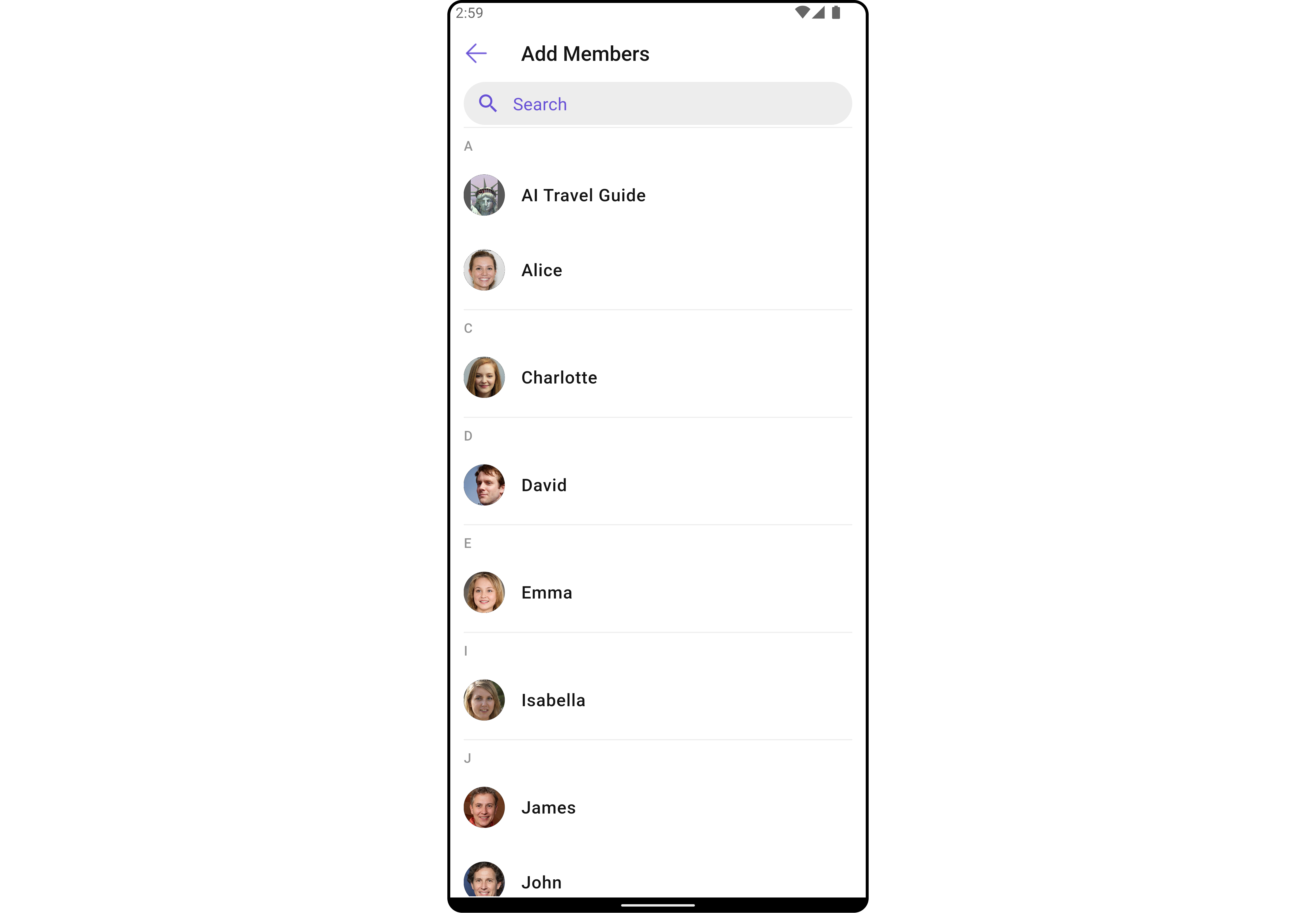
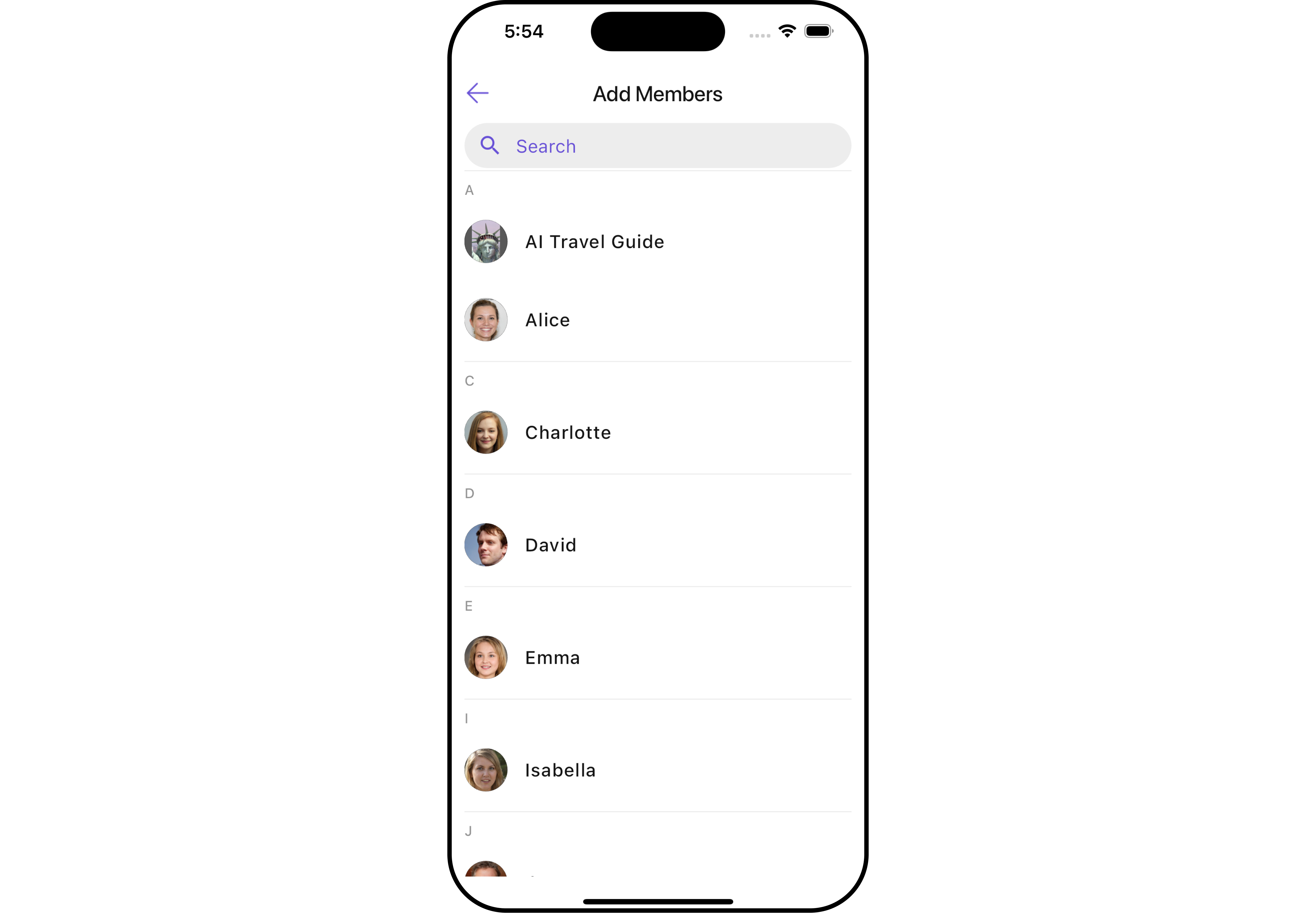 The `CometChatAddMembers` widget is composed of the following BaseWidgets:
| Widgets | Description |
| ------------------------------------------------- | -------------------------------------------------------------------------------------------------------------------------------------------------------------------------------------------------------------------------------------------------------------------------------------------------------------------------------------------------------- |
| [CometChatUsers](/ui-kit/flutter/v4/users) | `CometChatUsers` is a standalone widget that presents a user list and enables targeted user searches. As a container inheriting from `CometChatListBase` , it seamlessly incorporates the `CometChatUserList` widget. This setup streamlines user browsing and search capabilities, enhancing overall usability and facilitating efficient interactions. |
| [CometChatListItem](/ui-kit/flutter/v4/list-item) | This widget renders information extracted from a `User` object onto a tile, featuring a title, subtitle, leading view, and trailing view. experience, facilitating seamless navigation and interaction within the widget. |
***
## Usage
### Integration
`CometChatAddMembers` , as a Composite Widget, offers flexible integration options, allowing it to be launched directly via button clicks or any user-triggered action. Additionally, it seamlessly integrates into tab view controllers. With add members, users gain access to a wide range of parameters and methods for effortless customization of its user interface.
You can launch `CometChatAddMembers` directly using `Navigator.push` , or you can define it as a widget within the `build` method of your `State` class.
##### 1. Using Navigator to Launch `CometChatAddMembers`
```dart theme={null}
Navigator.push(context, MaterialPageRoute(builder: (context) => CometChatAddMembers(group: Group(guid: "", name: "", type: "")))); // A group object is required to launch this widget.
```
##### 2. Embedding `CometChatAddMembers` as a Widget in the build Method
```dart theme={null}
import 'package:cometchat_chat_uikit/cometchat_chat_uikit.dart';
import 'package:flutter/material.dart';
class AddMembers extends StatefulWidget {
const AddMembers({super.key});
@override
State createState() => _AddMembersState();
}
class _AddMembersState extends State {
@override
Widget build(BuildContext context) {
return Scaffold(
body: SafeArea(
child: CometChatAddMembers(
group: Group(guid: "", name: "", type: ""), // A group object is required to launch this widget.
) // A group object is required to launch this widget.
)
);
}
}
```
***
### Actions
[Actions](/ui-kit/flutter/v4/components-overview#actions) dictate how a widget functions. They are divided into two types: Predefined and User-defined. You can override either type, allowing you to tailor the behavior of the widget to fit your specific needs.
##### 1. onBack
Enhance your application's functionality by leveraging the `onBack` feature. This capability allows you to customize the behavior associated with navigating back within your app. Utilize the provided code snippet to override default behaviors and tailor the user experience according to your specific requirements.
```dart theme={null}
CometChatAddMembers(
group: Group(guid: "", name: "", type: ""), // A group object is required to launch this widget.
onBack: () {
// TODO("Not yet implemented")
},
)
```
***
##### 2. onError
You can customize this behavior by using the provided code snippet to override the `onError` and improve error handling.
```dart theme={null}
CometChatAddMembers(
group: Group(guid: "", name: "", type: ""), // A group object is required to launch this widget.
onError: (e) {
// TODO("Not yet implemented")
},
)
```
***
##### 3. onSelection
When the `onSelection` event is triggered, it furnishes the list of selected users. This event can be invoked by any button or action within the interface. You have the flexibility to implement custom actions or behaviors based on the selected users.
This action does not come with any predefined behavior. However, you have the flexibility to override this event and tailor it to suit your needs using the following code snippet.
```dart theme={null}
CometChatAddMembers(
group: Group(guid: "", name: "", type: ""), // A group object is required to launch this widget.
selectionMode: SelectionMode.multiple,
onSelection: (groupMembersList, context) {
// TODO("Not yet implemented")
},
)
```
***
### Filters
**Filters** allow you to customize the data displayed in a list within a `Widget` . You can filter the list based on your specific criteria, allowing for a more customized. Filters can be applied using `RequestBuilders` of Chat SDK.
##### 1. UsersRequestBuilder
The [UsersRequestBuilder](/sdk/flutter/retrieve-users) enables you to filter and customize the group list based on available parameters in UsersRequestBuilder. This feature allows you to create more specific and targeted queries when fetching users. The following are the parameters available in [UsersRequestBuilder](/sdk/flutter/retrieve-users)
| Property | Description | Code |
| ---------------------- | ----------------------------------------------- | ------------------------- |
| **Friends Only** | Indicates if the request is limited to friends. | `friendsOnly: bool?` |
| **Hide Blocked Users** | Whether to hide blocked users in the request. | `hideBlockedUsers: bool?` |
| **Limit** | Maximum number of users to fetch. | `limit: int?` |
| **Role** | Specific role of the users to fetch. | `role: String?` |
| **Roles** | List of roles for the users. | `roles: List?` |
| **Search Keyword** | Keyword for searching users. | `searchKeyword: String?` |
| **Tags** | List of tags associated with the users. | `tags: List?` |
| **Uids** | List of user IDs. | `uids: List?` |
| **User Status** | Status of the user. | `userStatus: String?` |
| **With Tags** | Whether to include users with specific tags. | `withTags: bool?` |
**Example**
```dart theme={null}
CometChatAddMembers(
group: Group(guid: "", name: "", type: ""), // A group object is required to launch this widget.
usersRequestBuilder: UsersRequestBuilder()
..limit = 10
)
```
***
##### 2. UsersProtocol
The `UsersProtocol` uses [UsersRequestBuilder](/sdk/flutter/retrieve-users) enables you to filter and customize the search list based on available parameters in UsersRequestBuilder. This feature allows you to keep uniformity between the displayed User List and searched User List.
**Example**
```dart custom_protocol.dart theme={null}
import 'package:cometchat_chat_uikit/cometchat_chat_uikit.dart';
class CustomUsersProtocol extends UsersBuilderProtocol {
const CustomUsersProtocol(super.builder);
@override
UsersRequest getRequest() {
return requestBuilder.build();
}
@override
UsersRequest getSearchRequest(String val) {
requestBuilder.searchKeyword = val;
return requestBuilder.build();
}
}
```
```dart main.dart theme={null}
CometChatAddMembers(
group: Group(guid: "", name: "", type: ""), // A group object is required to launch this widget.
usersProtocol: CustomUsersProtocol(UsersRequestBuilder()..searchKeyword = "searchKeyword"),
)
```
***
### Events
[Events](/ui-kit/flutter/v4/components-overview#events) are emitted by a `Widget` . By using event you can extend existing functionality. Being global events, they can be applied in Multiple Locations and are capable of being Added or Removed.
Events emitted by the Join Group widget is as follows.
| Event | Description |
| ---------------------- | -------------------------------------------------- |
| **ccGroupMemberAdded** | Triggers when a user added to a group successfully |
**Example**
```dart your_screen.dart theme={null}
import 'package:cometchat_chat_uikit/cometchat_chat_uikit.dart';
import 'package:cometchat_sdk/models/action.dart' as cc;
import 'package:flutter/material.dart';
class YourScreen extends StatefulWidget {
const YourScreen({super.key});
@override
State createState() => _YourScreenState();
}
class _YourScreenState extends State with CometChatGroupEventListener {
@override
void initState() {
super.initState();
CometChatGroupEvents.addGroupsListener("listenerId", this); // Add the listener
}
@override
void dispose(){
super.dispose();
CometChatGroupEvents.removeGroupsListener("listenerId"); // Remove the listener
}
@override
void ccGroupMemberAdded(List messages, List usersAdded, Group groupAddedIn, User addedBy) {
// TODO("Not yet implemented")
}
@override
Widget build(BuildContext context) {
return const Placeholder();
}
}
```
***
## Customization
To fit your app's design requirements, you can customize the appearance of the Groups widget. We provide exposed methods that allow you to modify the experience and behavior according to your specific needs.
### Style
Using **Style** you can **customize** the look and feel of the widget in your app, These parameters typically control elements such as the **color**, **size**, **shape**, and **fonts** used within the widget.
##### 1. AddMembers Style
To apply customized styles to the `CometChatAddMembers` widget in the Group Member Widget, you can use the following code snippet.
```dart theme={null}
CometChatAddMembers(
group: Group(guid: "", name: "", type: ""), // A group object is required to launch this widget.
addMembersStyle: AddMembersStyle(
background: Color(0xFFE4EBF5),
titleStyle: TextStyle(color: Colors.red),
backIconTint: Colors.red
),
)
```
The `CometChatAddMembers` widget is composed of the following BaseWidgets:
| Widgets | Description |
| ------------------------------------------------- | -------------------------------------------------------------------------------------------------------------------------------------------------------------------------------------------------------------------------------------------------------------------------------------------------------------------------------------------------------- |
| [CometChatUsers](/ui-kit/flutter/v4/users) | `CometChatUsers` is a standalone widget that presents a user list and enables targeted user searches. As a container inheriting from `CometChatListBase` , it seamlessly incorporates the `CometChatUserList` widget. This setup streamlines user browsing and search capabilities, enhancing overall usability and facilitating efficient interactions. |
| [CometChatListItem](/ui-kit/flutter/v4/list-item) | This widget renders information extracted from a `User` object onto a tile, featuring a title, subtitle, leading view, and trailing view. experience, facilitating seamless navigation and interaction within the widget. |
***
## Usage
### Integration
`CometChatAddMembers` , as a Composite Widget, offers flexible integration options, allowing it to be launched directly via button clicks or any user-triggered action. Additionally, it seamlessly integrates into tab view controllers. With add members, users gain access to a wide range of parameters and methods for effortless customization of its user interface.
You can launch `CometChatAddMembers` directly using `Navigator.push` , or you can define it as a widget within the `build` method of your `State` class.
##### 1. Using Navigator to Launch `CometChatAddMembers`
```dart theme={null}
Navigator.push(context, MaterialPageRoute(builder: (context) => CometChatAddMembers(group: Group(guid: "", name: "", type: "")))); // A group object is required to launch this widget.
```
##### 2. Embedding `CometChatAddMembers` as a Widget in the build Method
```dart theme={null}
import 'package:cometchat_chat_uikit/cometchat_chat_uikit.dart';
import 'package:flutter/material.dart';
class AddMembers extends StatefulWidget {
const AddMembers({super.key});
@override
State createState() => _AddMembersState();
}
class _AddMembersState extends State {
@override
Widget build(BuildContext context) {
return Scaffold(
body: SafeArea(
child: CometChatAddMembers(
group: Group(guid: "", name: "", type: ""), // A group object is required to launch this widget.
) // A group object is required to launch this widget.
)
);
}
}
```
***
### Actions
[Actions](/ui-kit/flutter/v4/components-overview#actions) dictate how a widget functions. They are divided into two types: Predefined and User-defined. You can override either type, allowing you to tailor the behavior of the widget to fit your specific needs.
##### 1. onBack
Enhance your application's functionality by leveraging the `onBack` feature. This capability allows you to customize the behavior associated with navigating back within your app. Utilize the provided code snippet to override default behaviors and tailor the user experience according to your specific requirements.
```dart theme={null}
CometChatAddMembers(
group: Group(guid: "", name: "", type: ""), // A group object is required to launch this widget.
onBack: () {
// TODO("Not yet implemented")
},
)
```
***
##### 2. onError
You can customize this behavior by using the provided code snippet to override the `onError` and improve error handling.
```dart theme={null}
CometChatAddMembers(
group: Group(guid: "", name: "", type: ""), // A group object is required to launch this widget.
onError: (e) {
// TODO("Not yet implemented")
},
)
```
***
##### 3. onSelection
When the `onSelection` event is triggered, it furnishes the list of selected users. This event can be invoked by any button or action within the interface. You have the flexibility to implement custom actions or behaviors based on the selected users.
This action does not come with any predefined behavior. However, you have the flexibility to override this event and tailor it to suit your needs using the following code snippet.
```dart theme={null}
CometChatAddMembers(
group: Group(guid: "", name: "", type: ""), // A group object is required to launch this widget.
selectionMode: SelectionMode.multiple,
onSelection: (groupMembersList, context) {
// TODO("Not yet implemented")
},
)
```
***
### Filters
**Filters** allow you to customize the data displayed in a list within a `Widget` . You can filter the list based on your specific criteria, allowing for a more customized. Filters can be applied using `RequestBuilders` of Chat SDK.
##### 1. UsersRequestBuilder
The [UsersRequestBuilder](/sdk/flutter/retrieve-users) enables you to filter and customize the group list based on available parameters in UsersRequestBuilder. This feature allows you to create more specific and targeted queries when fetching users. The following are the parameters available in [UsersRequestBuilder](/sdk/flutter/retrieve-users)
| Property | Description | Code |
| ---------------------- | ----------------------------------------------- | ------------------------- |
| **Friends Only** | Indicates if the request is limited to friends. | `friendsOnly: bool?` |
| **Hide Blocked Users** | Whether to hide blocked users in the request. | `hideBlockedUsers: bool?` |
| **Limit** | Maximum number of users to fetch. | `limit: int?` |
| **Role** | Specific role of the users to fetch. | `role: String?` |
| **Roles** | List of roles for the users. | `roles: List?` |
| **Search Keyword** | Keyword for searching users. | `searchKeyword: String?` |
| **Tags** | List of tags associated with the users. | `tags: List?` |
| **Uids** | List of user IDs. | `uids: List?` |
| **User Status** | Status of the user. | `userStatus: String?` |
| **With Tags** | Whether to include users with specific tags. | `withTags: bool?` |
**Example**
```dart theme={null}
CometChatAddMembers(
group: Group(guid: "", name: "", type: ""), // A group object is required to launch this widget.
usersRequestBuilder: UsersRequestBuilder()
..limit = 10
)
```
***
##### 2. UsersProtocol
The `UsersProtocol` uses [UsersRequestBuilder](/sdk/flutter/retrieve-users) enables you to filter and customize the search list based on available parameters in UsersRequestBuilder. This feature allows you to keep uniformity between the displayed User List and searched User List.
**Example**
```dart custom_protocol.dart theme={null}
import 'package:cometchat_chat_uikit/cometchat_chat_uikit.dart';
class CustomUsersProtocol extends UsersBuilderProtocol {
const CustomUsersProtocol(super.builder);
@override
UsersRequest getRequest() {
return requestBuilder.build();
}
@override
UsersRequest getSearchRequest(String val) {
requestBuilder.searchKeyword = val;
return requestBuilder.build();
}
}
```
```dart main.dart theme={null}
CometChatAddMembers(
group: Group(guid: "", name: "", type: ""), // A group object is required to launch this widget.
usersProtocol: CustomUsersProtocol(UsersRequestBuilder()..searchKeyword = "searchKeyword"),
)
```
***
### Events
[Events](/ui-kit/flutter/v4/components-overview#events) are emitted by a `Widget` . By using event you can extend existing functionality. Being global events, they can be applied in Multiple Locations and are capable of being Added or Removed.
Events emitted by the Join Group widget is as follows.
| Event | Description |
| ---------------------- | -------------------------------------------------- |
| **ccGroupMemberAdded** | Triggers when a user added to a group successfully |
**Example**
```dart your_screen.dart theme={null}
import 'package:cometchat_chat_uikit/cometchat_chat_uikit.dart';
import 'package:cometchat_sdk/models/action.dart' as cc;
import 'package:flutter/material.dart';
class YourScreen extends StatefulWidget {
const YourScreen({super.key});
@override
State createState() => _YourScreenState();
}
class _YourScreenState extends State with CometChatGroupEventListener {
@override
void initState() {
super.initState();
CometChatGroupEvents.addGroupsListener("listenerId", this); // Add the listener
}
@override
void dispose(){
super.dispose();
CometChatGroupEvents.removeGroupsListener("listenerId"); // Remove the listener
}
@override
void ccGroupMemberAdded(List messages, List usersAdded, Group groupAddedIn, User addedBy) {
// TODO("Not yet implemented")
}
@override
Widget build(BuildContext context) {
return const Placeholder();
}
}
```
***
## Customization
To fit your app's design requirements, you can customize the appearance of the Groups widget. We provide exposed methods that allow you to modify the experience and behavior according to your specific needs.
### Style
Using **Style** you can **customize** the look and feel of the widget in your app, These parameters typically control elements such as the **color**, **size**, **shape**, and **fonts** used within the widget.
##### 1. AddMembers Style
To apply customized styles to the `CometChatAddMembers` widget in the Group Member Widget, you can use the following code snippet.
```dart theme={null}
CometChatAddMembers(
group: Group(guid: "", name: "", type: ""), // A group object is required to launch this widget.
addMembersStyle: AddMembersStyle(
background: Color(0xFFE4EBF5),
titleStyle: TextStyle(color: Colors.red),
backIconTint: Colors.red
),
)
```
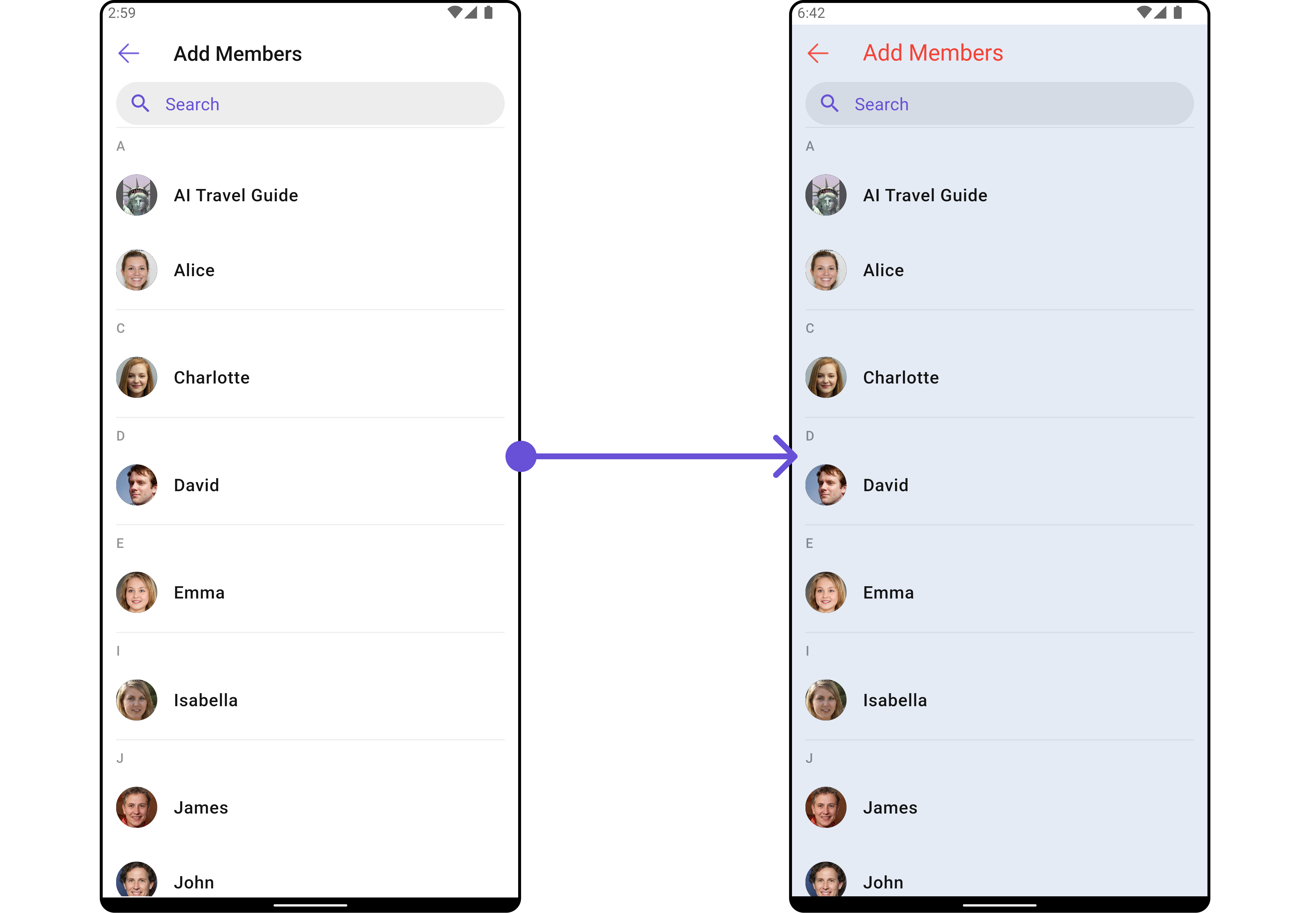
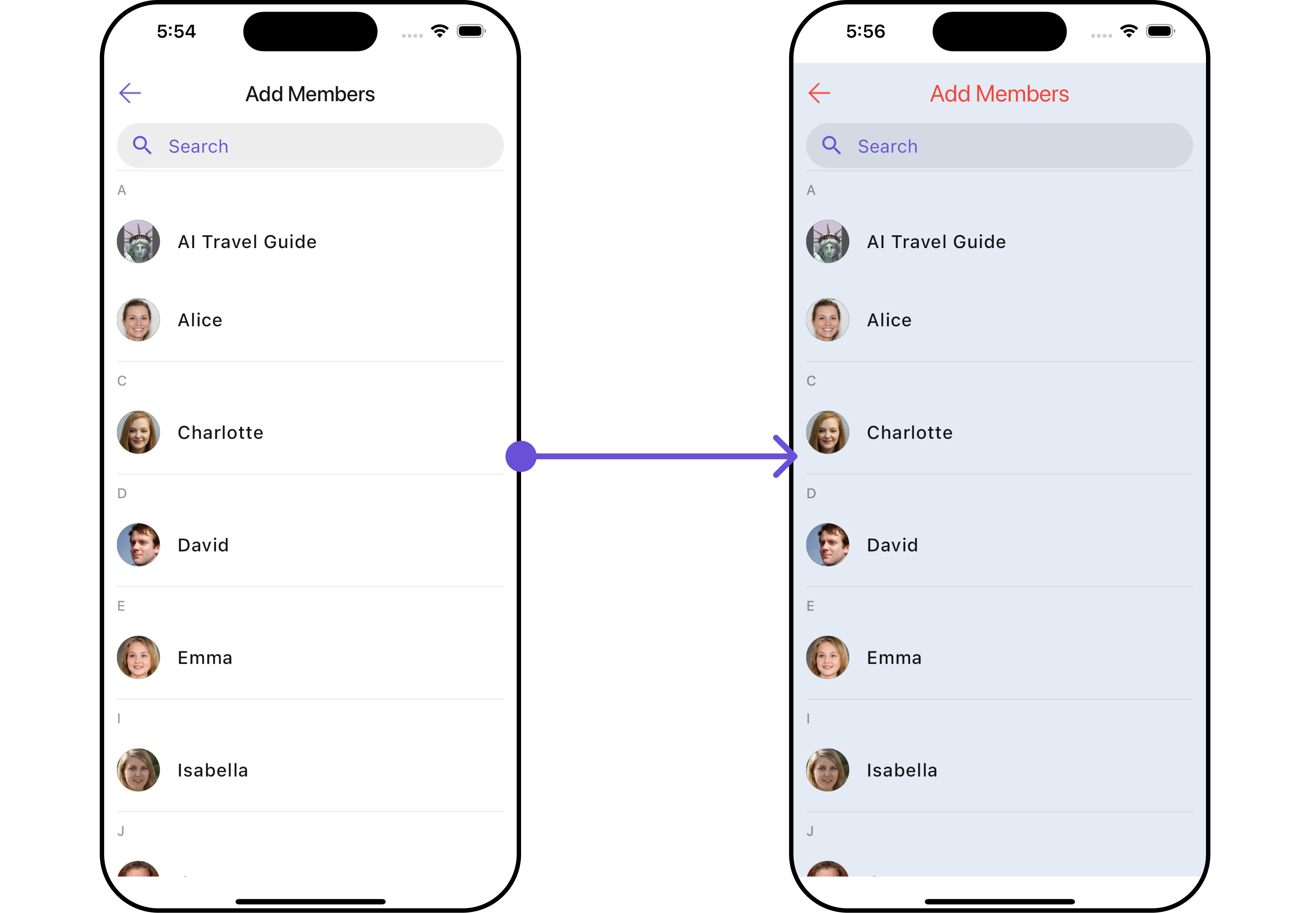 List of properties exposed by `AddMembersStyle`
| Property | Description | Code |
| -------------------------- | ---------------------------------------------- | ----------------------------------- |
| **Back Icon Tint** | Tint color for the back icon. | `backIconTint: Color?` |
| **Background** | Background color or decoration. | `background: Decoration?` |
| **Border** | Border of the widget. | `border: Border?` |
| **Border Radius** | Radius of the widget's border. | `borderRadius: BorderRadius?` |
| **Close Icon Tint** | Tint color for the close icon. | `closeIconTint: Color?` |
| **Empty State Text Style** | Style for the empty state text. | `emptyStateTextStyle: TextStyle?` |
| **Error State Text Style** | Style for the error state text. | `errorStateTextStyle: TextStyle?` |
| **Gradient** | Gradient used for the widget's background. | `gradient: Gradient?` |
| **Height** | Height of the widget. | `height: double?` |
| **Placeholder Style** | Style for the placeholder text. | `placeholderStyle: TextStyle?` |
| **Search Background** | Background color or decoration for the search. | `searchBackground: Decoration?` |
| **Search Border Color** | Color of the search field's border. | `searchBorderColor: Color?` |
| **Search Border Radius** | Radius of the search field's border. | `searchBorderRadius: BorderRadius?` |
| **Search Border Width** | Width of the search field's border. | `searchBorderWidth: double?` |
| **Search Icon Tint** | Tint color for the search icon. | `searchIconTint: Color?` |
| **Search Style** | Style for the search text. | `searchStyle: TextStyle?` |
| **Selection Icon Tint** | Tint color for the selection icon. | `selectionIconTint: Color?` |
| **Submit Icon Tint** | Tint color for the submit icon. | `submitIconTint: Color?` |
| **Title Style** | Style for the title text. | `titleStyle: TextStyle?` |
| **Width** | Width of the widget. | `width: double?` |
***
##### 2. Avatar Style
To apply customized styles to the `Avatar` widget in the `CometChatAddMembers` Widget, you can use the following code snippet. For further insights on `Avatar` Styles [refer](/ui-kit/flutter/v4/avatar)
```dart theme={null}
CometChatAddMembers(
group: Group(guid: "", name: "", type: ""), // A group object is required to launch this widget.
avatarStyle: AvatarStyle(
border: Border.all(width: 5),
borderRadius: 20,
background: Colors.red
),
)
```
***
##### 3. StatusIndicator Style
To apply customized styles to the Status Indicator widget in the `CometChatAddMembers` Widget, You can use the following code snippet. For further insights on Status Indicator Styles [refer](/ui-kit/flutter/v4/status-indicator)
```dart theme={null}
CometChatAddMembers(
group: Group(guid: "", name: "", type: ""), // A group object is required to launch this widget.
statusIndicatorStyle: StatusIndicatorStyle(
borderRadius: 10,
gradient: LinearGradient(colors: [Colors.red, Colors.orange], begin: Alignment.topLeft, end: Alignment.bottomRight)
),
)
```
***
##### 4. ListItem Style
To apply customized styles to the `ListItemStyle` in the `CometChatAddMembers` Widget, you can use the following code snippet. For further insights on `List Item` Styles [refer](/ui-kit/flutter/v4/list-item)
```dart theme={null}
CometChatAddMembers(
group: Group(guid: "", name: "", type: ""), // A group object is required to launch this widget.
hideSeparator: true,
listItemStyle: ListItemStyle(
background: Color(0xFFE4EBF5),
borderRadius: 20,
border: Border.all(width: 2),
margin: EdgeInsets.only(top: 10),
padding: EdgeInsets.only(left: 10)
),
)
```
***
### Functionality
These are a set of small functional customizations that allow you to fine-tune the overall experience of the widget. With these, you can change text, set custom icons, and toggle the visibility of UI elements.
```dart theme={null}
CometChatAddMembers(
group: Group(guid: "", name: "", type: ""), // A group object is required to launch this widget.
title: "Your Title",
hideSeparator: true,
hideSearch: true,
showBackButton: false
)
```
List of properties exposed by `AddMembersStyle`
| Property | Description | Code |
| -------------------------- | ---------------------------------------------- | ----------------------------------- |
| **Back Icon Tint** | Tint color for the back icon. | `backIconTint: Color?` |
| **Background** | Background color or decoration. | `background: Decoration?` |
| **Border** | Border of the widget. | `border: Border?` |
| **Border Radius** | Radius of the widget's border. | `borderRadius: BorderRadius?` |
| **Close Icon Tint** | Tint color for the close icon. | `closeIconTint: Color?` |
| **Empty State Text Style** | Style for the empty state text. | `emptyStateTextStyle: TextStyle?` |
| **Error State Text Style** | Style for the error state text. | `errorStateTextStyle: TextStyle?` |
| **Gradient** | Gradient used for the widget's background. | `gradient: Gradient?` |
| **Height** | Height of the widget. | `height: double?` |
| **Placeholder Style** | Style for the placeholder text. | `placeholderStyle: TextStyle?` |
| **Search Background** | Background color or decoration for the search. | `searchBackground: Decoration?` |
| **Search Border Color** | Color of the search field's border. | `searchBorderColor: Color?` |
| **Search Border Radius** | Radius of the search field's border. | `searchBorderRadius: BorderRadius?` |
| **Search Border Width** | Width of the search field's border. | `searchBorderWidth: double?` |
| **Search Icon Tint** | Tint color for the search icon. | `searchIconTint: Color?` |
| **Search Style** | Style for the search text. | `searchStyle: TextStyle?` |
| **Selection Icon Tint** | Tint color for the selection icon. | `selectionIconTint: Color?` |
| **Submit Icon Tint** | Tint color for the submit icon. | `submitIconTint: Color?` |
| **Title Style** | Style for the title text. | `titleStyle: TextStyle?` |
| **Width** | Width of the widget. | `width: double?` |
***
##### 2. Avatar Style
To apply customized styles to the `Avatar` widget in the `CometChatAddMembers` Widget, you can use the following code snippet. For further insights on `Avatar` Styles [refer](/ui-kit/flutter/v4/avatar)
```dart theme={null}
CometChatAddMembers(
group: Group(guid: "", name: "", type: ""), // A group object is required to launch this widget.
avatarStyle: AvatarStyle(
border: Border.all(width: 5),
borderRadius: 20,
background: Colors.red
),
)
```
***
##### 3. StatusIndicator Style
To apply customized styles to the Status Indicator widget in the `CometChatAddMembers` Widget, You can use the following code snippet. For further insights on Status Indicator Styles [refer](/ui-kit/flutter/v4/status-indicator)
```dart theme={null}
CometChatAddMembers(
group: Group(guid: "", name: "", type: ""), // A group object is required to launch this widget.
statusIndicatorStyle: StatusIndicatorStyle(
borderRadius: 10,
gradient: LinearGradient(colors: [Colors.red, Colors.orange], begin: Alignment.topLeft, end: Alignment.bottomRight)
),
)
```
***
##### 4. ListItem Style
To apply customized styles to the `ListItemStyle` in the `CometChatAddMembers` Widget, you can use the following code snippet. For further insights on `List Item` Styles [refer](/ui-kit/flutter/v4/list-item)
```dart theme={null}
CometChatAddMembers(
group: Group(guid: "", name: "", type: ""), // A group object is required to launch this widget.
hideSeparator: true,
listItemStyle: ListItemStyle(
background: Color(0xFFE4EBF5),
borderRadius: 20,
border: Border.all(width: 2),
margin: EdgeInsets.only(top: 10),
padding: EdgeInsets.only(left: 10)
),
)
```
***
### Functionality
These are a set of small functional customizations that allow you to fine-tune the overall experience of the widget. With these, you can change text, set custom icons, and toggle the visibility of UI elements.
```dart theme={null}
CometChatAddMembers(
group: Group(guid: "", name: "", type: ""), // A group object is required to launch this widget.
title: "Your Title",
hideSeparator: true,
hideSearch: true,
showBackButton: false
)
```
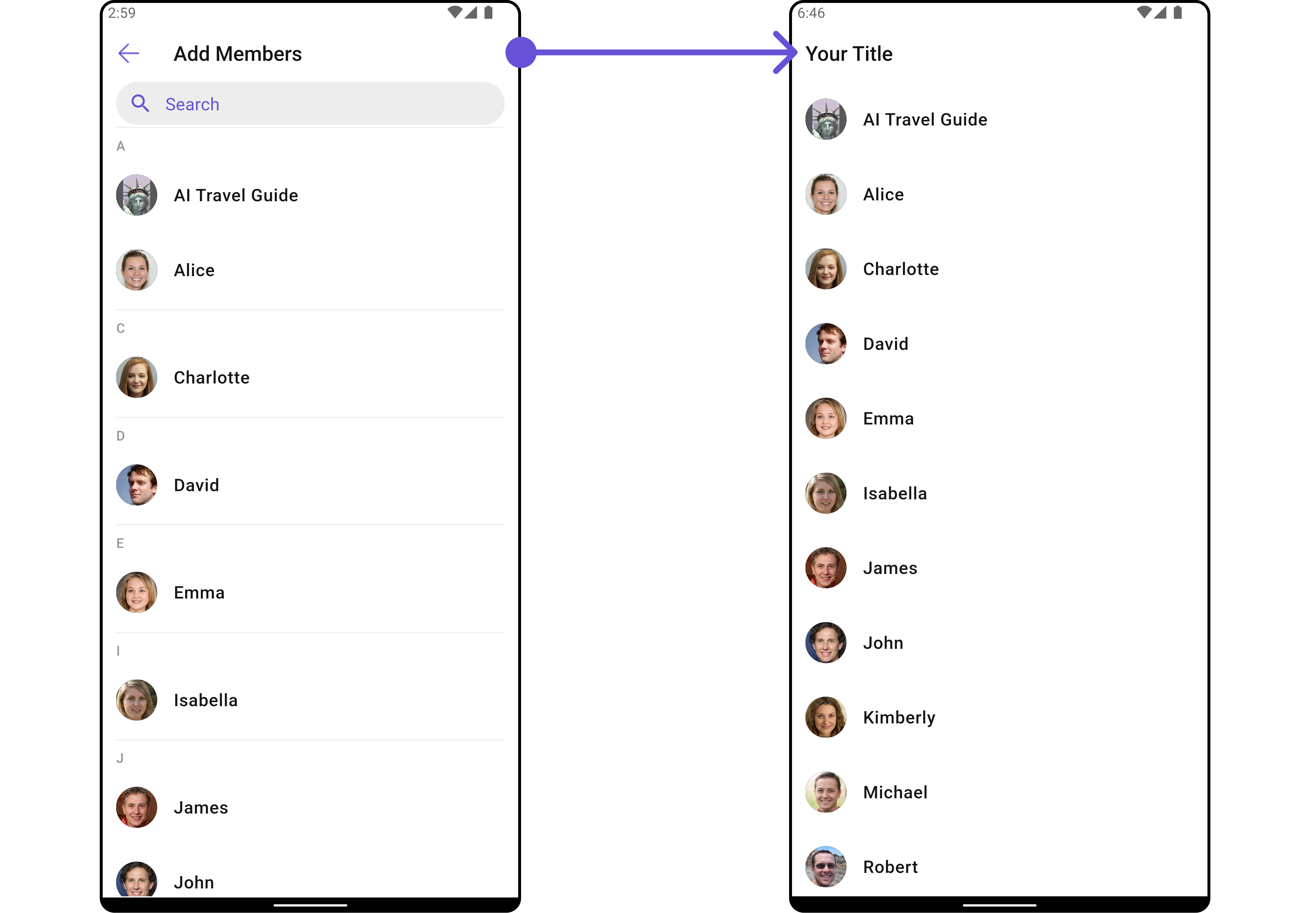
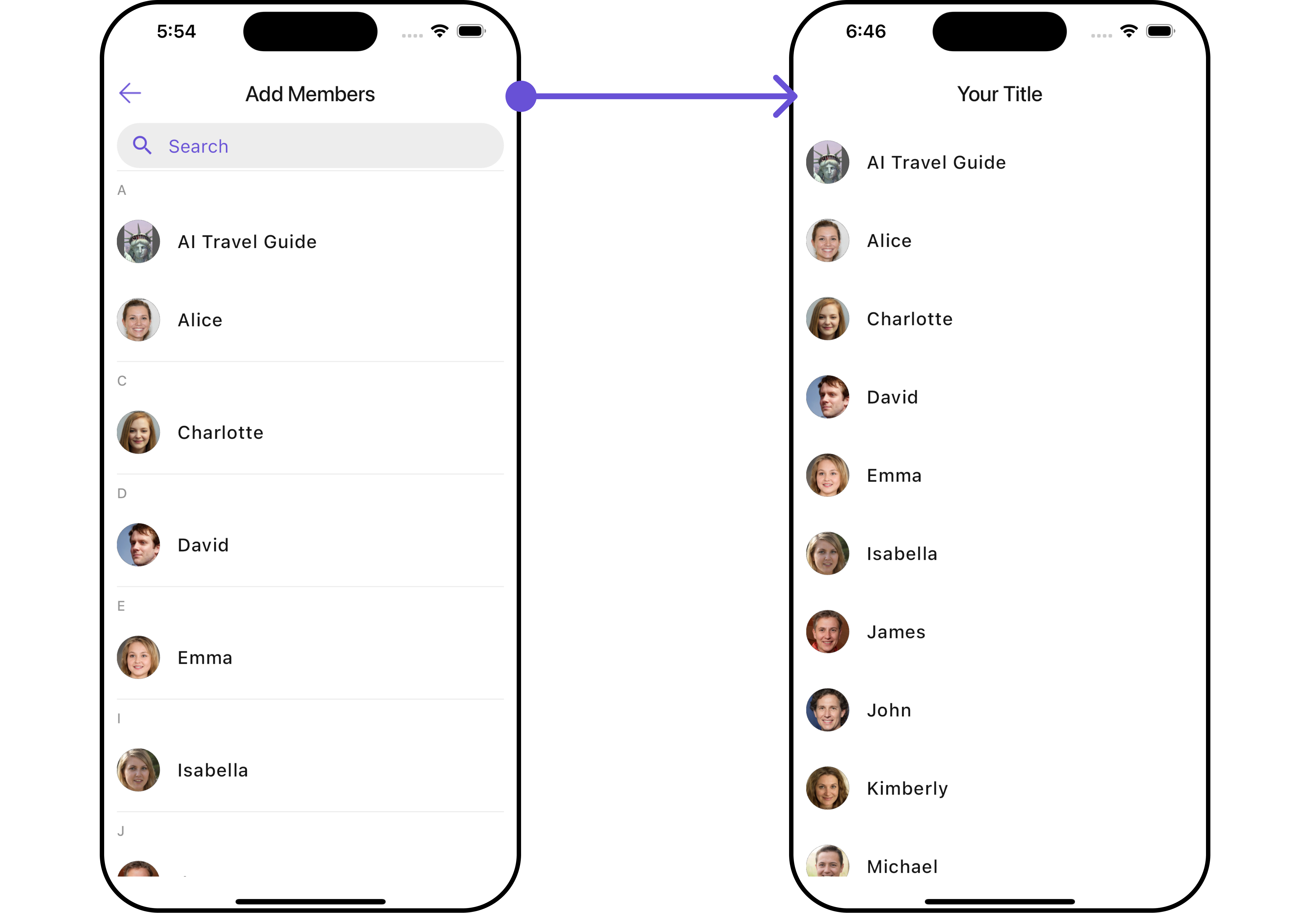 List of functionality exposed by `CometChatAddMembers`
| Property | Description | Code |
| -------------------------- | --------------------------------------------- | ----------------------------- |
| **Back Button** | Custom widget for the back button. | `backButton: Widget?` |
| **Disable Users Presence** | Option to disable displaying users' presence. | `disableUsersPresence: bool?` |
| **Empty State Text** | Text to display when there are no members. | `emptyStateText: String?` |
| **Error State Text** | Text to display when there is an error. | `errorStateText: String?` |
| **Hide Error** | Option to hide error messages. | `hideError: bool?` |
| **Hide Search** | Option to hide the search bar. | `hideSearch: bool` |
| **Hide Separator** | Option to hide item separators in the list. | `hideSeparator: bool?` |
| **Search Icon** | Custom widget for the search icon. | `searchIcon: Widget?` |
| **Search Placeholder** | Placeholder text for the search bar. | `searchPlaceholder: String?` |
| **Selection Icon** | Custom widget for the selection icon. | `selectionIcon: Widget?` |
| **Show Back Button** | Option to show or hide the back button. | `showBackButton: bool` |
| **Submit Icon** | Custom widget for the submit icon. | `submitIcon: Widget?` |
| **Title** | Title text for the widget. | `title: String?` |
***
### Advanced
For advanced-level customization, you can set custom views to the widget. This lets you tailor each aspect of the widget to fit your exact needs and application aesthetics. You can create and define your own widget and then incorporate those into the widget.
The `CometChatAddMembers` widget does not provide additional functionalities beyond this level of customization.
#### ListItemView
With this function, you can assign a custom ListItem to the `CometChatAddMembers` Widget.
```dart widget theme={null}
CometChatAddMembers(
group: Group(guid: "", name: "", type: ""), // A group object is required to launch this widget.
listItemView: (user) {
return Placeholder(); // Replace this placeholder with your custom widget.
},
)
```
Here is the complete example for reference:
**Example**
You can indeed create a custom widget named `custom_list_item.dart` for more complex or unique list items.
```dart custom_list_item.dart theme={null}
import 'package:flutter/material.dart';
import 'package:intl/intl.dart';
import '../helper/utils/custom_colors.dart';
class CustomListItems extends StatelessWidget {
final String name;
final DateTime? lastMessageTime;
final String? avatarUrl;
const CustomListItems({
super.key,
required this.name,
this.lastMessageTime,
this.avatarUrl,
});
String formatDateTime(DateTime dateTime) {
final now = DateTime.now();
final difference = now.difference(dateTime);
if (difference.inDays == 0) {
return DateFormat('HH:mm').format(dateTime);
} else if (difference.inDays == 1) {
return 'Yesterday';
} else {
return DateFormat('yyyy-MM-dd').format(dateTime);
}
}
@override
Widget build(BuildContext context) {
return Container(
margin: const EdgeInsets.only(top: 5, bottom: 5),
padding: const EdgeInsets.all(8.0),
decoration: BoxDecoration(
border: Border.all(color: Color(0xFF6851D6), width: 1), // Example border color
borderRadius: BorderRadius.circular(8.0),
color: Color(0xFFEEEEEE)
),
child: Row(
crossAxisAlignment: CrossAxisAlignment.center,
children: [
Expanded(
child: Column(
crossAxisAlignment: CrossAxisAlignment.start,
mainAxisAlignment: MainAxisAlignment.center,
children: [
Text(
name,
style: const TextStyle(
fontWeight: FontWeight.bold,
),
),
lastMessageTime == null ? Container() : Text(formatDateTime(lastMessageTime!)),
],
),
),
const SizedBox(width: 8.0),
if (avatarUrl != null)
ClipOval(
child: Image.network(
avatarUrl!,
width: 40.0,
height: 40.0,
fit: BoxFit.cover,
errorBuilder: (context, error, stackTrace) {
return const Icon(
Icons.person,
size: 40.0,
);
},
),
)
else
const Icon(
Icons.person,
size: 40.0,
),
],
),
);
}
}
```
```dart main.dart theme={null}
CometChatAddMembers(
group: Group(guid: "", name: "", type: ""), // A group object is required to launch this widget.
listItemView: (user) {
return CustomListItems(
name: user.name,
avatarUrl: user.avatar,
); // Replaced Placeholder with CustomListItems widget.
},
)
```
List of functionality exposed by `CometChatAddMembers`
| Property | Description | Code |
| -------------------------- | --------------------------------------------- | ----------------------------- |
| **Back Button** | Custom widget for the back button. | `backButton: Widget?` |
| **Disable Users Presence** | Option to disable displaying users' presence. | `disableUsersPresence: bool?` |
| **Empty State Text** | Text to display when there are no members. | `emptyStateText: String?` |
| **Error State Text** | Text to display when there is an error. | `errorStateText: String?` |
| **Hide Error** | Option to hide error messages. | `hideError: bool?` |
| **Hide Search** | Option to hide the search bar. | `hideSearch: bool` |
| **Hide Separator** | Option to hide item separators in the list. | `hideSeparator: bool?` |
| **Search Icon** | Custom widget for the search icon. | `searchIcon: Widget?` |
| **Search Placeholder** | Placeholder text for the search bar. | `searchPlaceholder: String?` |
| **Selection Icon** | Custom widget for the selection icon. | `selectionIcon: Widget?` |
| **Show Back Button** | Option to show or hide the back button. | `showBackButton: bool` |
| **Submit Icon** | Custom widget for the submit icon. | `submitIcon: Widget?` |
| **Title** | Title text for the widget. | `title: String?` |
***
### Advanced
For advanced-level customization, you can set custom views to the widget. This lets you tailor each aspect of the widget to fit your exact needs and application aesthetics. You can create and define your own widget and then incorporate those into the widget.
The `CometChatAddMembers` widget does not provide additional functionalities beyond this level of customization.
#### ListItemView
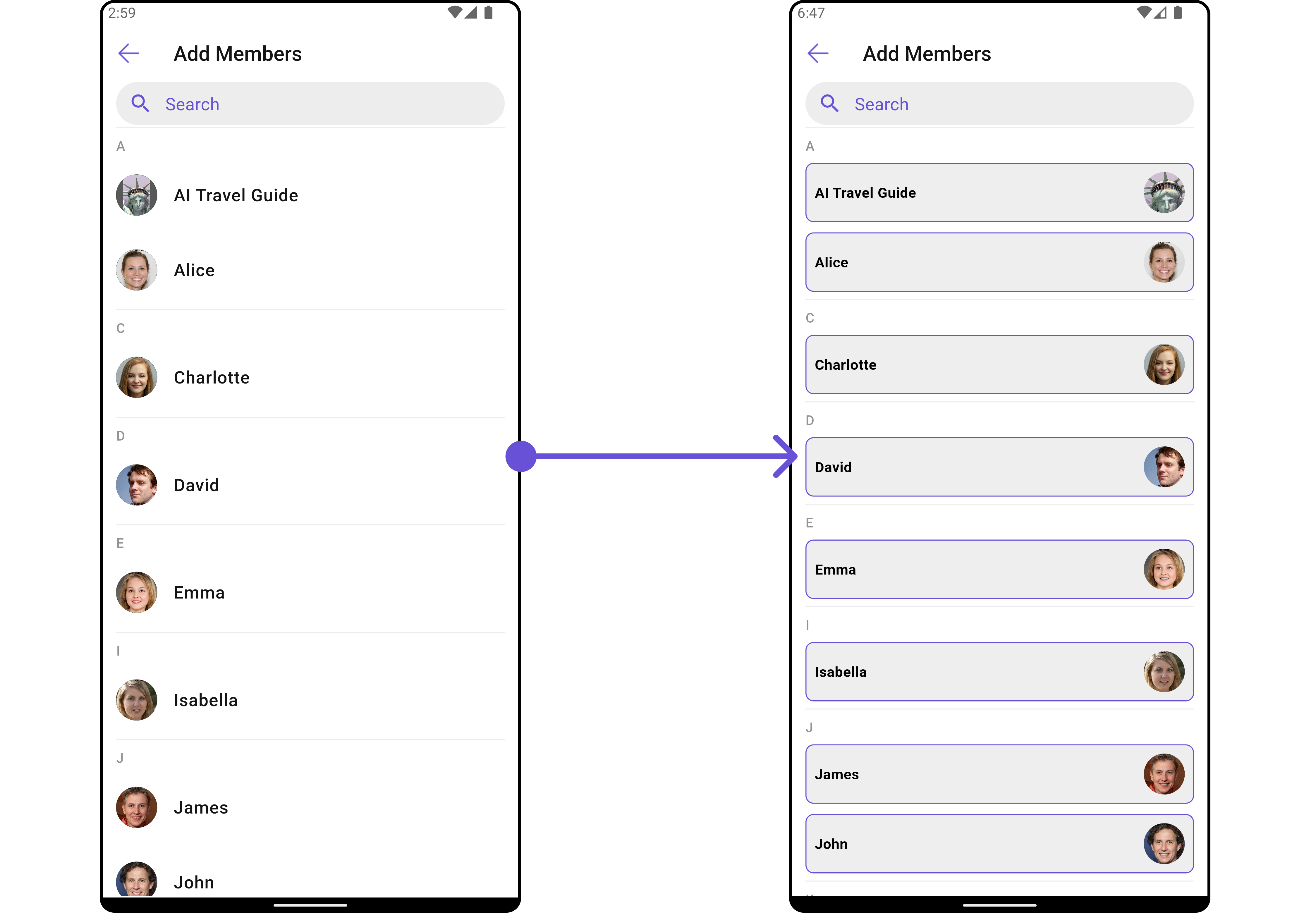
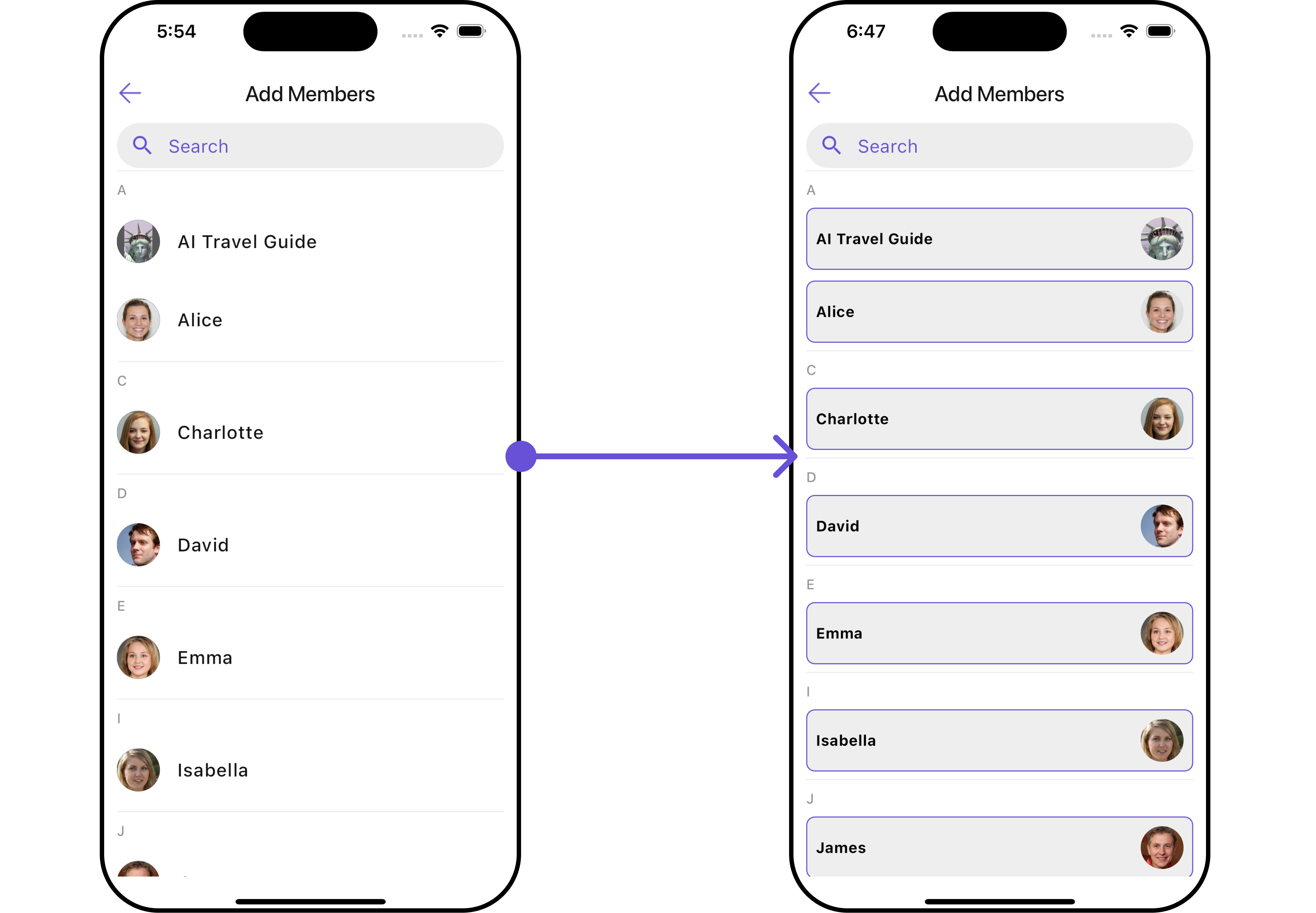
With this function, you can assign a custom ListItem to the `CometChatAddMembers` Widget.
```dart widget theme={null}
CometChatAddMembers(
group: Group(guid: "", name: "", type: ""), // A group object is required to launch this widget.
listItemView: (user) {
return Placeholder(); // Replace this placeholder with your custom widget.
},
)
```
Here is the complete example for reference:
**Example**
You can indeed create a custom widget named `custom_list_item.dart` for more complex or unique list items.
```dart custom_list_item.dart theme={null}
import 'package:flutter/material.dart';
import 'package:intl/intl.dart';
import '../helper/utils/custom_colors.dart';
class CustomListItems extends StatelessWidget {
final String name;
final DateTime? lastMessageTime;
final String? avatarUrl;
const CustomListItems({
super.key,
required this.name,
this.lastMessageTime,
this.avatarUrl,
});
String formatDateTime(DateTime dateTime) {
final now = DateTime.now();
final difference = now.difference(dateTime);
if (difference.inDays == 0) {
return DateFormat('HH:mm').format(dateTime);
} else if (difference.inDays == 1) {
return 'Yesterday';
} else {
return DateFormat('yyyy-MM-dd').format(dateTime);
}
}
@override
Widget build(BuildContext context) {
return Container(
margin: const EdgeInsets.only(top: 5, bottom: 5),
padding: const EdgeInsets.all(8.0),
decoration: BoxDecoration(
border: Border.all(color: Color(0xFF6851D6), width: 1), // Example border color
borderRadius: BorderRadius.circular(8.0),
color: Color(0xFFEEEEEE)
),
child: Row(
crossAxisAlignment: CrossAxisAlignment.center,
children: [
Expanded(
child: Column(
crossAxisAlignment: CrossAxisAlignment.start,
mainAxisAlignment: MainAxisAlignment.center,
children: [
Text(
name,
style: const TextStyle(
fontWeight: FontWeight.bold,
),
),
lastMessageTime == null ? Container() : Text(formatDateTime(lastMessageTime!)),
],
),
),
const SizedBox(width: 8.0),
if (avatarUrl != null)
ClipOval(
child: Image.network(
avatarUrl!,
width: 40.0,
height: 40.0,
fit: BoxFit.cover,
errorBuilder: (context, error, stackTrace) {
return const Icon(
Icons.person,
size: 40.0,
);
},
),
)
else
const Icon(
Icons.person,
size: 40.0,
),
],
),
);
}
}
```
```dart main.dart theme={null}
CometChatAddMembers(
group: Group(guid: "", name: "", type: ""), // A group object is required to launch this widget.
listItemView: (user) {
return CustomListItems(
name: user.name,
avatarUrl: user.avatar,
); // Replaced Placeholder with CustomListItems widget.
},
)
```
 ***
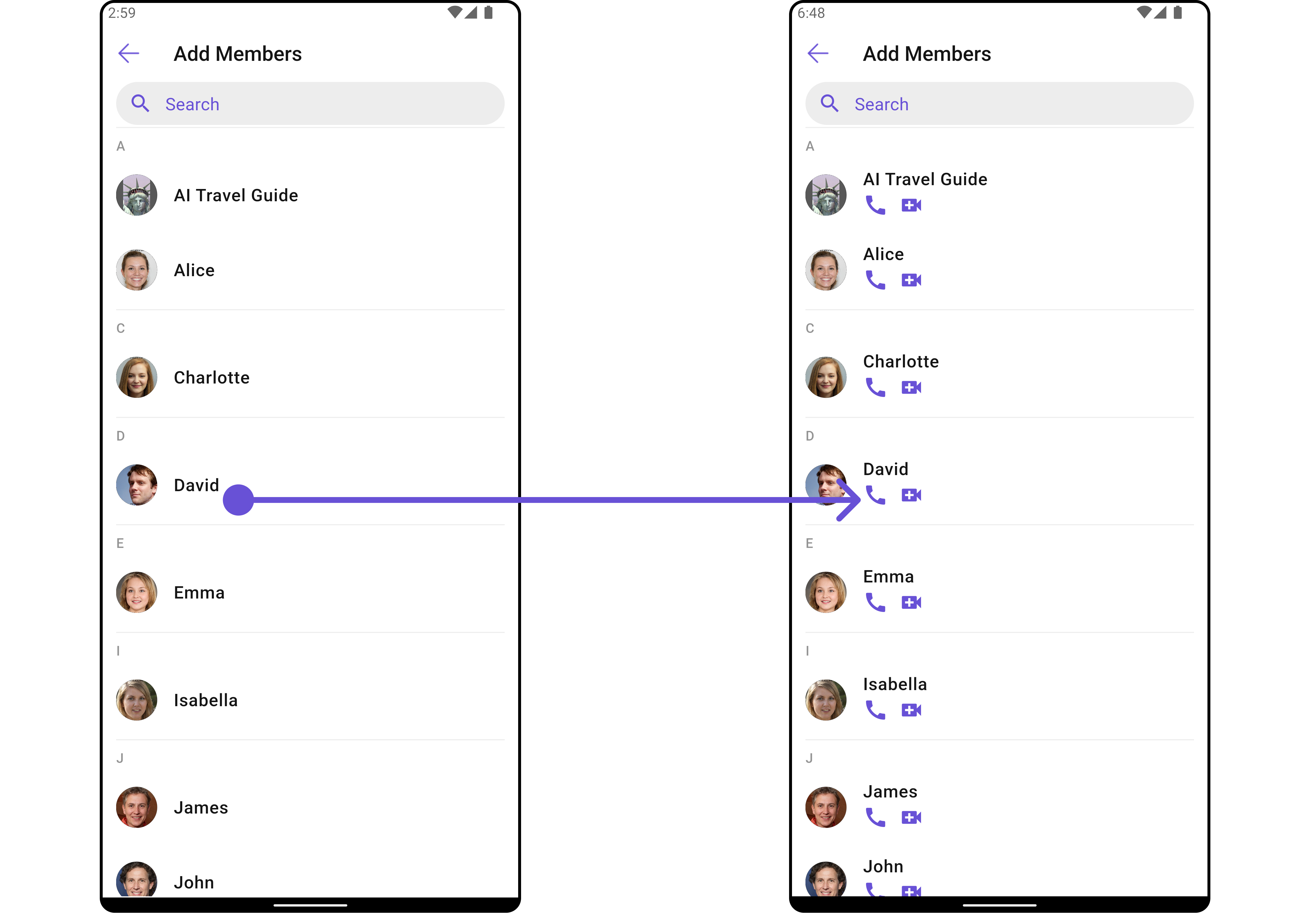
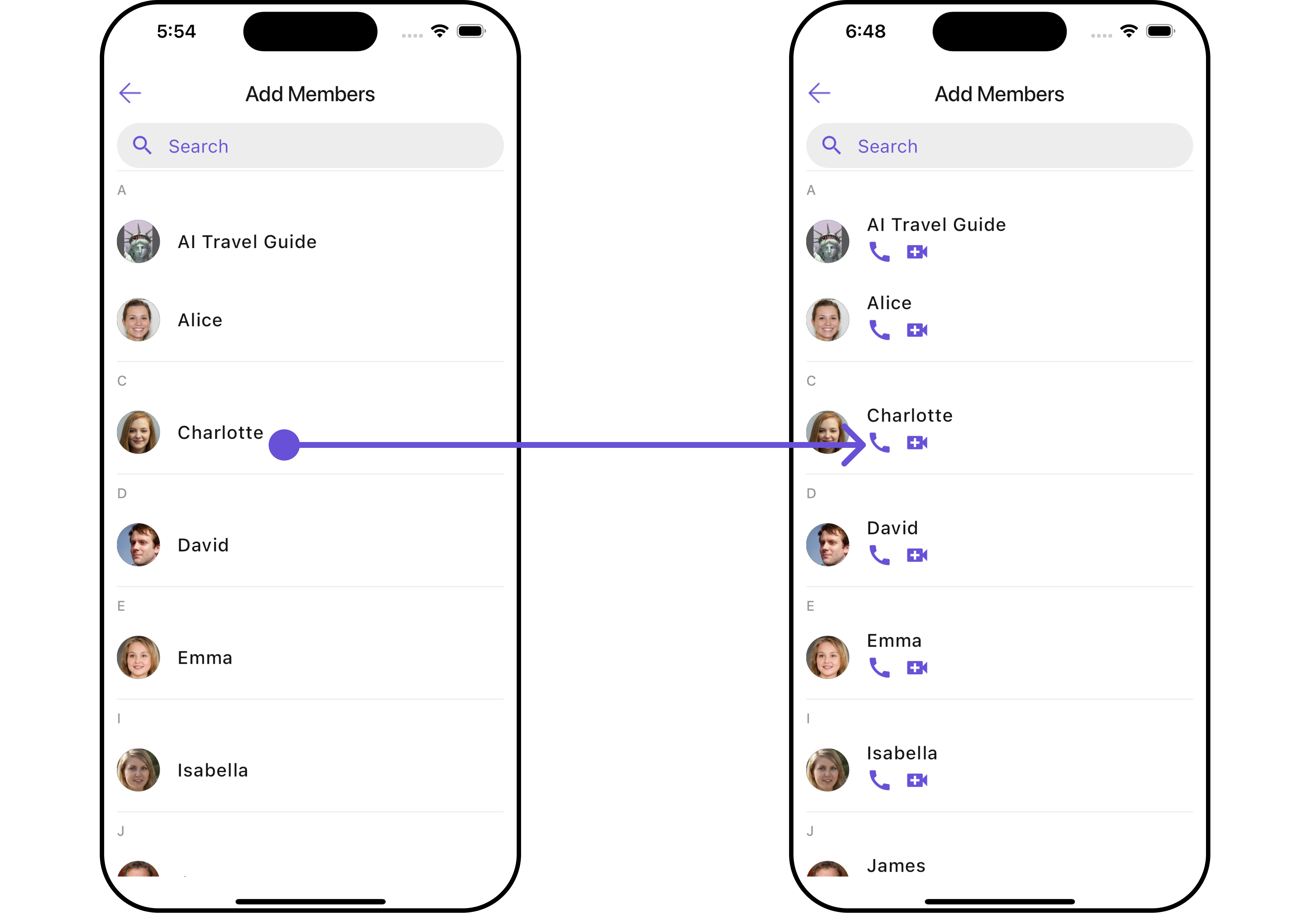
#### SubtitleView
You can customize the subtitle view for each item to meet your specific preferences and needs.
```dart widget theme={null}
CometChatAddMembers(
group: Group(guid: "", name: "", type: ""), // A group object is required to launch this widget.
subtitleView: (context, user) {
return Placeholder(); // Replace this placeholder with your custom widget.
},
)
```
Here is the complete example for reference:
**Example**
```dart main.dart theme={null}
CometChatAddMembers(
group: Group(guid: "", name: "", type: ""), // A group object is required to launch this widget.
subtitleView: (context, user) {
return const Row(
children: [
Icon(Icons.call, color: Color(0xFF6851D6), size: 25,),
SizedBox(width: 10),
Icon(Icons.video_call, color: Color(0xFF6851D6), size: 25,),
],
); // Replaced the placeholder with a custom widget.
},
)
```
***
#### SubtitleView
You can customize the subtitle view for each item to meet your specific preferences and needs.
```dart widget theme={null}
CometChatAddMembers(
group: Group(guid: "", name: "", type: ""), // A group object is required to launch this widget.
subtitleView: (context, user) {
return Placeholder(); // Replace this placeholder with your custom widget.
},
)
```
Here is the complete example for reference:
**Example**
```dart main.dart theme={null}
CometChatAddMembers(
group: Group(guid: "", name: "", type: ""), // A group object is required to launch this widget.
subtitleView: (context, user) {
return const Row(
children: [
Icon(Icons.call, color: Color(0xFF6851D6), size: 25,),
SizedBox(width: 10),
Icon(Icons.video_call, color: Color(0xFF6851D6), size: 25,),
],
); // Replaced the placeholder with a custom widget.
},
)
```
 ***
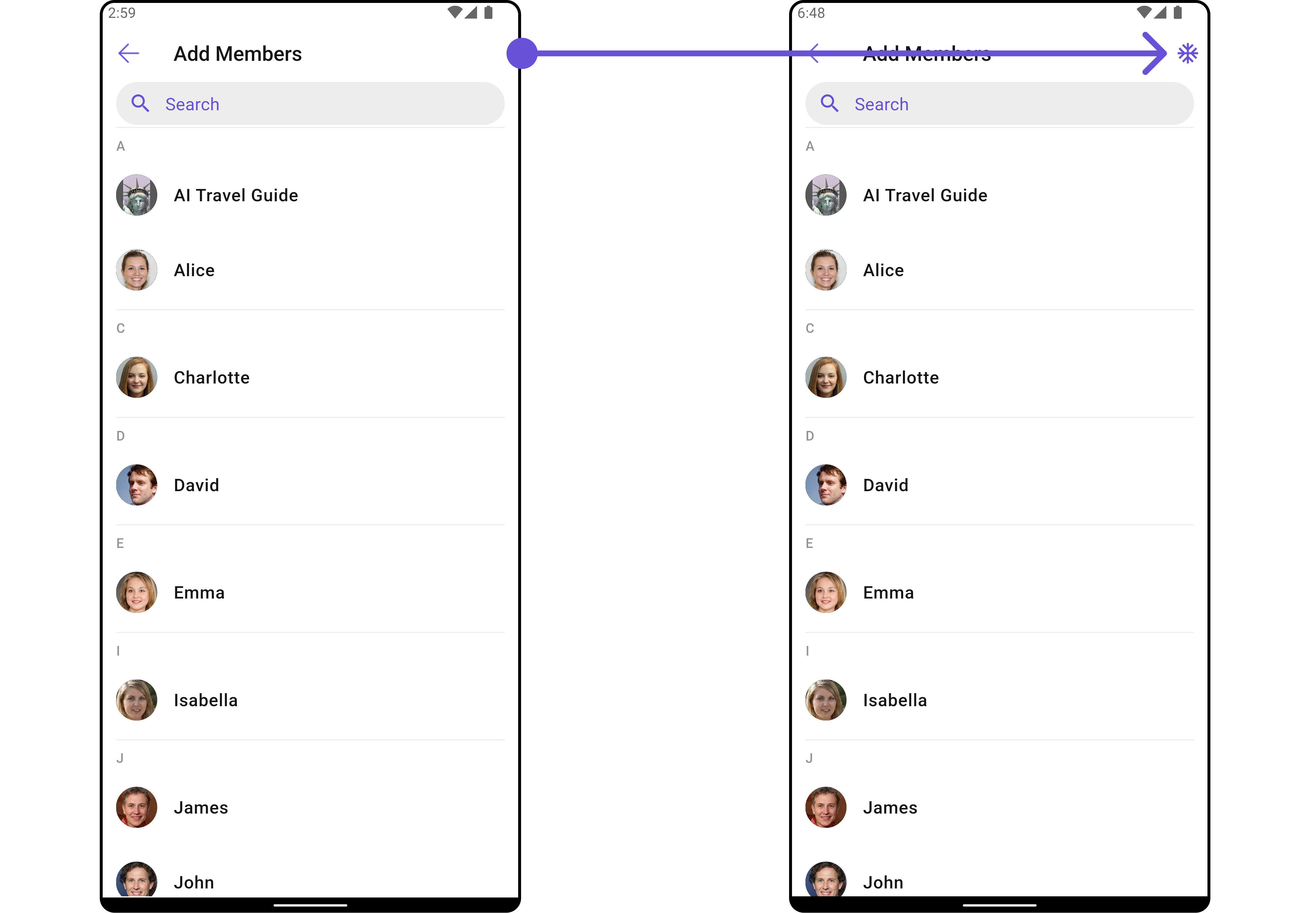
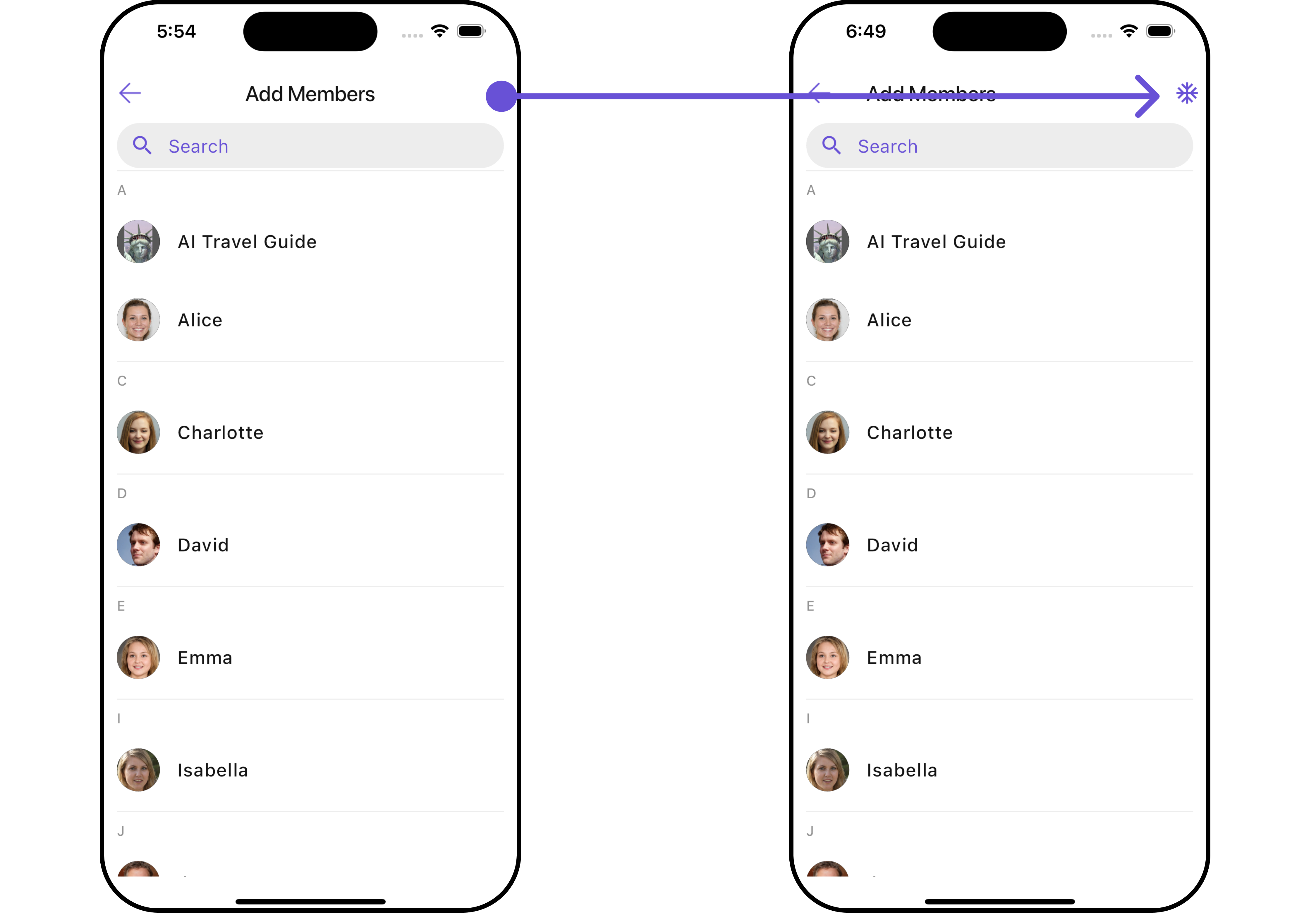
#### AppBarOptions
You can set the Custom `appBarOptions` to the `CometChatAddMembers` widget.
```dart widget theme={null}
CometChatAddMembers(
group: Group(guid: "", name: "", type: ""), // A group object is required to launch this widget.
appBarOptions: (context) {
return [
Placeholder(),
Placeholder(),
Placeholder()
] // Replace this list of placeholder widgets with your list of custom widgets.
},
)
```
Here is the complete example for reference:
**Example**
```dart theme={null}
CometChatAddMembers(
group: Group(guid: "", name: "", type: ""), // A group object is required to launch this widget.
appBarOptions: (context) {
return [
InkWell(
onTap: () {
// TODO("Not yet implemented")
},
child: const Icon(Icons.ac_unit, color: Color(0xFF6851D6)),
),
const SizedBox(width: 10)
]; // Replaced the list of placeholder widgets with a list of custom widgets.
},
)
```
***
#### AppBarOptions
You can set the Custom `appBarOptions` to the `CometChatAddMembers` widget.
```dart widget theme={null}
CometChatAddMembers(
group: Group(guid: "", name: "", type: ""), // A group object is required to launch this widget.
appBarOptions: (context) {
return [
Placeholder(),
Placeholder(),
Placeholder()
] // Replace this list of placeholder widgets with your list of custom widgets.
},
)
```
Here is the complete example for reference:
**Example**
```dart theme={null}
CometChatAddMembers(
group: Group(guid: "", name: "", type: ""), // A group object is required to launch this widget.
appBarOptions: (context) {
return [
InkWell(
onTap: () {
// TODO("Not yet implemented")
},
child: const Icon(Icons.ac_unit, color: Color(0xFF6851D6)),
),
const SizedBox(width: 10)
]; // Replaced the list of placeholder widgets with a list of custom widgets.
},
)
```
 ***
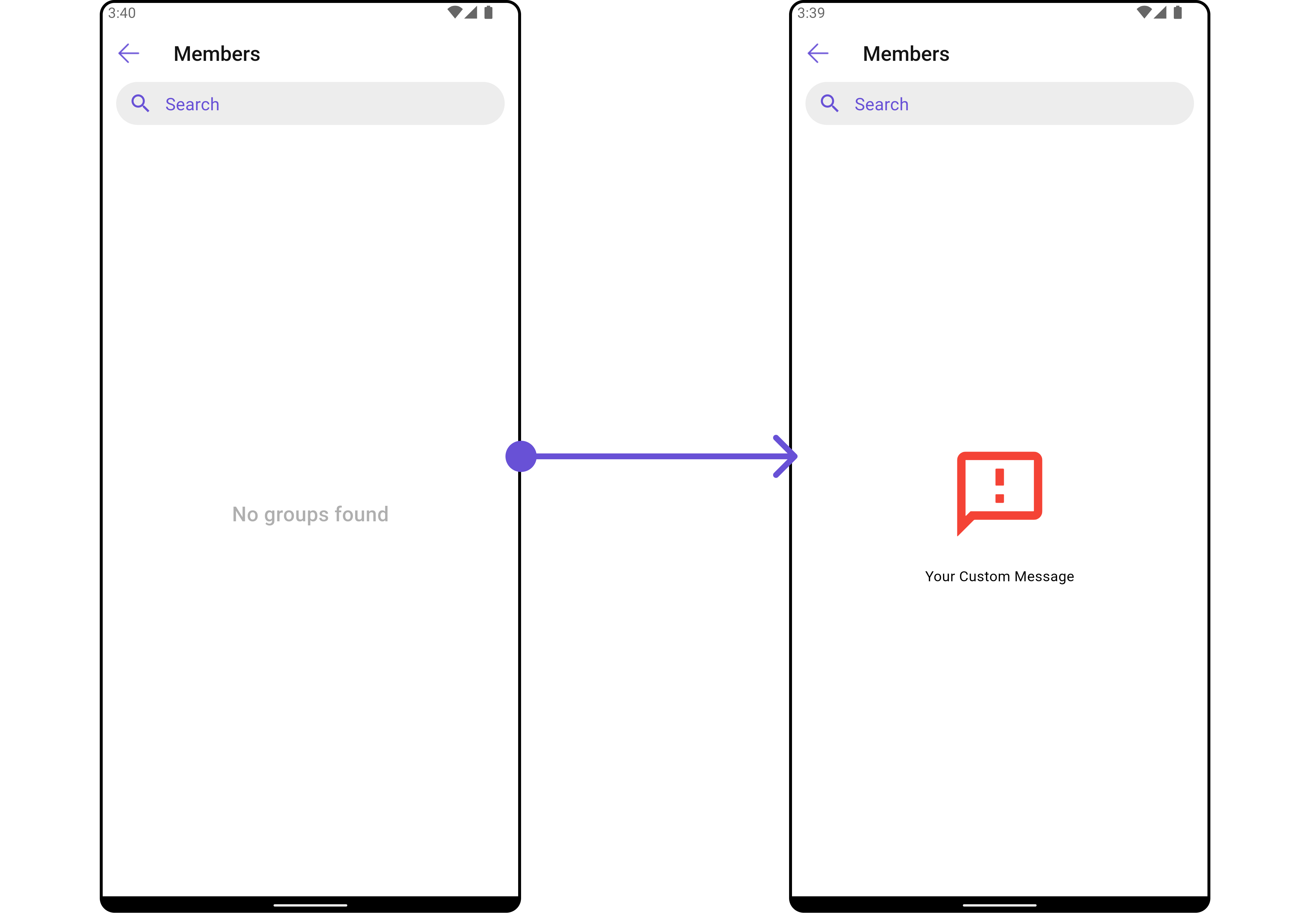
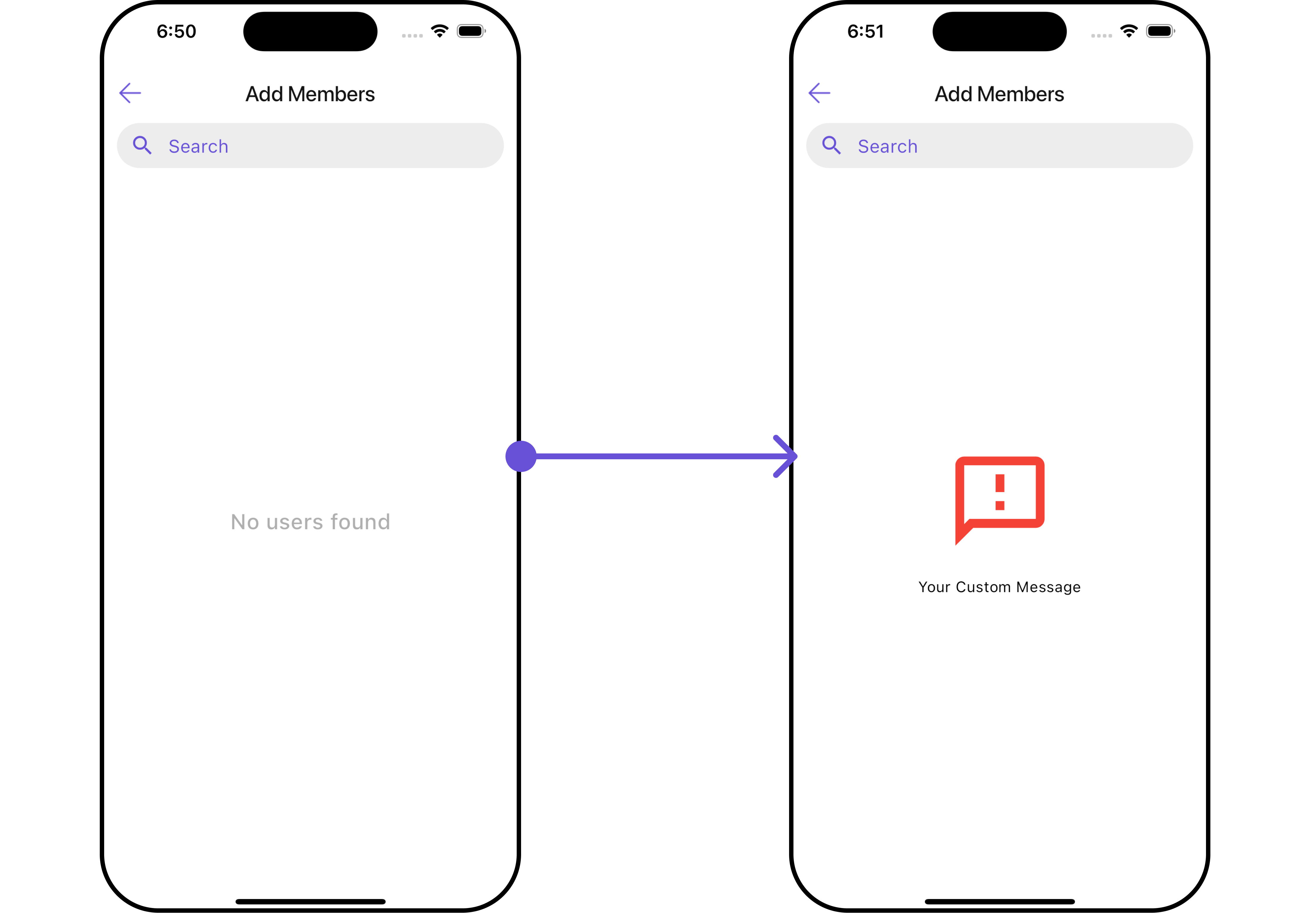
#### EmptyStateView
You can set a custom `EmptyStateView` using `emptyStateView` to match the error widget of your app.
```dart widget theme={null}
CometChatAddMembers(
group: Group(guid: "", name: "", type: ""), // A group object is required to launch this widget.
emptyStateView: (context) {
return Placeholder(); // Replace this placeholder with your custom widget.
},
)
```
Here is the complete example for reference:
**Example**
```dart main.dart theme={null}
CometChatAddMembers(
group: Group(guid: "", name: "", type: ""), // A group object is required to launch this widget.
emptyStateView: (context) {
return Container(
width: MediaQuery.of(context).size.width,
child: Center(
child: const Column(
crossAxisAlignment: CrossAxisAlignment.center,
mainAxisAlignment: MainAxisAlignment.center,
children: [
Spacer(),
Icon(Icons.sms_failed_outlined, color: Colors.red, size: 100,),
SizedBox(height: 20,),
Text("Your Custom Message"),
Spacer(),
],
)
),
); // Replaced the placeholder with a custom widget.
},
)
```
***
#### EmptyStateView
You can set a custom `EmptyStateView` using `emptyStateView` to match the error widget of your app.
```dart widget theme={null}
CometChatAddMembers(
group: Group(guid: "", name: "", type: ""), // A group object is required to launch this widget.
emptyStateView: (context) {
return Placeholder(); // Replace this placeholder with your custom widget.
},
)
```
Here is the complete example for reference:
**Example**
```dart main.dart theme={null}
CometChatAddMembers(
group: Group(guid: "", name: "", type: ""), // A group object is required to launch this widget.
emptyStateView: (context) {
return Container(
width: MediaQuery.of(context).size.width,
child: Center(
child: const Column(
crossAxisAlignment: CrossAxisAlignment.center,
mainAxisAlignment: MainAxisAlignment.center,
children: [
Spacer(),
Icon(Icons.sms_failed_outlined, color: Colors.red, size: 100,),
SizedBox(height: 20,),
Text("Your Custom Message"),
Spacer(),
],
)
),
); // Replaced the placeholder with a custom widget.
},
)
```
 ***
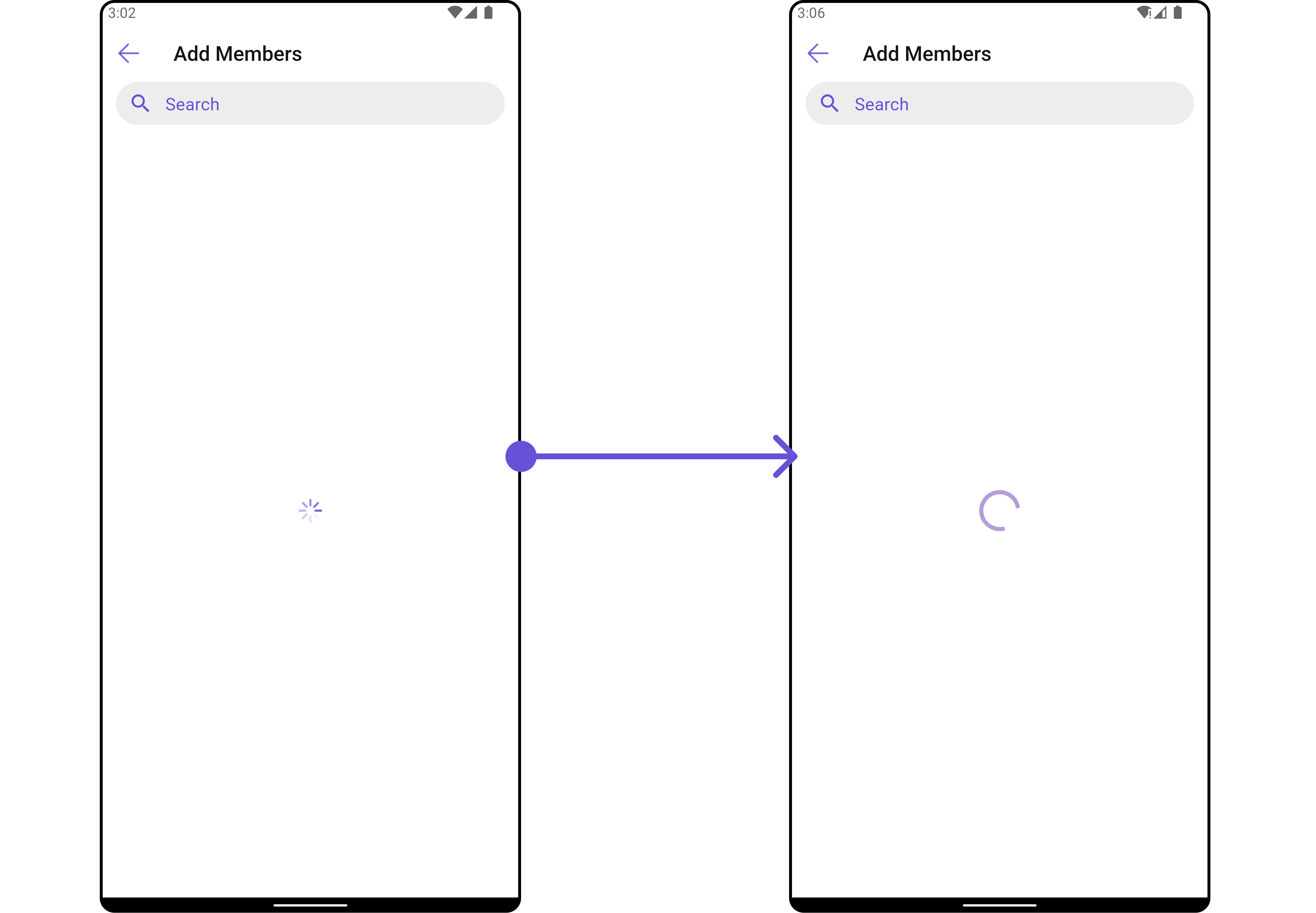
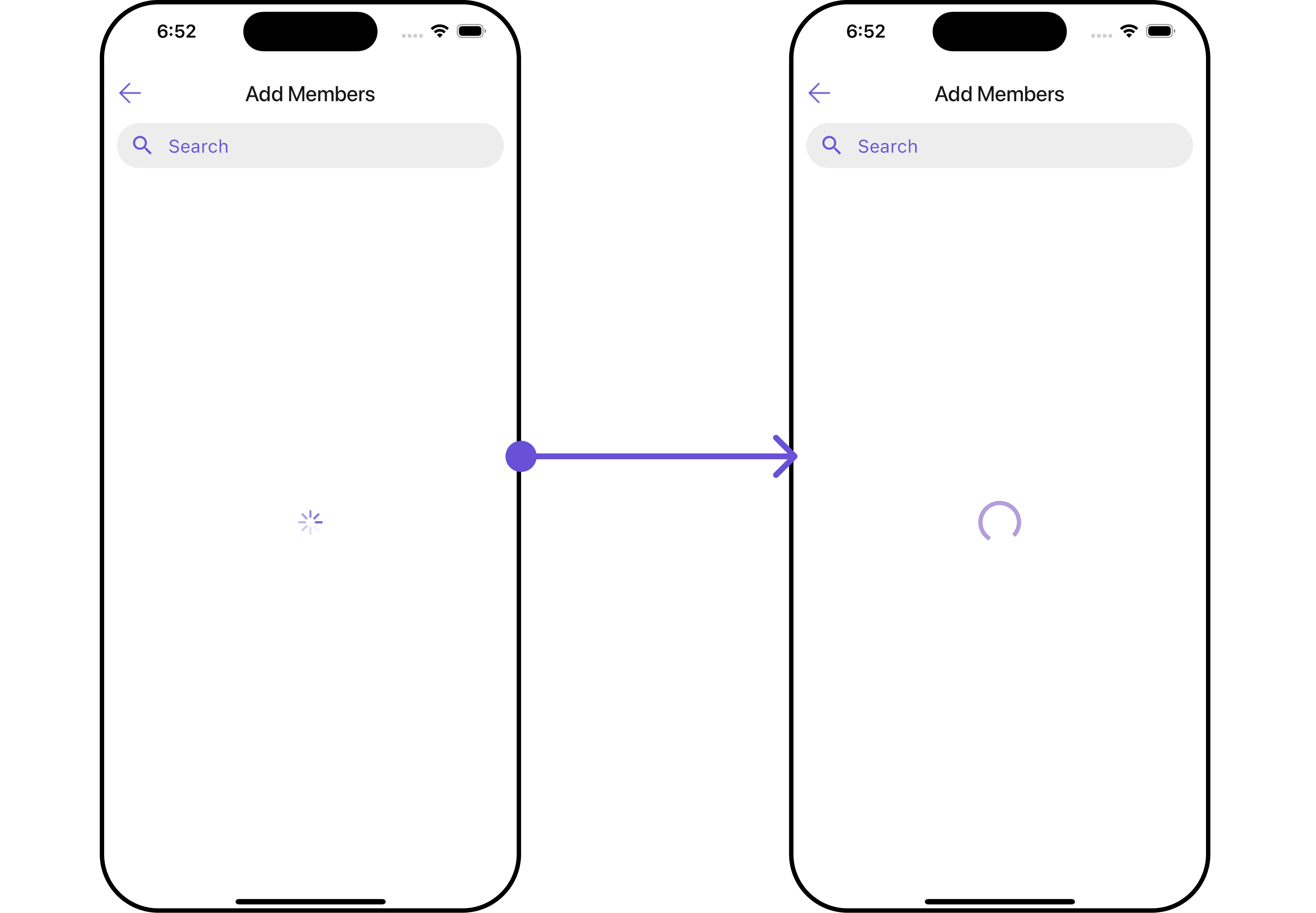
#### LoadingStateView
You can set a custom loader widget using `loadingStateView` to match the loading UI of your app.
```dart widget theme={null}
CometChatAddMembers(
group: Group(guid: "", name: "", type: ""), // A group object is required to launch this widget.
loadingStateView: (context) {
return Placeholder(); // Replace this placeholder with your custom widget.
},
)
```
Here is the complete example for reference:
**Example**
```dart main.dart theme={null}
CometChatAddMembers(
group: Group(guid: "", name: "", type: ""), // A group object is required to launch this widget.
loadingStateView: (context) {
return Container(
width: MediaQuery.of(context).size.width,
child: Center(
child: CircularProgressIndicator()
),
); // Replaced the placeholder with a custom widget.
},
)
```
***
#### LoadingStateView
You can set a custom loader widget using `loadingStateView` to match the loading UI of your app.
```dart widget theme={null}
CometChatAddMembers(
group: Group(guid: "", name: "", type: ""), // A group object is required to launch this widget.
loadingStateView: (context) {
return Placeholder(); // Replace this placeholder with your custom widget.
},
)
```
Here is the complete example for reference:
**Example**
```dart main.dart theme={null}
CometChatAddMembers(
group: Group(guid: "", name: "", type: ""), // A group object is required to launch this widget.
loadingStateView: (context) {
return Container(
width: MediaQuery.of(context).size.width,
child: Center(
child: CircularProgressIndicator()
),
); // Replaced the placeholder with a custom widget.
},
)
```
 ***
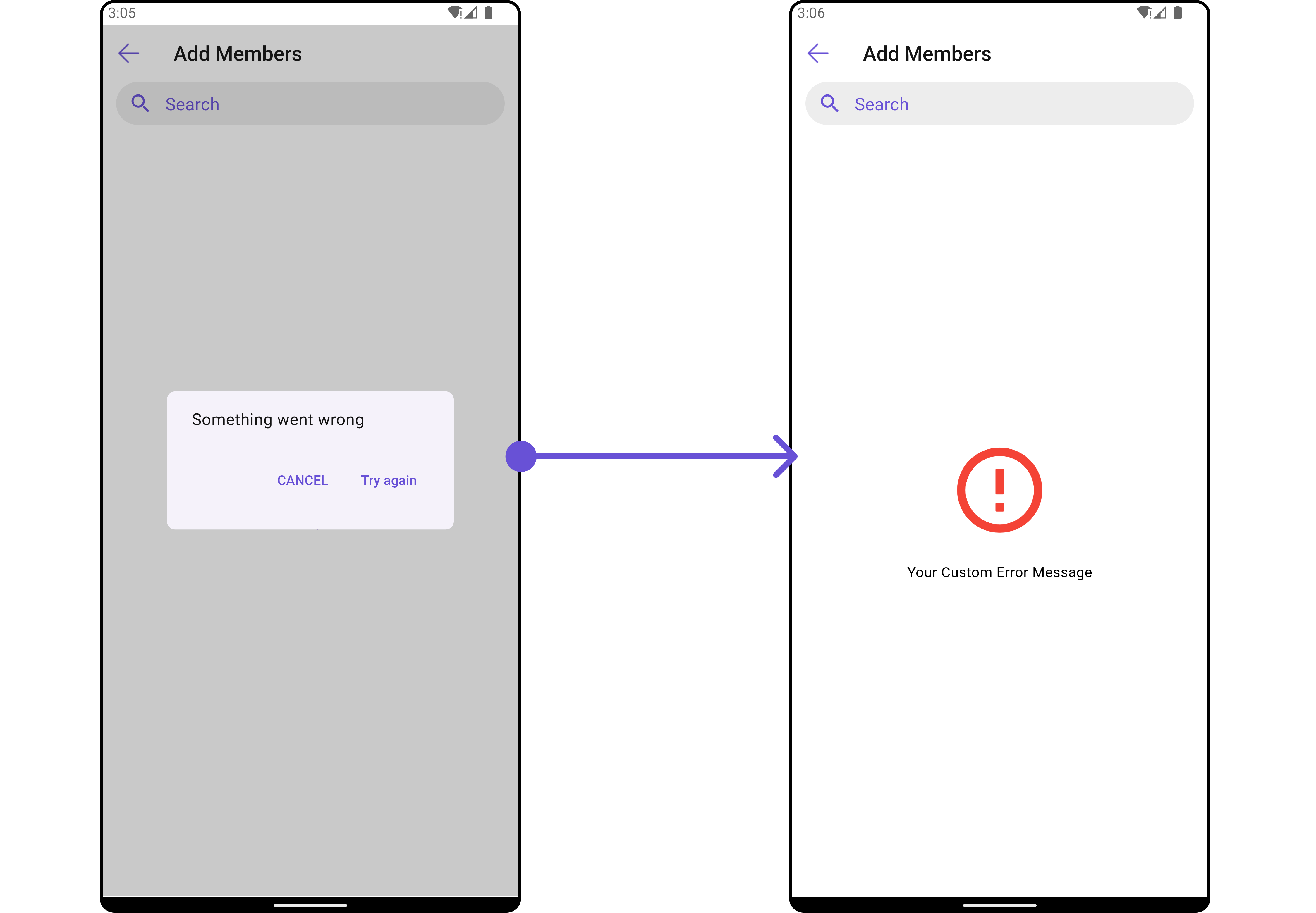
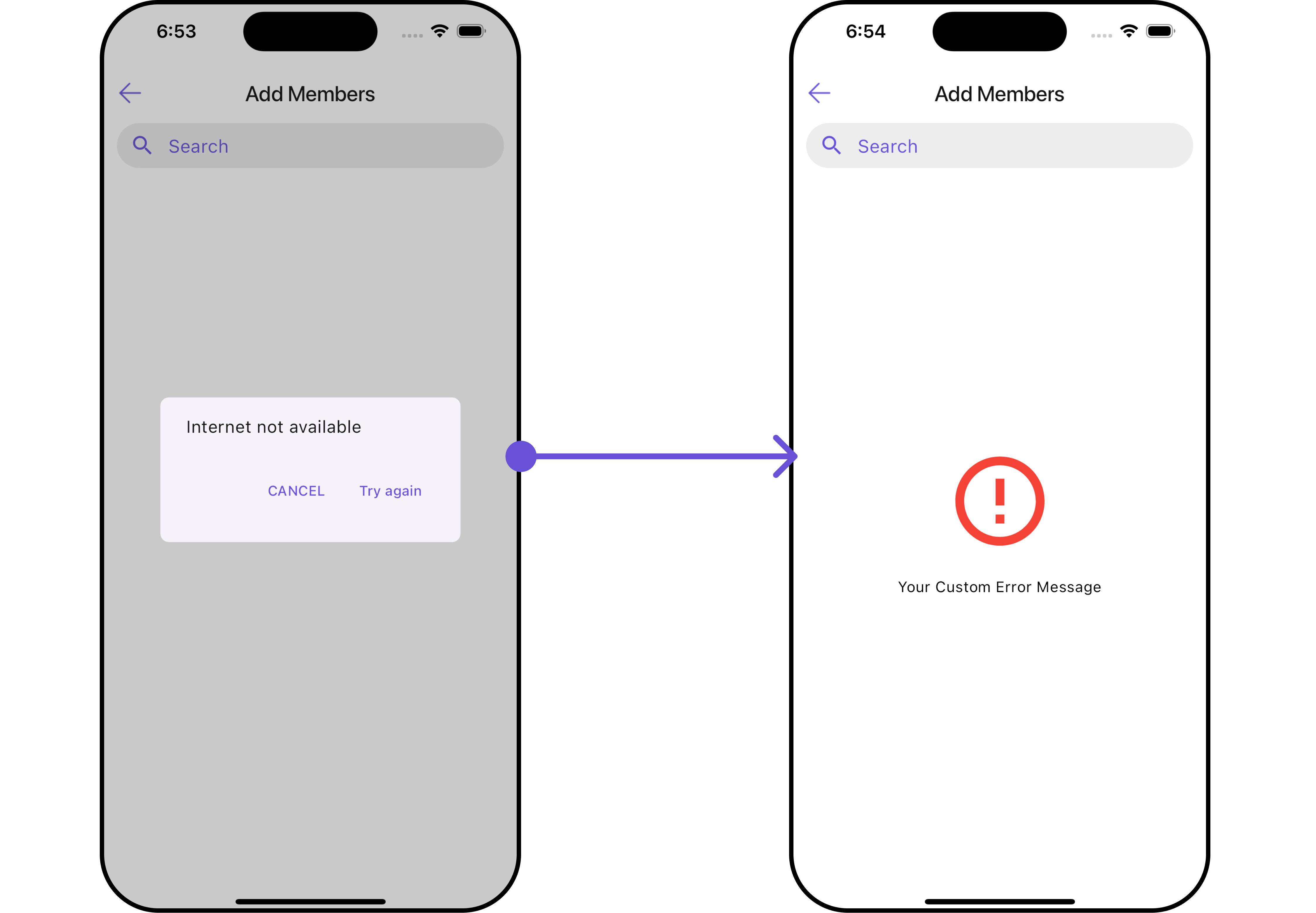
#### ErrorStateView
You can set a custom `ErrorStateView` using `errorStateView` to match the error UI of your app.
```dart widget theme={null}
CometChatAddMembers(
group: Group(guid: "", name: "", type: ""), // A group object is required to launch this widget.
errorStateView: (context) {
return Placeholder(); // Replace this placeholder with your custom widget.
},
)
```
Here is the complete example for reference:
**Example**
```dart main.dart theme={null}
CometChatAddMembers(
group: Group(guid: "", name: "", type: ""), // A group object is required to launch this widget.
errorStateView: (context) {
return Container(
width: MediaQuery.of(context).size.width,
child: Center(
child: const Column(
crossAxisAlignment: CrossAxisAlignment.center,
mainAxisAlignment: MainAxisAlignment.center,
children: [
Spacer(),
Icon(Icons.error_outline, color: Colors.red, size: 100,),
SizedBox(height: 20,),
Text("Your Custom Error Message"),
Spacer(),
],
),
),
); // Replaced the placeholder with a custom widget.
},
)
```
***
#### ErrorStateView
You can set a custom `ErrorStateView` using `errorStateView` to match the error UI of your app.
```dart widget theme={null}
CometChatAddMembers(
group: Group(guid: "", name: "", type: ""), // A group object is required to launch this widget.
errorStateView: (context) {
return Placeholder(); // Replace this placeholder with your custom widget.
},
)
```
Here is the complete example for reference:
**Example**
```dart main.dart theme={null}
CometChatAddMembers(
group: Group(guid: "", name: "", type: ""), // A group object is required to launch this widget.
errorStateView: (context) {
return Container(
width: MediaQuery.of(context).size.width,
child: Center(
child: const Column(
crossAxisAlignment: CrossAxisAlignment.center,
mainAxisAlignment: MainAxisAlignment.center,
children: [
Spacer(),
Icon(Icons.error_outline, color: Colors.red, size: 100,),
SizedBox(height: 20,),
Text("Your Custom Error Message"),
Spacer(),
],
),
),
); // Replaced the placeholder with a custom widget.
},
)
```
 ***
***