> ## Documentation Index
> Fetch the complete documentation index at: https://cometchat-22654f5b-docs-platform-docs-release.mintlify.site/llms.txt
> Use this file to discover all available pages before exploring further.
# AI Assistant Chat History
> Displays the conversation history between users and an AI assistant for easy review of past interactions.
```json theme={null}
{
"component": "CometChatAIAssistantChatHistory",
"package": "com.cometchat.chatuikit.aiassistantchathistory",
"xmlElement": "",
"description": "Displays the conversation history between users and an AI assistant for easy review of past interactions.",
"primaryOutput": {
"method": "setOnItemClickListener",
"type": "OnItemClickListener"
},
"methods": {
"data": {
"setUser": {
"type": "User",
"required": true,
"note": "User must have role set to @agentic"
}
},
"callbacks": {
"setOnItemClickListener": "OnItemClickListener",
"setOnItemLongClickListener": "OnItemLongClickListener",
"setOnNewChatClickListener": "OnClick",
"setOnCloseClickListener": "OnClick"
},
"visibility": {
"setErrorStateVisibility": { "type": "int (View.VISIBLE | View.GONE)", "default": "View.VISIBLE" },
"setEmptyStateVisibility": { "type": "int (View.VISIBLE | View.GONE)", "default": "View.VISIBLE" }
},
"style": {
"setStyle": {
"type": "@StyleRes int",
"parent": "CometChatAIAssistantChatHistoryStyle"
}
}
},
"events": [],
"sdkListeners": []
}
```
## Quick Start
1. Open your layout XML file.
2. Add the `CometChatAIAssistantChatHistory` XML element:
```xml lines theme={null}
```
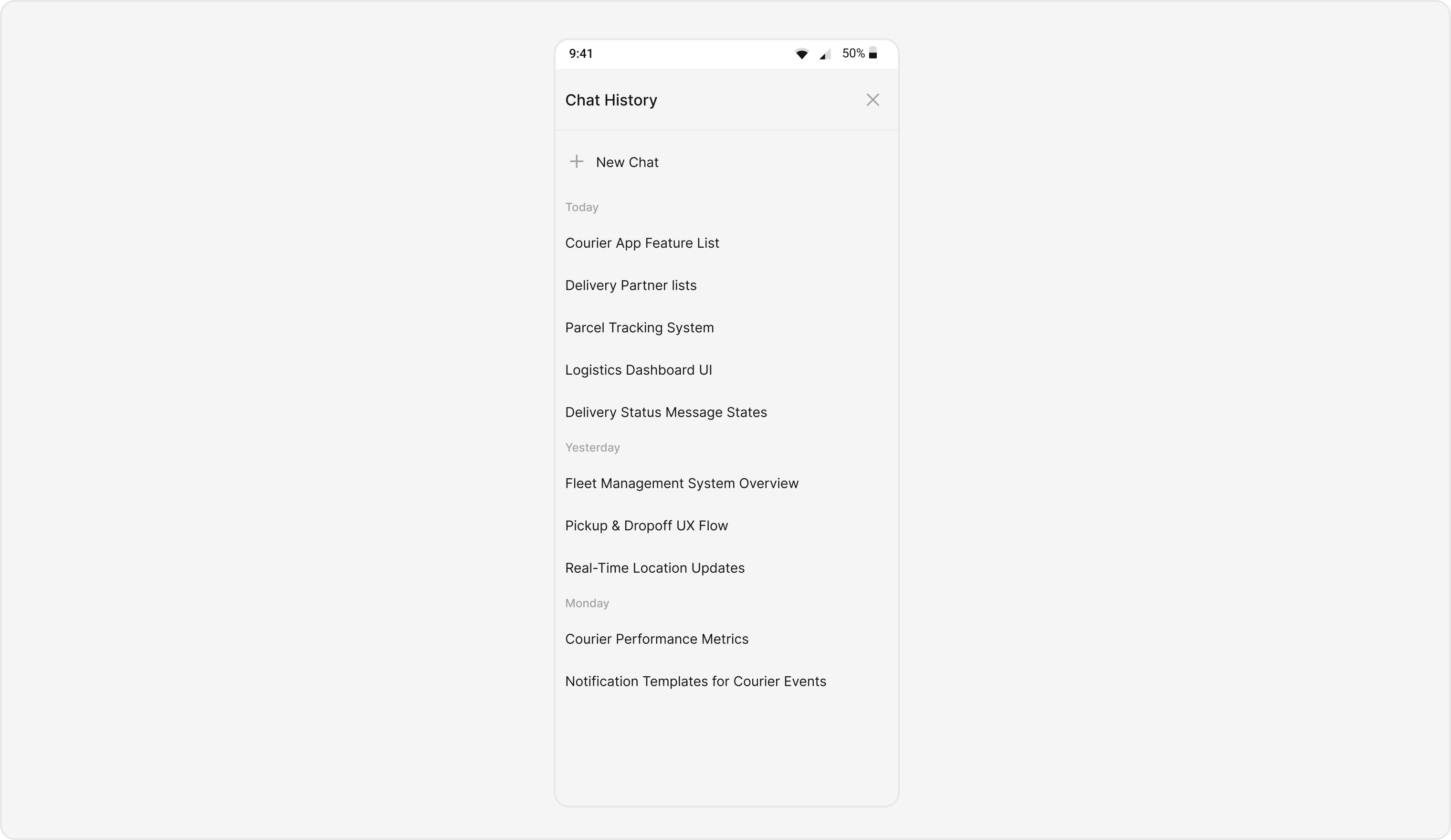
> **What this does:** Adds the `CometChatAIAssistantChatHistory` component to your layout. It fills the available width and height and renders the AI assistant chat history list.
3. In your Activity or Fragment, create a `User` object with the role set to `@agentic` and pass it to the component:
```java lines theme={null}
User user = new User();
user.setUid("userId");
user.setName("User Name");
user.setRole("@agentic"); // User role must be @agentic to use AI Assistant features
binding.cometChatAiAssistantChatHistory.setUser(user);
```
```kotlin lines theme={null}
val user = User()
user.uid = "userId"
user.name = "User Name"
user.role = "@agentic" // User role must be @agentic to use AI Assistant features
binding.cometChatAiAssistantChatHistory.setUser(user)
```
> **What this does:** Creates a `User` object with the `@agentic` role and sets it on the `CometChatAIAssistantChatHistory` component. This is required for the component to fetch and display the AI assistant chat histories for that user.
4. Build and run your app.
5. Verify that the AI assistant chat history list appears with past conversation items.
 ## Core Concepts
* **`CometChatAIAssistantChatHistory`**: The main component class that renders the AI assistant chat history list. It is a Composite Component that can be launched via button clicks or any user-triggered action.
* **Actions**: Callbacks such as `setOnItemClickListener`, `setOnItemLongClickListener`, `setOnNewChatClickListener`, and `setOnCloseClickListener` that let you respond to user interactions.
* **Style**: XML theme styles applied via `setStyle()` to customize colors, fonts, and visual appearance of the chat history.
* **Functionality**: Methods like `setUser`, `setErrorStateVisibility`, and `setEmptyStateVisibility` that configure the component's behavior and state visibility.
## Actions and Events
### Callback Methods
What you're changing: How the component responds to user interactions such as taps, long-presses, new chat clicks, and close clicks.
* **Where**: Activity or Fragment where you hold a reference to `CometChatAIAssistantChatHistory`.
* **Applies to**: `CometChatAIAssistantChatHistory`.
* **Default behavior**: Predefined actions execute automatically when the user interacts with the component.
* **Override**: Call the corresponding setter method to replace the default behavior with your own logic.
#### `setOnItemClickListener`
Function invoked when a chat history item is clicked, used to open an AI assistant chat screen.
```java YourActivity.java lines theme={null}
binding.cometchatAiAssistantChatHistory.setOnItemClickListener((view, position, message) -> {
});
```
```kotlin YourActivity.kt lines theme={null}
binding.cometchatAiAssistantChatHistory.setOnItemClickListener { view, position, message ->
}
```
> **What this does:** Replaces the default item-click behavior. When a user taps a chat history item, your custom lambda executes instead of the built-in navigation.
#### `setOnItemLongClickListener`
Function executed when a chat history item is long-pressed, allowing additional actions like delete or block.
```java YourActivity.java lines theme={null}
binding.cometchatAiAssistantChatHistory.setOnItemLongClickListener((view, position, message) -> {
});
```
```kotlin YourActivity.kt lines theme={null}
binding.cometchatAiAssistantChatHistory.setOnItemLongClickListener { view, position, message ->
}
```
> **What this does:** Replaces the default long-press behavior. When a user long-presses a chat history item, your custom lambda executes.
#### `setOnNewChatClickListener`
Function triggered when the new chat button is clicked, used to start a new conversation with the AI assistant.
```java YourActivity.java lines theme={null}
binding.cometchatAiAssistantChatHistory.setOnNewChatClickListener(() -> {
});
```
```kotlin YourActivity.kt lines theme={null}
binding.cometchatAiAssistantChatHistory.setOnNewChatClickListener {
}
```
> **What this does:** Replaces the default new-chat-click behavior. When the user taps the new chat button, your custom logic runs instead of the built-in action.
#### `setOnCloseClickListener`
Function activated when the close button is clicked, used to exit the chat history view.
```java YourActivity.java lines theme={null}
binding.cometchatAiAssistantChatHistory.setOnCloseClickListener(() -> {
});
```
```kotlin YourActivity.kt lines theme={null}
binding.cometchatAiAssistantChatHistory.setOnCloseClickListener {
}
```
> **What this does:** Replaces the default close-click behavior. When the user taps the close button, your custom logic runs instead of the built-in exit action.
* **Verify**: After setting an action callback, trigger the corresponding user interaction (tap, long-press, new chat, close) and confirm your custom logic executes instead of the default behavior.
## Styling
What you're changing: The visual appearance of the AI Assistant Chat History component using XML theme styles.
* **Where**: `themes.xml` for style definitions, and your Activity/Fragment for applying the style.
* **Applies to**: `CometChatAIAssistantChatHistory`.
* **Default behavior**: The component uses its default style.
* **Override**: Define a custom style in `themes.xml`, then call `setStyle()` on the component.
## Core Concepts
* **`CometChatAIAssistantChatHistory`**: The main component class that renders the AI assistant chat history list. It is a Composite Component that can be launched via button clicks or any user-triggered action.
* **Actions**: Callbacks such as `setOnItemClickListener`, `setOnItemLongClickListener`, `setOnNewChatClickListener`, and `setOnCloseClickListener` that let you respond to user interactions.
* **Style**: XML theme styles applied via `setStyle()` to customize colors, fonts, and visual appearance of the chat history.
* **Functionality**: Methods like `setUser`, `setErrorStateVisibility`, and `setEmptyStateVisibility` that configure the component's behavior and state visibility.
## Actions and Events
### Callback Methods
What you're changing: How the component responds to user interactions such as taps, long-presses, new chat clicks, and close clicks.
* **Where**: Activity or Fragment where you hold a reference to `CometChatAIAssistantChatHistory`.
* **Applies to**: `CometChatAIAssistantChatHistory`.
* **Default behavior**: Predefined actions execute automatically when the user interacts with the component.
* **Override**: Call the corresponding setter method to replace the default behavior with your own logic.
#### `setOnItemClickListener`
Function invoked when a chat history item is clicked, used to open an AI assistant chat screen.
```java YourActivity.java lines theme={null}
binding.cometchatAiAssistantChatHistory.setOnItemClickListener((view, position, message) -> {
});
```
```kotlin YourActivity.kt lines theme={null}
binding.cometchatAiAssistantChatHistory.setOnItemClickListener { view, position, message ->
}
```
> **What this does:** Replaces the default item-click behavior. When a user taps a chat history item, your custom lambda executes instead of the built-in navigation.
#### `setOnItemLongClickListener`
Function executed when a chat history item is long-pressed, allowing additional actions like delete or block.
```java YourActivity.java lines theme={null}
binding.cometchatAiAssistantChatHistory.setOnItemLongClickListener((view, position, message) -> {
});
```
```kotlin YourActivity.kt lines theme={null}
binding.cometchatAiAssistantChatHistory.setOnItemLongClickListener { view, position, message ->
}
```
> **What this does:** Replaces the default long-press behavior. When a user long-presses a chat history item, your custom lambda executes.
#### `setOnNewChatClickListener`
Function triggered when the new chat button is clicked, used to start a new conversation with the AI assistant.
```java YourActivity.java lines theme={null}
binding.cometchatAiAssistantChatHistory.setOnNewChatClickListener(() -> {
});
```
```kotlin YourActivity.kt lines theme={null}
binding.cometchatAiAssistantChatHistory.setOnNewChatClickListener {
}
```
> **What this does:** Replaces the default new-chat-click behavior. When the user taps the new chat button, your custom logic runs instead of the built-in action.
#### `setOnCloseClickListener`
Function activated when the close button is clicked, used to exit the chat history view.
```java YourActivity.java lines theme={null}
binding.cometchatAiAssistantChatHistory.setOnCloseClickListener(() -> {
});
```
```kotlin YourActivity.kt lines theme={null}
binding.cometchatAiAssistantChatHistory.setOnCloseClickListener {
}
```
> **What this does:** Replaces the default close-click behavior. When the user taps the close button, your custom logic runs instead of the built-in exit action.
* **Verify**: After setting an action callback, trigger the corresponding user interaction (tap, long-press, new chat, close) and confirm your custom logic executes instead of the default behavior.
## Styling
What you're changing: The visual appearance of the AI Assistant Chat History component using XML theme styles.
* **Where**: `themes.xml` for style definitions, and your Activity/Fragment for applying the style.
* **Applies to**: `CometChatAIAssistantChatHistory`.
* **Default behavior**: The component uses its default style.
* **Override**: Define a custom style in `themes.xml`, then call `setStyle()` on the component.
 * **Code**:
```xml themes.xml lines theme={null}
```
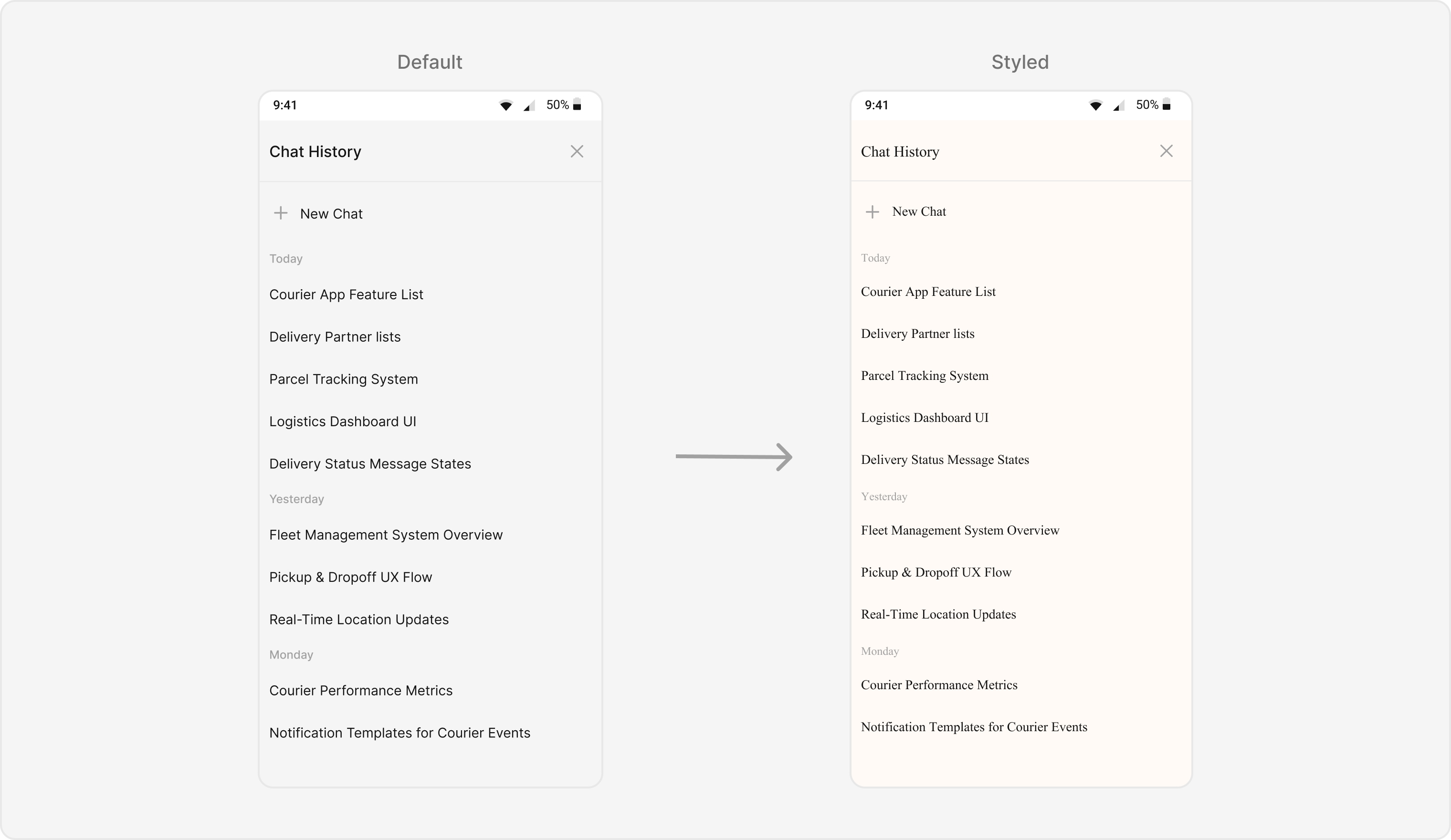
> **What this does:** Defines a custom style `CustomAIAssistantChatHistoryStyle` that sets the background color to `#FFFAF6` for the component, header, new chat area, date separator, and items. It applies a Times New Roman font to the header, new chat text, date separator, and item text. A helper style `textStyleTimesNewRoman` defines the font family.
```java lines theme={null}
binding.cometchatAiAssistantChatHistory.setStyle(R.style.CustomAIAssistantChatHistoryStyle);
```
```kotlin lines theme={null}
binding.cometchatAiAssistantChatHistory.setStyle(R.style.CustomAIAssistantChatHistoryStyle);
```
> **What this does:** Applies the `CustomAIAssistantChatHistoryStyle` theme to the `CometChatAIAssistantChatHistory` component, changing the background colors and fonts.
To know more such attributes, visit the [attributes file](https://github.com/cometchat/cometchat-uikit-android/blob/v5/chatuikit/src/main/res/values/attr_cometchat_ai_assistant_chat_history.xml).
* **Verify**: The chat history component displays with the `#FFFAF6` background color and Times New Roman font for header text, new chat text, date separator text, and item text.
## Functionality
What you're changing: Small functional customizations such as setting the user and toggling visibility of UI states.
* **Where**: Activity or Fragment where you hold a reference to `CometChatAIAssistantChatHistory`.
* **Applies to**: `CometChatAIAssistantChatHistory`.
* **Default behavior**: All UI states are visible with default settings.
* **Override**: Call the corresponding method on the component instance.
| Methods | Description | Code |
| ------------------------- | --------------------------------------------------------------------------------------------------------------------------------------------------------------------------- | -------------------------------------- |
| `setUser` | Sets the user whose chat histories with the AI assistant need to be fetched. This is a required property for the component to function. The user's role must be `@agentic`. | `.setUser(user);` |
| `setErrorStateVisibility` | Toggles the visibility of the error state of the component | `.setErrorStateVisibility(View.GONE);` |
| `setEmptyStateVisibility` | Toggles the visibility of the empty state of the component | `.setEmptyStateVisibility(View.GONE);` |
* **Verify**: After calling `setUser(user)`, confirm the component fetches and displays the AI assistant chat histories for that user. After calling a visibility method, confirm the corresponding UI state is shown or hidden.
## Customization Matrix
| What you want to change | Where | Property/API | Example |
| --------------------------------- | ----------------- | ------------------------------------------------------------- | -------------------------------------------------------------------------------------------------------------- |
| Component background color | `themes.xml` | `cometChatAIAssistantChatHistoryBackgroundColor` | `
* **Code**:
```xml themes.xml lines theme={null}
```
> **What this does:** Defines a custom style `CustomAIAssistantChatHistoryStyle` that sets the background color to `#FFFAF6` for the component, header, new chat area, date separator, and items. It applies a Times New Roman font to the header, new chat text, date separator, and item text. A helper style `textStyleTimesNewRoman` defines the font family.
```java lines theme={null}
binding.cometchatAiAssistantChatHistory.setStyle(R.style.CustomAIAssistantChatHistoryStyle);
```
```kotlin lines theme={null}
binding.cometchatAiAssistantChatHistory.setStyle(R.style.CustomAIAssistantChatHistoryStyle);
```
> **What this does:** Applies the `CustomAIAssistantChatHistoryStyle` theme to the `CometChatAIAssistantChatHistory` component, changing the background colors and fonts.
To know more such attributes, visit the [attributes file](https://github.com/cometchat/cometchat-uikit-android/blob/v5/chatuikit/src/main/res/values/attr_cometchat_ai_assistant_chat_history.xml).
* **Verify**: The chat history component displays with the `#FFFAF6` background color and Times New Roman font for header text, new chat text, date separator text, and item text.
## Functionality
What you're changing: Small functional customizations such as setting the user and toggling visibility of UI states.
* **Where**: Activity or Fragment where you hold a reference to `CometChatAIAssistantChatHistory`.
* **Applies to**: `CometChatAIAssistantChatHistory`.
* **Default behavior**: All UI states are visible with default settings.
* **Override**: Call the corresponding method on the component instance.
| Methods | Description | Code |
| ------------------------- | --------------------------------------------------------------------------------------------------------------------------------------------------------------------------- | -------------------------------------- |
| `setUser` | Sets the user whose chat histories with the AI assistant need to be fetched. This is a required property for the component to function. The user's role must be `@agentic`. | `.setUser(user);` |
| `setErrorStateVisibility` | Toggles the visibility of the error state of the component | `.setErrorStateVisibility(View.GONE);` |
| `setEmptyStateVisibility` | Toggles the visibility of the empty state of the component | `.setEmptyStateVisibility(View.GONE);` |
* **Verify**: After calling `setUser(user)`, confirm the component fetches and displays the AI assistant chat histories for that user. After calling a visibility method, confirm the corresponding UI state is shown or hidden.
## Customization Matrix
| What you want to change | Where | Property/API | Example |
| --------------------------------- | ----------------- | ------------------------------------------------------------- | -------------------------------------------------------------------------------------------------------------- |
| Component background color | `themes.xml` | `cometChatAIAssistantChatHistoryBackgroundColor` | `- #FFFAF6
` |
| Header background color | `themes.xml` | `cometChatAIAssistantChatHistoryHeaderBackgroundColor` | `- #FFFAF6
` |
| Header text color | `themes.xml` | `cometChatAIAssistantChatHistoryHeaderTextColor` | `- ?attr/cometchatTextColorPrimary
` |
| Header text appearance | `themes.xml` | `cometChatAIAssistantChatHistoryHeaderTextAppearance` | `- @style/textStyleTimesNewRoman
` |
| New chat background color | `themes.xml` | `cometChatAIAssistantChatHistoryNewChatBackgroundColor` | `- #FFFAF6
` |
| New chat text color | `themes.xml` | `cometChatAIAssistantChatHistoryNewChatTextColor` | `- ?attr/cometchatTextColorPrimary
` |
| New chat text appearance | `themes.xml` | `cometChatAIAssistantChatHistoryNewChatTextAppearance` | `- @style/textStyleTimesNewRoman
` |
| Date separator text appearance | `themes.xml` | `cometChatAIAssistantChatHistoryDateSeparatorTextAppearance` | `- @style/textStyleTimesNewRoman
` |
| Date separator text color | `themes.xml` | `cometChatAIAssistantChatHistoryDateSeparatorTextColor` | `- ?attr/cometchatTextColorTertiary
` |
| Date separator background color | `themes.xml` | `cometChatAIAssistantChatHistoryDateSeparatorBackgroundColor` | `- #FFFAF6
` |
| Item background color | `themes.xml` | `cometChatAIAssistantChatHistoryItemBackgroundColor` | `- #FFFAF6
` |
| Item text appearance | `themes.xml` | `cometChatAIAssistantChatHistoryItemTextAppearance` | `- @style/textStyleTimesNewRoman
` |
| Item text color | `themes.xml` | `cometChatAIAssistantChatHistoryItemTextColor` | `- ?attr/cometchatTextColorPrimary
` |
| Apply a custom style | Activity/Fragment | `setStyle(int styleRes)` | `binding.cometchatAiAssistantChatHistory.setStyle(R.style.CustomAIAssistantChatHistoryStyle);` |
| Set the user for fetching history | Activity/Fragment | `setUser(User)` | `.setUser(user);` |
| Error state visibility | Activity/Fragment | `setErrorStateVisibility(int)` | `.setErrorStateVisibility(View.GONE);` |
| Empty state visibility | Activity/Fragment | `setEmptyStateVisibility(int)` | `.setEmptyStateVisibility(View.GONE);` |
## Next Steps
Display messages in a conversation
Browse recent conversations
Browse and search available users
Search across conversations and messages