> ## Documentation Index
> Fetch the complete documentation index at: https://cometchat-22654f5b-docs-platform-docs-release.mintlify.site/llms.txt
> Use this file to discover all available pages before exploring further.
# Launch Chat Window On Tap Of Push Notification
> Launch Chat Window On Tap Of Push Notification — CometChat documentation.
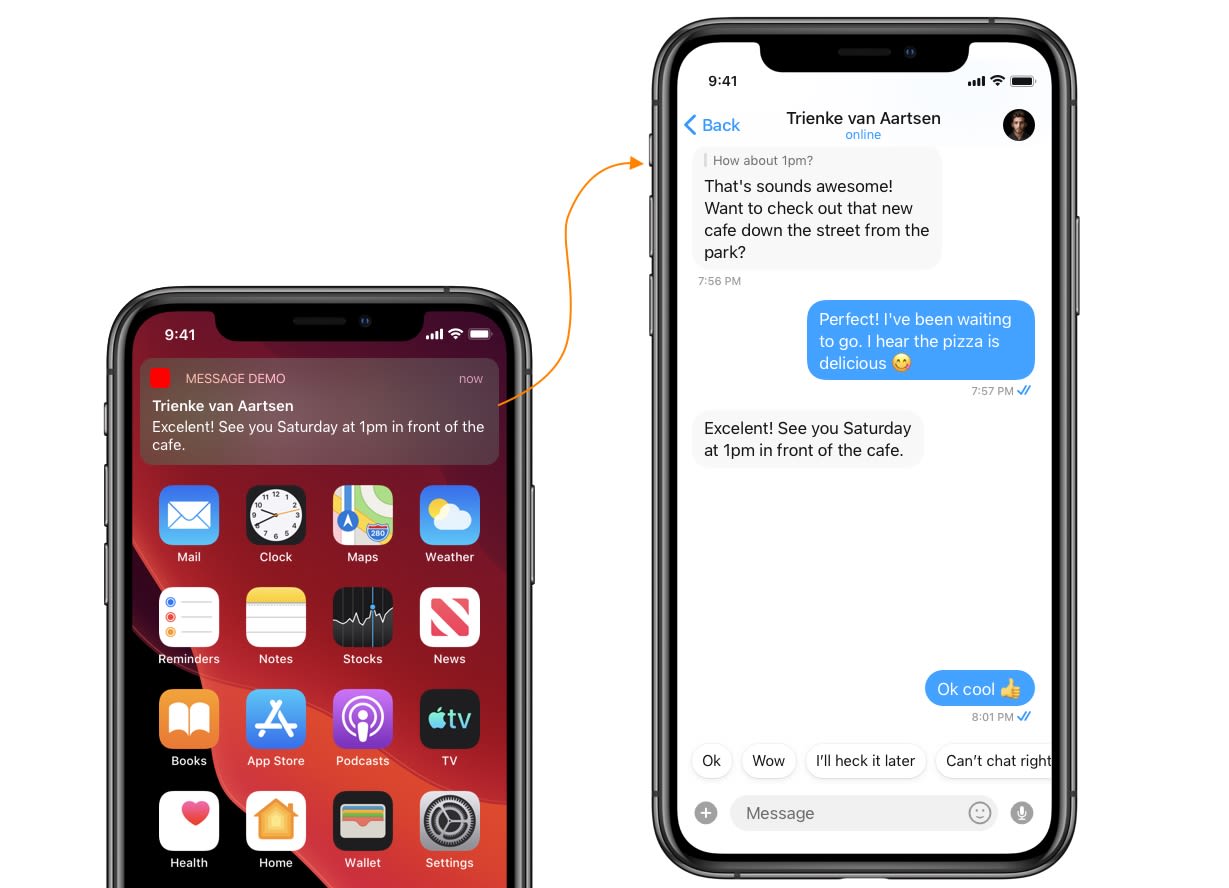 This guide helps you to launch a chat window from the UI Kit library on receiving a new message notification.
CometChat SDK & UI Kit both need to be configured before launching the chat window.
***
## Step 1. Process push notification payload and grab `User` or `Group` object
To present a chat window, firstly you will need a `User` or a `Group` object. You can grab this from the push notification payload itself of incoming message notification. You need to call `CometChat.processMessage()` method to process push notification payload.
```swift theme={null}
func userNotificationCenter(_ center: UNUserNotificationCenter,
didReceive response: UNNotificationResponse,
withCompletionHandler completionHandler: @escaping () -> Void) {
if let userInfo = response.notification.request.content.userInfo as? [String : Any], let messageObject = userInfo["message"] as? [String:Any] {
print("didReceive: \(userInfo)")
if let baseMessage = CometChat.processMessage(messageObject).0 {
switch baseMessage.messageCategory {
case .message:
print("Message Object Received: \(String(describing: (baseMessage as? TextMessage)?.stringValue()))")
case .action: break
case .call: break
case .custom: break
@unknown default: break
}
}
}
completionHandler()
}
```
## Step 2 . Launch Chat Window
You can launch the chat window from your base view controller after you tap on the Message Notification. This method uses NotificationCenter to trigger and present a chat window.
1. In this method you need to fire notification after you receive the `User` or `Group` Object.
2. In Notification's user info you can pass `User` or` Group` Object to that desired notification.
### Trigger notification from App Delegate
```swift theme={null}
if let message = baseMessage as? BaseMessage {
switch baseMessage.receiverType {
case .user:
DispatchQueue.main.asyncAfter(deadline: .now() + 0.5) {
if let user = baseMessage.sender {
NotificationCenter.default.post(name: NSNotification.Name(rawValue: "didReceivedMessageFromUser"), object: nil, userInfo: ["user":user])
}
}
case .group:
DispatchQueue.main.asyncAfter(deadline: .now() + 0.5) {
if let group = baseMessage.receiver as? Group {
NotificationCenter.default.post(name: NSNotification.Name(rawValue: "didReceivedMessageFromGroup"), object: nil, userInfo: ["group":group])
}
}
@unknown default: break
}
}
```
3. On the other hand, you need to observe for the above notification in your base view controller.
1) Base view controller is a controller that launches immediately after the app delegate.
2) Base view controller should be present to observe the notification when notification fires.
3) If the view controller is not present in the memory when a new notification receives, then it won't launch Chat Window.
### Observe notification in Base View Controller
```swift theme={null}
class BaseViewController : UIViewController {
override func viewDidLoad() {
NotificationCenter.default.addObserver(self, selector:#selector(self.didReceivedMessageFromGroup(_:)), name: NSNotification.Name(rawValue: "didReceivedMessageFromGroup"), object: nil)
NotificationCenter.default.addObserver(self, selector:#selector(self.didReceivedMessageFromUser(_:)), name: NSNotification.Name(rawValue: "didReceivedMessageFromUser"), object: nil)
}
}
```
### Add selector method & Launch Chat Window
```swift theme={null}
@objc func didReceivedMessageFromGroup(_ notification: NSNotification) {
if let group = notification.userInfo?["group"] as? Group {
DispatchQueue.main.async {
let messageList = CometChatMessageList()
let navigationController = UINavigationController(rootViewController:messageList)
messageList.set(conversationWith: group, type: .group)
self.present(navigationController, animated:true, completion:nil)
}
}
}
@objc func didReceivedMessageFromUser(_ notification: NSNotification) {
print("didReceivedMessageFromUser")
if let user = notification.userInfo?["user"] as? User {
DispatchQueue.main.async {
let messageList = CometChatMessageList()
let navigationController = UINavigationController(rootViewController:messageList)
messageList.set(conversationWith: user, type: .user)
self.present(navigationController, animated:true, completion:nil)
}
}
}
```
This guide helps you to launch a chat window from the UI Kit library on receiving a new message notification.
CometChat SDK & UI Kit both need to be configured before launching the chat window.
***
## Step 1. Process push notification payload and grab `User` or `Group` object
To present a chat window, firstly you will need a `User` or a `Group` object. You can grab this from the push notification payload itself of incoming message notification. You need to call `CometChat.processMessage()` method to process push notification payload.
```swift theme={null}
func userNotificationCenter(_ center: UNUserNotificationCenter,
didReceive response: UNNotificationResponse,
withCompletionHandler completionHandler: @escaping () -> Void) {
if let userInfo = response.notification.request.content.userInfo as? [String : Any], let messageObject = userInfo["message"] as? [String:Any] {
print("didReceive: \(userInfo)")
if let baseMessage = CometChat.processMessage(messageObject).0 {
switch baseMessage.messageCategory {
case .message:
print("Message Object Received: \(String(describing: (baseMessage as? TextMessage)?.stringValue()))")
case .action: break
case .call: break
case .custom: break
@unknown default: break
}
}
}
completionHandler()
}
```
## Step 2 . Launch Chat Window
You can launch the chat window from your base view controller after you tap on the Message Notification. This method uses NotificationCenter to trigger and present a chat window.
1. In this method you need to fire notification after you receive the `User` or `Group` Object.
2. In Notification's user info you can pass `User` or` Group` Object to that desired notification.
### Trigger notification from App Delegate
```swift theme={null}
if let message = baseMessage as? BaseMessage {
switch baseMessage.receiverType {
case .user:
DispatchQueue.main.asyncAfter(deadline: .now() + 0.5) {
if let user = baseMessage.sender {
NotificationCenter.default.post(name: NSNotification.Name(rawValue: "didReceivedMessageFromUser"), object: nil, userInfo: ["user":user])
}
}
case .group:
DispatchQueue.main.asyncAfter(deadline: .now() + 0.5) {
if let group = baseMessage.receiver as? Group {
NotificationCenter.default.post(name: NSNotification.Name(rawValue: "didReceivedMessageFromGroup"), object: nil, userInfo: ["group":group])
}
}
@unknown default: break
}
}
```
3. On the other hand, you need to observe for the above notification in your base view controller.
1) Base view controller is a controller that launches immediately after the app delegate.
2) Base view controller should be present to observe the notification when notification fires.
3) If the view controller is not present in the memory when a new notification receives, then it won't launch Chat Window.
### Observe notification in Base View Controller
```swift theme={null}
class BaseViewController : UIViewController {
override func viewDidLoad() {
NotificationCenter.default.addObserver(self, selector:#selector(self.didReceivedMessageFromGroup(_:)), name: NSNotification.Name(rawValue: "didReceivedMessageFromGroup"), object: nil)
NotificationCenter.default.addObserver(self, selector:#selector(self.didReceivedMessageFromUser(_:)), name: NSNotification.Name(rawValue: "didReceivedMessageFromUser"), object: nil)
}
}
```
### Add selector method & Launch Chat Window
```swift theme={null}
@objc func didReceivedMessageFromGroup(_ notification: NSNotification) {
if let group = notification.userInfo?["group"] as? Group {
DispatchQueue.main.async {
let messageList = CometChatMessageList()
let navigationController = UINavigationController(rootViewController:messageList)
messageList.set(conversationWith: group, type: .group)
self.present(navigationController, animated:true, completion:nil)
}
}
}
@objc func didReceivedMessageFromUser(_ notification: NSNotification) {
print("didReceivedMessageFromUser")
if let user = notification.userInfo?["user"] as? User {
DispatchQueue.main.async {
let messageList = CometChatMessageList()
let navigationController = UINavigationController(rootViewController:messageList)
messageList.set(conversationWith: user, type: .user)
self.present(navigationController, animated:true, completion:nil)
}
}
}
```